Macro Template Reference
Macros are reusable prompt templates with optional typed inputs and Jinja2 support. They
let you define a prompt fragment once and reference it by name anywhere a prompt is
composed, keeping prompts DRY and consistent across projects. Inline prompt fragments
use #name; standalone workflows use #!name when they are launched as workflows.
Use macros when you want to:
- Share common instructions across multiple prompts (e.g., output format rules, role definitions).
- Parameterize prompts with typed, validated arguments.
- Compose prompts from smaller building blocks using
#name(args)syntax.
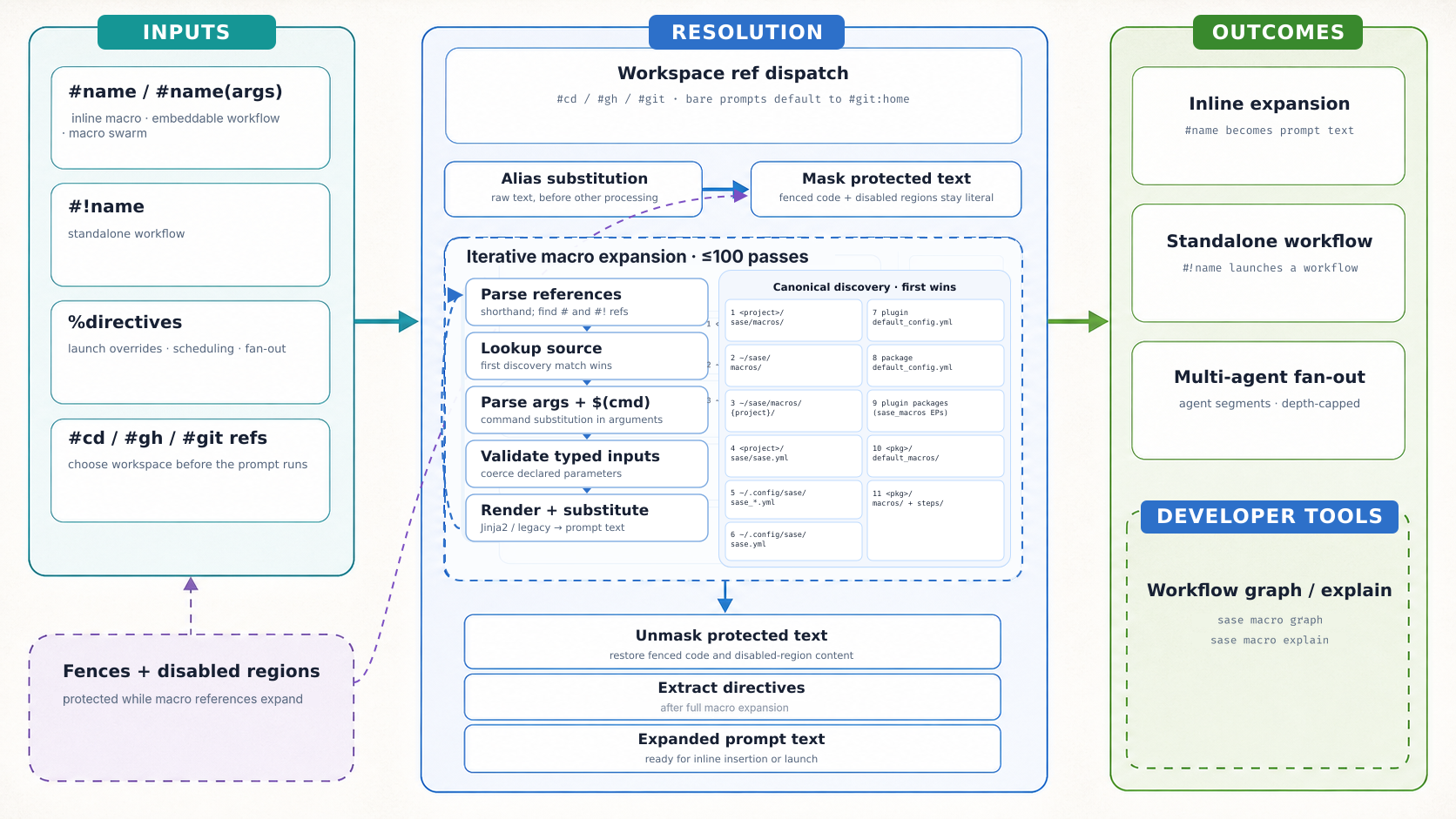
There are two related paths to keep separate:
launch setup:
  project tag validation and expansion (+sase -> #gh:gh_sase-org__sase)
  -> macro swarm fan-out check
  -> default workspace ref insertion when needed (#git:home)
  -> project name/alias canonicalization (#gh:bob -> #gh_bbugyi200__bob)
  -> workspace ref resolution (#git/#gh, plugin-provided refs, and known-project fallbacks)
  -> prompt/workflow execution

macro expansion inside a prompt or prompt_part:
  alias substitution
  -> fenced-block and disabled-region protection
  -> iterative reference expansion (parse -> lookup -> args -> render -> substitute)
  -> directive extraction at the launch or workflow-step boundary
The checked-in infographic prompt in
docs/images/macro-resolution-infographic.prompt.md tracks the intended visual version
of this model; the text model above is the authoritative current reference for resolver
order.
Table of Contents
- sase macro expand
- sase macro explain
- sase macro list
- sase macro show
- sase macro graph
- sase macro catalog
- sase macro types
- Editor LSP
- Discovery Order
- File Format
- Reference Syntax
- VCS Workspace References
- Project Tags
- Artifact References
- Arguments
- Shorthand Syntax
- Typed Inputs
- Output Specification
- Jinja2 Integration
- Legacy Placeholders
- Raw Prompt Placeholders
- Tags
- Snippet Field
- Snippet CLI
- Skill Field
- Canonical Skill Sources
- Source, Reference, and Provider Names
- Bundled Skills
- Memory Field
- Built-in Macros
- Config-Based Macros
- Local Configuration Files
- Directives
- Static Conditional Segments
- Remote Dispatch
- Launch-Scoped Model Alias Overrides
- Agent Names, Waits, and Queue Admission
- Hold Directive
- Command Substitution
- Protected Content
- Macro Aliases
- Recursive Expansion
- Multi-Agent Prompts
- Macro Swarms (Library-Defined Fan-Out)
- Relationship to Workflows
Renamed from xprompts
SASE's reusable prompt definitions were called xprompts before this release and are
now called macros. The retired syntax aliases below keep working behind the
legacy_xprompt_syntax sunset flag while callers migrate; help, completion, examples,
and output show only the macro spelling. %xprompts_enabled regions stay accepted
permanently as an alias of %macros_enabled.
The sunset flag covers command, configuration, and discovery spellings. Python
integrations must import sase.macro: the retired Python package and package source
directories shown in the table were removed in either flag state. Those table entries
record source moves rather than accepted aliases.
Turning that flag off rejects a retired spelling in a new command, config key,
frontmatter key, environment variable, or sase path target, and the error names the
macro replacement. The retired entry-point group in the table is not loaded, a plugin's
packaged copy of the retired definition directory is not read (a plugin that ships only
that directory is skipped), and the retired definition directories in the table are
invisible to expansion, workflow loading, completion, catalogs, and save choices. Config
keys and frontmatter keys are an error when both spellings are present, in either flag
state. A retired config or frontmatter value still counts when it is null, an empty
mapping, false, or an empty string. The plugin-disable environment variable (macro form
SASE_DISABLE_PLUGIN_MACROS) is the same kind of error: setting both names is an error
even when both values are empty. The LSP command environment variable is different. A
non-empty SASE_MACRO_LSP_CMD wins and the retired value is ignored. An empty or
whitespace macro value does not count as set, so a retired command is then considered.
State files and agent artifact filenames already written under the old names stay
readable either way; new writes use only the macro spelling. Those files are separate
from the definition directories above, which stay invisible while the flag is off. A
default sase doctor run includes the config check for retired names in this rename, in
either flag state. That check lists retired config keys, frontmatter keys, non-empty
retired definition directories, keymap overrides, set retired environment variables
(names only), and plugins still registered on the retired entry-point group. It does not
report the state files or agent artifact filenames in the table, and it does not report
the region alias above.
| Retired spelling | Replacement |
|---|---|
sase xprompt …, sase path xprompts-dir, xprompts-schema, xprompts-collection-schema, xprompt-catalog |
sase macro …, sase path macros-dir, macros-schema, macros-collection-schema, macro-catalog |
%xprompts_enabled |
%macros_enabled |
sase/xprompts/, ~/sase/xprompts/, ~/.xprompts/, ~/xprompts/ |
sase/macros/, ~/sase/macros/, ~/.macros/, ~/macros/ |
package sase.xprompt, src/sase/xprompts/, src/sase/default_xprompts/ |
sase.macro, src/sase/macros/, src/sase/default_macros/ |
config xprompts:, xprompt_aliases:, auto_xprompt_menu, xprompt_placeholder_args, mentors[].xprompt; frontmatter xprompts: |
macros:, macro_aliases:, auto_macro_menu, macro_placeholder_args, mentors[].macro; frontmatter macros: |
keymap actions focus_xprompt, clear_xprompt_focus, start_last_vcs_xprompt_in_editor |
focus_macro, clear_macro_focus, start_last_vcs_macro_in_editor |
entry-point group sase_xprompts; env SASE_XPROMPT_*, SASE_*_XPROMPTS |
sase_macros; SASE_MACRO_*, SASE_*_MACROS |
sase-xprompt-lsp, crate sase_xprompt_lsp, sase.xpromptLsp.* |
sase-macro-lsp, sase_macro_lsp, sase.macroLsp.* |
~/.sase/vcs_xprompt_mru.json, ~/.sase/xprompt_save_state.json (key xprompt), ~/.sase/xprompt_lsp/ |
vcs_macro_mru.json, macro_save_state.json (key macro), macro_lsp/ |
agent artifacts xprompts.json, xprompts_<step>.json, raw_xprompt.md, submitted_xprompt.md |
macros.json, macros_<step>.json, raw_prompt.md, submitted_prompt.md |
doctor ids config.model_xprompts, config.xprompt_definitions, config.xprompt_directives, tools.xprompt_lsp |
config.model_macros, config.macro_definitions, config.macro_directives, tools.macro_lsp |
Telegram /xprompts; mobile route /api/v1/xprompts/catalog |
/macros; /api/v1/macros/catalog |
%proc origin xprompt-proc / field xprompt_proc |
prompt-proc / prompt_proc |
The old page sase.sh/xprompt/ redirects here.
CLI Subcommands
The sase macro command provides seven subcommands for working with macros. With no
subcommand, it defaults to sase macro list. Flags belong to the explicit subcommand,
so use forms like sase macro expand --trace '#plan' rather than putting --trace on
bare sase macro.
sase macro expand
Expands macro references in a prompt. Reads from a positional argument or stdin.
sase macro expand '#greet(Alice)'         # Expand from argument
echo '#greet(Alice)' | sase macro expand  # Expand from stdin
sase macro expand --trace '#plan'         # Show expansion trace on stderr
The --trace flag prints a detailed expansion trace to stderr showing each resolved
reference, its source file, arguments, and expanded content. This is useful for
debugging reference resolution order and understanding how a complex prompt is
assembled.
sase macro explain
Shows a dry-run visualization of a workflow's execution plan without actually running it. Displays workflow metadata, input requirements, resolved arguments, and the full step-by-step execution plan with types, control flow annotations, rendered step bodies, and output schemas.
sase macro explain my_workflow                    # Explain with no args
sase macro explain my_workflow arg1 arg2          # With positional args
sase macro explain my_workflow --arg key=value    # With named args
sase macro list
Lists all available macros and workflows as a JSON array. Each entry includes the name,
type ("macro" or "workflow"), kind, reference prefix, insertion text, is_skill,
source file path, user-facing input definitions, tags, and a content preview. Clients
should treat insertion as the authoritative reference text. Most macro and
embeddable_workflow entries insert as #name, including markdown macro swarms;
standalone workflows insert as #!name. is_skill is true only for macro catalog
entries marked as skills; workflows report false. Step inputs are omitted from the
JSON inputs array because they are supplied by workflow execution rather than typed by
a user.
sase macro list                   # JSON array to stdout
sase macro list | jq '.[].name'  # Extract just names
sase macro show
Shows one macro or workflow definition with its properties, typed inputs, local helper
macros, provenance, references, and highlighted body. The NAME argument accepts a bare
name or a copied reference such as #name, #!name, or /name; copied arguments like
#name(a, b), #name:arg, and #name+ are ignored with a warning.
sase macro show sase/reads                  # Render a readable definition view
sase macro show '#!sync'                    # Show a standalone workflow
sase macro show plan --format json | jq .inputs
sase macro show coder --format raw > coder.md
sase macro show t --color always | less -R
--format full is the default Rich detail view. --format json emits the stable
schema-versioned show record, while --format raw writes the exact source definition
bytes without adding a trailing newline. --color auto|always|never controls ANSI
output for the rendered view, and --project PROJECT resolves within a specific project
namespace.
sase macro graph
Generates a directed acyclic graph (DAG) visualization of a workflow. Without a workflow name, lists all available multi-step workflows with their step counts and source paths.
sase macro graph                        # List all workflows
sase macro graph my_workflow            # Mermaid DAG (default)
sase macro graph my_workflow --format text  # Plain-text summary
The Mermaid output can be pasted into any Mermaid-compatible renderer. Parallel sub-steps are shown as subgraphs, and nodes include type indicators and control flow annotations.
sase macro catalog
Renders every visible macro to a formatted PDF catalog for browsing and sharing.
sase macro catalog                # Write the PDF to a tempdir and print its path
sase macro catalog --out /tmp/out # Write the PDF to the specified directory
The command collects all visible macro templates, renders each into an HTML section, and
produces a single PDF using the bundled catalog_template.html.j2 and
catalog_style.css. The mobile helper's structured catalog uses the same collection and
classification, and returns JSON metadata instead of requiring a PDF renderer. That JSON
omits string input defaults: default_display is null for strings, including an empty
string, and also null when the default itself is null. Numbers and booleans are still
shown (3, true, false). required is true only when the input declares no
default. sase macro show still prints string defaults, and sase's TUI argument assist
may show them locally. The mobile catalog does not. The JSON inputs rows keep type
as the base kind and choices as canonical string values. They also include
type_label, choice_details (value, optional label, and optional description),
named_type, and value_role. The text view uses the same type label and shows each
choice's canonical value with its display label and description.
sase macro types
List the installed input-type catalog, or show one type's detail card. The catalog is
the same vocabulary the binder, TUI, and LSP use: scalar keywords, builtin
agent/model/effort, and plugin-shared enums.
sase macro types                                          # Grouped tables
sase macro types effort                                   # One builtin type
sase macro types sase-research-artifacts@audio_edition    # One plugin type
sase macro types --json                                   # Rust catalog projection
sase macro types model -j                                 # One type as JSON
NAME accepts a bare builtin (effort, model), a deprecated alias (string),
builtin@<name>, or a qualified plugin type (sase-research-artifacts@audio_edition).
--json prints the Rust catalog projection. Unknown names exit 1. See
Typed Inputs for the rule authors learn and
Shipping input types for plugin manifests.
Editor LSP
sase lsp starts the SASE macro language server over stdio for editor integrations. It
resolves the server command in this order:
SASE_MACRO_LSP_CMD, parsed as a shell-style command for development.- A
sase-macro-lspbinary in the current Python environment'sbin/directory. sase-macro-lsponPATH.- The newer debug or release
sase-macro-lspbinary under a sibling../sase-corecheckout. cargo run --manifest-path ../sase-core/Cargo.toml -p sase_macro_lsp --whencargois available and the sibling checkout has aCargo.toml.
Examples:
sase lsp
sase lsp --version
SASE_MACRO_LSP_CMD='cargo run --manifest-path ../sase-core/Cargo.toml -p sase_macro_lsp --' sase lsp
Use SASE_MACRO_LSP_CMD for any non-default LSP command, including a custom binary that
should beat the managed venv copy. Full editable-install SASE updates reinstall the
server into the uv-tool venv when pulled sase-core commits change. SASE_CORE_DIR is
a Justfile build/install override, not part of sase lsp command resolution.
The LSP loads the supported macro catalog sources directly in Rust for completion,
hover, diagnostics, and definition requests. sase lsp exports the installed package
macro paths to the server so built-in Markdown prompts, YAML workflows, default config
prompts, project-local prompts, user config prompts, and memory prompts do not require a
Python helper subprocess on the completion path. The Python helper bridge remains stable
for mobile clients and as a compatibility fallback for sources the Rust loader cannot
discover.
When the editor advertises LSP completionItem.snippetSupport, the server also returns
SASE snippets as ordinary CompletionItemKind.Snippet entries after bare trigger words
such as fix or review. Snippet entries are loaded from the same registry as sase's
TUI: macros with snippet front matter plus user-defined ace.snippets, with
ace.snippets winning on trigger collisions. The registry also includes the generated
initial-capital aliases (foo → Foo), so a completion for Foo appears wherever
foo does. The editor does not need to shell out or parse SASE config to discover
snippets.
The Python helper operation sase editor helper-bridge snippet-catalog is the
authoritative snippet registry because it matches sase's TUI macro composition behavior.
The Rust server also has a native fallback for simple macro snippets and ace.snippets
so completion can degrade gracefully if the helper is unavailable. That fallback
intentionally skips macros that require complex Jinja or composition it cannot mirror
exactly; when the helper is available, its response is preferred.
The LSP also consumes the project's glossary memory web, authored as strand files
under sase/memory/glossary/; see Memory Webs. A leading VCS
workflow reference selects the glossary project for the document, otherwise the active
workspace project is used. Glossary phrases are emitted as standard type semantic
tokens, with the same case-insensitive, code-literal-skipping, longest-match scanner
sase's TUI uses. A phrase wrapped across one line break is emitted as one semantic token
per line. Derived plurals of terms and aliases are matched like configured aliases.
sase-nvim underlines those tokens by default through an overridable SaseGlossaryTerm
highlight group. Hover returns Markdown for the canonical term, aliases, project, and
source context, and go-to-definition targets the glossary strand file's definition
range. Explicit macro and artifact references keep precedence over glossary matches.
When the selected project is disabled, unknown, home, unreadable, or has an invalid
glossary, the server suppresses glossary semantics for that context instead of falling
back to another project's terms.
See the editor integration guide for setup, feature coverage, helper bridge usage, and troubleshooting.
Discovery Order
Markdown macros and YAML workflows are loaded from multiple locations. When two locations define a macro or workflow with the same name, the higher-priority source wins (first-wins).
| Priority | Location | Role |
|---|---|---|
| 1 | <project>/sase/macros/ |
Canonical project files; writable |
| 2 | <project>/.macros/ |
Legacy hidden project files; read-only compatibility |
| 3 | <project>/macros/ |
Legacy visible project files; read-only compatibility |
| 4 | ~/sase/macros/ |
Canonical user-wide files; writable |
| 5 | ~/.macros/ |
Legacy hidden home files; read-only compatibility |
| 6 | ~/macros/ |
Legacy visible home files; read-only compatibility |
| 7 | ~/sase/macros/{project}/ |
Canonical project-specific home files; writable |
| 8 | ~/.config/sase/macros/{project}/ |
Legacy project-specific home files; read-only compatibility |
| 9 | <project>/sase/sase.yml |
Canonical project config definitions; writable |
| 10 | <project>/sase.yml |
Exclusive legacy project-config fallback |
| 11 | ~/.config/sase/sase_*.yml |
User overlays; reverse lexical winner order |
| 12 | ~/.config/sase/sase.yml |
User base config |
| 13 | Plugin default_config.yml resources |
Installed plugin config definitions |
| 14 | Package default_config.yml |
Built-in config definitions |
| 15 | Plugin packages (sase_macros EPs) |
Installed plugin files |
| 16 | <sase_package>/default_macros/*.md |
Built-in default Markdown files |
| 17 | <sase_package>/macros/ |
Built-in Markdown, YAML, and shared steps |
Skills are discovered separately, from canonical skills/ directories only, and take
skills/-namespaced reference names. See
Canonical Skill Sources for that order; no location in the
table above can define a skill.
Memory notes are also discovered separately, from canonical (and legacy-compatible)
sase/memory/ directories only, and take memory/-namespaced reference names. See
Memory Field and Memory Order; no
location in the table above can define a memory macro.
Each directory-based source can contain individual .md files and, where supported,
.yml or .yaml workflows plus a steps/ directory. Project config is exclusive: if
priorities 9 and 10 both exist, SASE reports a collision instead of merging them. File
directories are first-wins, so a canonical definition shadows a same-named legacy
definition. All save, create, copy-on-edit, export, and workflow-editor destinations use
writable canonical sources; legacy sources are displayed only for migration. See
Canonical SASE Content Layout for before/after paths and the
compatibility timeline.
For file-based macros, the macro name defaults to the filename stem (e.g.,
summarize.md defines the macro summarize). The name can be overridden via the name
field in the YAML front matter.
Project-specific macros (priorities 7-8) are namespaced: a file bar.md in the foo
project directory becomes foo/bar. Inline-capable project macros are referenced as
#foo/bar; standalone project workflows are referenced as #!foo/bar.
When a project is detected (via the workspace provider), project macros (priorities 1-3)
and local config macros are also auto-namespaced with the {project}/ prefix. For
example, if the project is myapp and sase/macros/deploy.md exists, it becomes
myapp/deploy and is referenced as #myapp/deploy. A project workflow with no
prompt_part would instead be launched as #!myapp/deploy. This prevents name
collisions between project-local macros and global or built-in ones.
An explicit namespaced reference also works when the caller is outside that project's
checkout. For an enabled registered project, #myapp/deploy resolves checkout-backed
files and local config from the project's primary workspace. Write the literal reference
with the configured project name shown by the macro catalog or completion. Loader-facing
project selection accepts the directory key or an alias too, but catalog entries are
still exposed under the configured name; those alternate identifiers are not literal
macro namespaces. If the caller is already inside another checkout of that same project,
the current checkout wins over the registry copy so local edits are visible. Disabled
projects are not loaded through this registry fallback. When one inline prompt mentions
registered project namespaces, the first such namespace selects the checkout-backed
project catalog for that prompt.
File Format
A macro file is a Markdown file with optional YAML front matter delimited by ---
lines. Everything after the closing --- is the template body.
---
name: greet
description: Greet a named user.
input:
  user_name:
    type: word
    description: User name to include in the greeting.
---

Hello, {{ user_name }}! Welcome aboard.
Front Matter Fields
| Field | Required | Description |
|---|---|---|
name |
No | Macro name (defaults to filename stem) |
input |
No | Input parameter definitions (see Typed Inputs) |
snippet |
No | Opt-in to sase's TUI snippet expansion (see Snippet Field below) |
description |
No | Human-readable one-line description of what the macro does |
skill |
No | Marks this macro as an agent skill source for sase skill init (see below) |
macros |
No | File-local helper macros whose names must start with _ |
If no front matter is present, the entire file content is the template body and the filename stem is the name.
Markdown macro files can carry file-local helper macros under macros:. These helpers
use the same structured format as config-based macros, including typed inputs and
descriptions, and they can reference each other transitively. During expansion they
inherit the containing macro's arguments and template scope, so a helper can use values
such as {{ topic }} from the outer macro. They are visible only while expanding the
containing macro and must use _-prefixed names such as _review_rules; they do not
leak into the global catalog, completion catalog, or other macro files. This underscore
rule also applies to local macros in ad hoc prompt front matter, while YAML
workflow-local macros follow the workflow rules described in
workflow_spec.md.
Reference Syntax
Reference inline-capable macros inside any prompt with the # prefix, including
markdown-defined macro swarms whose body contains top-level --- segment separators.
Use #! only for standalone YAML workflows that do not have a prompt_part step. The
marker must appear at the start of the string, after whitespace, or after one of
([{"'. For compatibility, #!name is still accepted for macro swarms, but new prompts
should use #name. Each #name or #!name use is a macro invocation; the file or
config entry it names is the macro.
| Syntax | Description |
|---|---|
#name |
Inline/template reference, no arguments |
#name(args) |
Inline parenthesis syntax with comma-separated arguments |
#name:arg |
Inline colon syntax, passes arg as a single positional arg |
#name:a,b,c |
Inline colon syntax with comma-separated multiple args |
#name:`arg with spaces` |
Colon+backtick syntax for args containing spaces (single only) |
#name+ |
Plus syntax, equivalent to #name:true |
#ns/name |
Namespaced reference (e.g., project-specific) |
#!name |
Standalone workflow reference, no args |
#!name(args) |
Standalone workflow reference with parenthesized arguments |
#!name:arg |
Standalone workflow reference with one colon-style arg |
#!name!! / #!name?? |
Standalone workflow with an explicit HITL approval override |
sase's TUI and editor clients that enable standard LSP on-type formatting smooth the
colon-to-parentheses transition while typing: with the caret immediately after an
argument-opening colon, typing ( removes that colon. For example, %q: becomes %q()
in sase's TUI, with the cursor between the parentheses, and #review: can become
#review(). The rule is syntax-aware; ordinary prose colons, URLs, unknown directives,
double-colon shorthand, fenced or inline code, disabled macro regions, prompt
frontmatter, and Jinja tags are left alone.
Accepting a macro entry with optional inputs from completion inserts the reference with
a completion-owned trailing space (for example, #optional with the caret after the
space). Typing ( immediately after that space deletes only the owned space and opens
parenthesized arguments — #optional() with the caret between the parentheses —
followed by the existing argument menu, including topic=; accepting that row produces
#optional(topic=). The rewrite applies only while the accepted reference and space are
intact, the selection is empty, and the widget is in insert mode: any other key consumes
eligibility, pasted or manually typed lookalike text never acquires it, and a zero-input
macro keeps its space with ordinary pairing behavior. Suffix text and snippet
placeholders are preserved, and the automatic argument menu respects auto_macro_menu;
disabling that menu does not disable the space rewrite. In external editors over LSP,
the same rewrite needs a client that executes completion-item commands, applies (
on-type formatting, and requests completion on the advertised ( trigger. Clients
missing those facilities retain ordinary editing, and the server cannot reproduce the
widget's exact move-away-and-back cancellation.
For double-colon text shorthand, typing ( immediately after the :: and any ASCII
spaces moves the delimiter after a new argument pair instead: #review:: becomes
#review():: with the caret inside (), and #review:: body becomes
#review():: body. The authored spaces and suffix text are preserved exactly, and tabs,
newlines, nonbreaking spaces, existing argument lists, and literal regions keep ordinary
insertion behavior. This pairing applies to macro references (including #!name::) and
to the %proc:: and %clan:: / %c:: directive forms; other directives followed by
::, such as %if:: or %q::, just insert ().
When a # macro reference already has a closed parenthesized argument list, typing (
immediately after its ) continues the list: #review(path=a) becomes
#review(path=a,|), and #review(path=a):: body becomes #review(path=a,|):: body,
where | marks the caret. The edit adds a comma after the last non-whitespace argument
character and moves the caret before ); an empty list or an argument list that already
ends in a comma only moves the caret. In the TUI, the remaining argument menu opens when
auto_macro_menu is enabled. This applies to # macro references, not % directives.
Over LSP, on-type formatting makes the text edit; the menu comes from the client's next
completion request, so it may appear after the next argument character or when
completion is invoked manually.
Examples:
sase run '#!sync'
sase run '+sase #!sync'
During the compatibility window, top-level legacy invocations such as sase run '#sync'
still run but emit a warning that points to #!sync. Inline expansion contexts reject
standalone workflows instead of passing literal #sync text to the model. Shell
examples should use single quotes around #!... so ! is not interpreted by
interactive shells.
A #-shaped token that matches no known macro, workspace ref, or plugin-provided
reference is not an error: it is passed to the agent as literal text. Because a typo
would otherwise be invisible, launching scans the prompt first and reports each
unresolved name — sase run prints one warning per name (with a did you mean '#…'?
suggestion when a close match exists, and a pointer to sase macro list), and sase's
TUI raises one aggregated toast,
Unknown macro reference(s): #foo - passed through as literal text. The scan is a
best-effort diagnostic: it never blocks or alters the launch, and references inside
literal zones (inline code, fenced code, disabled regions) are ignored.
For workspace references, underscores can be used as an alternative to colons:
#gh_sase is equivalent to #gh:sase. The underscore is normalized to a colon before
pattern matching, so both forms work identically. This is useful in contexts where
colons are inconvenient.
Provider-backed references also support @name agent references in the ref portion. The
@name is resolved at runtime to the named agent's Patch (branch name), allowing one
agent's prompt to target another agent's workspace:
#gh:@planner     resolves to e.g. #gh:planner_add_config_parser
#gh_@reviewer    same, underscore form
This is useful when chaining agents — for example, a review agent can target the branch
created by a prior agent using @name instead of hardcoding the branch name.
VCS Workspace References
Workspace-managing workflows use the same #name:ref reference syntax as macros, but
they control where the agent runs before the rest of the prompt is executed. Built-in
#git references are VCS-backed; provider plugins can add other workspace refs such as
#gh.
| Reference | Behavior |
|---|---|
#git:<ref> |
Run in a bare-git workspace |
#gh:<ref> |
Run in a GitHub workspace, when the GitHub plugin is installed |
#<provider>:<ref> |
Run through any other installed workspace provider |
Prompts that do not contain a workspace reference are normalized to #git:home, so a
bare prompt runs from the managed bare-git home project by default and gets normal
numbered workspace, checkout, diff, and release behavior.
By default, a missing home ProjectSpec is bootstrapped as a managed empty bare-git
project at the default home paths. An existing project owned by another workspace
provider is never converted in place: a mismatched #git:home fails with a hint to use
the provider's VCS tag. To make bare prompts use an existing home/dotfiles bare
repository, register a bare repository whose basename resolves to home, for example
#git:/path/to/home.git.
Provider-prefixed refs that point at a known project name are preserved as workspace
launches even if the matching workspace plugin is not loaded in the current process.
Known projects come from ~/.sase/projects/*/*.sase (with legacy
~/.sase/projects/*/*.gp accepted as a fallback). A launch such as #gh:sase #!sync
therefore targets the registered sase project, allocates a numbered workspace for
non-wait runs, and lets dispatch surfaces strip the wrapper ref when identifying an
embedded workflow body.
Known projects may also declare PROJECT_NAME and PROJECT_ALIASES in their
ProjectSpec. Friendly refs in VCS workspace tags are canonicalized before workspace
resolution and macro expansion, so #gh:bob #p is processed as a ref to the
directory-key project when that project declares PROJECT_NAME: bob or alias bob. The
rewrite is exact and applies to colon, underscore, and parenthesized workspace-ref
forms; it does not rewrite owner/repo paths such as #gh:bbugyi200/bob, partial project
names, prose, or fenced code examples. The tag must also match the registered project's
actual workspace provider. A provider-mismatched alias is left unchanged rather than
canonicalized to that project's directory key, but this does not make it a rejected
reference: because an unknown slashless #git: name triggers bare-git project
initialization, #git:<github-alias> may create a separate bare-git project named after
the alias. Use #gh:<github-alias> for the registered GitHub project.
Provider-mismatched entries are pruned from the VCS-reference history. See
Project Names and Aliases for validation
and management commands.
GitHub owner/repo refs use PROJECT_NAME after first use. Resolving #gh:foo-org/foo
creates or reuses the canonical project whose WORKSPACE_DIR is
~/projects/github/foo-org/foo/; for a new repo that canonical directory key is
typically gh_foo-org__foo, with PROJECT_NAME: foo. A second repo with the same
basename, such as #gh:bar-org/foo, gets a different canonical project such as
gh_bar-org__foo and the next available display name, for example foo_1. Future
launches can use #gh:foo and #gh:foo_1, and those refs canonicalize before prompt
history, metadata, and artifacts are written.
For compatibility, existing basename ProjectSpecs are reused when their WORKSPACE_DIR
already matches the GitHub repo. Owner/repo fallback avoids basename routing when
duplicate GitHub basenames would make that ambiguous; direct owner/repo refs match the
GitHub workspace path first, then only use a basename fallback when it is unambiguous.
A known project can also be targeted with its shorter +<project> tag, such as +sase,
which expands to the canonical workspace reference at launch; see
Project Tags, which also covers +query project/Patch completion.
sase's TUI and the macro LSP also provide token-local completion at the root of
registered VCS workflow refs. Typing : or ( after a workflow tag, such as #gh: or
#git(, opens project and active PR-sized Patch rows scoped to that provider. Providers
can add fast local namespace rows; the GitHub plugin derives organization rows from
enabled GitHub project records and github_orgs. Accepting a project or Patch completes
the current token, for example #gh:sase or #gh(sase). Accepting a namespace inserts
a trailing slash such as #gh:sase-org/ without closing the token, so repository
completion can immediately take over.
sase's TUI and the macro LSP also complete repositories inside provider refs after the
namespace slash. Typing #gh:bbugyi200/ asks the registered GitHub workspace plugin for
repositories owned by bbugyi200; typing #gh:bbugyi200/sa narrows the menu toward
matching repository names. Accepting a row rewrites only the current ref value, so colon
form becomes #gh:bbugyi200/sase and parenthesized form becomes #gh(bbugyi200/sase).
The hook is provider-agnostic: another workspace plugin can support the same UX for
nested namespaces such as #gl:group/subgroup/ by implementing repository candidate
listing.
Known-project discovery defaults to enabled ProjectSpecs. Disabled and sibling records
are omitted from broad project-local macro catalogs and completion menus. An explicitly
typed known-project # VCS ref is a launch-time exception: launch preparation writes
PROJECT_STATE: enabled before claiming the workspace. This is a persistent state
change, so use sase project enable <project> first when you prefer to make the
transition separately. A +<project> tag for a disabled project is rejected instead of
re-enabling it (see Project Tags). A checkout cwd or mobile project
value is context rather than a workspace ref; a prompt without an explicit ref defaults
to #git:home. Direct claims that bypass launch preparation remain blocked while the
ProjectSpec is disabled. Management and history code paths that need hidden projects opt
into an all-state scan explicitly.
Double underscores (__) in macro names are treated as forward slashes (/), enabling
flat references to namespaced macros. For example, #foo__bar resolves to the macro
registered as foo/bar, and #a__b__c resolves to a/b/c. Single underscores are not
affected. This is useful when / is inconvenient in certain input contexts (e.g., shell
completion or certain prompt editors).
Markdown headings like # Heading are not matched because a space after # prevents
the pattern from firing.
Project Tags
A project tag is the short +<project> spelling of a known-project workspace reference.
+sase fix the flaky test targets the same workspace as #gh:sase fix the flaky test,
without you having to remember which provider the project uses. At launch, each tag that
resolves to a registered project is rewritten in place to that project's canonical
#<workflow>:<directory-key> reference, such as #gh:gh_sase-org__sase. Prompt
history, agent metadata, workspace claims, and the VCS MRU therefore record exactly what
a typed #gh:sase would have produced.
sase run '+sase summarize the open TODOs'
sase run '%model:opus +bob-cli fix the failing test'
sase run '%{+sase | +bob-cli} audit the README'   # one agent per project
Syntax. A tag is + followed by a name that starts with an ASCII letter and
continues with letters, digits, _, ., or -, without ending in . or -. The +
must sit at the start of the text or directly after whitespace, {, or |. The name
must be followed by whitespace, |, }, or the end of the text. So C++, a+b,
(+sase), and +sase, are ordinary text. Tags inside fenced code, inline code,
disabled macro regions, and the leading YAML frontmatter block are ignored.
Resolution. A tag name matches a project's PROJECT_NAME, its directory key, or any
of its PROJECT_ALIASES. An exact match wins first, then a case-insensitive one, so
+SASE works too. The catalog covers enabled and disabled projects plus the
system-managed home project (+home expands to #git:home); sibling records are
excluded. A project whose PROJECT_NAME does not fit the tag syntax, such as one that
starts with a digit, gets no +<name> spelling in completion or display. A typed tag
can still reach it through a tag-shaped alias or directory key, or you can keep using
its #<workflow>:<name> reference. See
Project Names and Aliases for how names and
aliases are kept unique.
Launch validation. Tags are checked before anything is spawned, and a failing prompt aborts the whole launch:
| Tag situation | Result |
|---|---|
Resolves to an enabled project (or home) |
Expands to #<workflow>:<directory-key>. |
| Resolves to a disabled project | Error: `+beta` is disabled — `sase project enable beta`. Unlike a typed # ref, a tag does not re-enable a project. |
| Resolves to a project with no detected VCS provider | Error naming the unclaimed workspace. |
| Matches more than one project | Error listing the candidates; run sase doctor to find the collision. |
| Unknown, and anchored (first word on its line) | Error such as Unknown project tag +ssae (line 1). Did you mean +sase, +home, or +bob-cli? Known: +bob-cli +home +sase. |
| Unknown, anywhere else | Left alone as plain text, so run chmod +x build.sh still launches. |
A tag is anchored when it is the first word on its line, ignoring leading whitespace and
leading %directive tokens (%m:opus +ssae ... is anchored). A resolved tag counts as
a workspace target wherever it appears, not only when anchored.
Each launch unit may name only one workspace target, and tags and # workspace refs
count together. +sase +bob-cli do x and +sase #git:notes do x both fail with
Only one workspace target is allowed per launch unit, .... Each --- segment of a
multi-agent prompt and each branch of a %{a | b} alternative
is its own unit, which is why the fan-out example above is valid. A segment containing a
resolvable tag is treated as already having a workspace reference, so the default
#git:home prefix is not added next to it.
Tags resolve against the launching machine's projects. sase run, sase's TUI, and
agent-requested launches (whose LaunchApproval preview reports tag errors) all validate
and expand tags the same way. sase bead work is the exception: it writes +<project>
prefixes itself and expands them without this validation, so, like a typed # ref, it
re-enables a disabled project. A prompt forwarded through
remote dispatch is sent verbatim and resolves on the remote host. A
launch rejected by tag validation is kept in prompt history as a cancelled prompt, so
you can recover and fix it. When sase's TUI already has its project catalog cached, it
checks tags before the prompt editor closes: the error appears as a toast and the prompt
stays in place for editing.
Completion. sase's TUI and the macro LSP share one + project/Patch completion
helper. Typing +query wherever a tag may start opens a picker of enabled launchable
projects and active PR-sized Patches in WIP, Draft, Ready, or Mailed status. A
tag may start at the beginning of the prompt or after whitespace (including a newline or
tab), {, or |, while a+b, c++, and #+query are not triggers. Project rows show
+name in the project's accent color, with the provider and the #<workflow>:<name>
reference as detail. sase's TUI also marks the current project. Rows are ordered current
project first, then most recently launched, then by name, with Patch rows last.
Accepting a project row removes the +query token and places the project's tag (for
example +sase), or #<workflow>:<name> when the name does not fit tag syntax, at
the earliest existing workspace target in the same --- segment — or at that segment's
leading tag position (after frontmatter and %directive tokens) when the segment has no
target yet. Accepting a Patch row places a reference such as #gh:my_change the same
way. Either way, the other workspace targets in the segment are removed, so the accepted
prompt keeps exactly one. The helper filters by PROJECT_NAME, directory-key project
name, project alias, or Patch name prefix. It omits the system-managed home project,
disabled projects, sibling records, non-launchable projects, and projects with no
detected VCS provider, even though +home and disabled-project tags still resolve when
typed.
The macro LSP also checks tags as you type. Hovering a tag shows its project. An
anchored unknown tag gets a warning with Use +<suggestion> quick fixes, an ambiguous
tag is an error, and a tag whose project has no detected provider gets a warning. A
refactor.rewrite code action turns a plain project ref such as #gh:sase into
+sase.
Display. sase's TUI prefers the tag spelling wherever it seeds a project prompt: the
+ launch picker, project quick launches, the repeat-last-launch prefill, new stacked
prompt panes, ctrl+p/ctrl+n VCS MRU cycling, and artifact-reference prompts. Patch
targets keep their #<workflow>:<patch> form. Agent panels and the prompt editor also
show known-project refs such as #gh:gh_sase-org__sase as +sase. That display form is
used only where the rewritten text would scan as a tag again, so copied, relaunched, and
forked prompts expand the same way. Disabled projects get the tag spelling too, so
relaunching such a prompt is rejected until you run sase project enable, where the
original # ref would have re-enabled the project. Patch refs, owner/repo refs,
@agent refs, parenthesized forms, and refs with !!/?? suffixes keep their #
spelling. Tags render as chips: a dim + and a bold name in the project's accent color,
the same color as the project: chip in each tab's launch-context cluster. Disabled
projects and home render neutral, and an anchored unknown tag is underlined in the
warning color. These surfaces read a cached project catalog that sase's TUI warms in the
background. Until it is warm, they briefly fall back to the # spelling, and launch
still validates tags.
CLI views follow the same display rules: sase agent show, sase prompt list,
sase prompt search, and sase prompt show -f markdown load the project catalog and
show known-project refs as +<project> tags. The first three accent-color the tags on a
color terminal; sase prompt show -f markdown writes them as plain text. Raw and JSON
output (sase prompt show, sase prompt list --json, and sase prompt search -f json)
keeps the exact stored text. sase macro show accent-colors tags in its highlighted
body, and sase project list and sase project show print each project's tag. The
SASE Pager colors resolved tags in Markdown prose with
the same accent styling when the project catalog is already loaded (in practice, inside
sase's TUI).
Artifact References
Artifact references are prompt syntax, not macros. They use @<kind>:<argument> to cite
a durable document, entity, revision, or file, and SASE resolves them late in prompt
preprocessing after macro expansion. The retired #ref/<kind>:<argument> renderer
syntax is not accepted.
See Artifact References for the grammar, live kinds,
compatibility aliases, provider specs, publication links, and allow-listed @file
roots.
Arguments
Positional Arguments
Positional arguments are comma-separated values inside parentheses:
#greet(Alice)
#format(json, 4)
Positional arguments are mapped to input definitions by position (0-indexed).
Named Arguments
Named arguments use key=value syntax:
#greet(user_name=Alice)
#format(style=json, indent=4)
Positional and named arguments can be mixed; positional arguments must come first:
#template(Alice, style=formal)
Quoted Strings
Values containing commas or special characters can be double- or single-quoted:
#note("Hello, world!", priority=high)
#tag('key=value')
Text Blocks
For multi-line argument values, use [[...]] delimiters:
#review([[
  This is a multi-line
  text block argument.
  Blank lines are preserved.
]])
A [[ opens a text block. It closes at the first ]] whose next non-whitespace
character is an argument terminator — ,, ), }, |, or the end of the scanned
region. A ]] anywhere else is ordinary content, so prose such as
`[<web>:<keyword> [...]]` does not end the argument.
Text blocks automatically strip leading whitespace from the first line and dedent continuation lines by their minimum common indentation.
Shorthand free-text payloads (#name: text, #name:: text, and #name(args): text)
are bound structurally during expansion. The captured text is not rewritten into
#name([[...]]) and re-lexed, so commas, ]], +, and unbalanced parentheses in user
prose stay inside the bound value.
One residual ambiguity remains: a text block whose content holds a ]] that is itself
followed by an argument terminator closes there, because first-match cannot distinguish
that content from the real terminator. #name([[a]], b]]) binds two arguments (a and
b]]), not one. Content ending in ]] is fine — #name([[foo]]]]) binds foo]] —
because only the final ]] sits in terminator position. Prefer an explicit quoted
argument when a ]] must be followed by ,, ), }, or |, for example
#name("a]], b").
Argument Completion and Highlighting
sase's TUI helps fill arguments in. Inside #name(, it offers the macro's missing
name= inputs in declaration order, each with its type, default, and description, and
accepting a bool, path, or agent input opens that input's value menu next. sase's
TUI and sase macro show color argument keys and values by type and underline unknown,
repeated, or mistyped keywords; the macro LSP reports the same argument spans as
semantic tokens. See
sase's TUI completion and the
Prompt Input Widget.
Compact input signatures use the shared type label: closed sets of up to four values
show their canonical values, larger sets show the named type and count, and domain
inputs show their named type. For example, an enum may appear as
environment: staging | prod.
Shorthand Syntax
Shorthand syntax captures line-oriented prompt text as a single argument without
requiring explicit [[...]] delimiters. Expansion binds that payload structurally; it
does not round-trip the prose through source syntax.
Single-Colon Shorthand
#name: text captures text until a blank line (\n\n) or end of string. Like any
reference, it must start the prompt or follow whitespace or one of ([{"'; the space
after the colon is what distinguishes it from the #name:arg form:
#review: Please check this code for correctness
and performance issues.
The captured payload is the same value #review([[...]]) would bind, but expansion does
not rewrite the source into that form.
Double-Colon Shorthand
#name:: text captures text until the next line that starts with a macro reference
followed by (, :, ::, or :: at end of line, or until the end of the string.
:: may end its line, in which case the payload starts on the next line. Blank lines do
not terminate it, and neither do lines that start with a % directive, a bare #name,
or a #name:arg reference:
#instructions:: Follow these rules:

1. Be concise
2. Be accurate

#review: Now review the code.
#template(style=formal)::
Please review the following code.
Paren + Shorthand
Combine parenthesized args with shorthand text:
#template(style=formal): Please review the following code.
#template(style=formal):: Please review the following code.

Even across blank lines (double-colon only).
The text is bound as one more positional argument after any positional arguments inside the parentheses.
Typed Inputs
type names what the value is: a scalar keyword (word, line, text, path, int,
float, bool, code), enum with inline choices, a builtin type (agent,
model, effort), or a plugin's shared enum (<dist>@<id>). Bare names belong to
sase; qualified names belong to plugins.
The same catalog drives every surface: the runtime binder,
sase macro types and sase macro show, the
TUI prompt bar, and the macro LSP.
Completing, validating, and explaining a value follows one rule.
---
name: deploy
input:
  env: # inline enum
    type: enum
    choices:
      - { value: staging, description: Pre-prod cluster }
      - { value: prod, label: Production, description: Customer traffic }
    default: staging
  model: { type: model, default: "@large" } # builtin domain, same values as %model
  effort: effort # builtin closed enum, same values as %effort
  edition: sase-research-artifacts@audio_edition # plugin-shared enum
---
The shortform name: <type string> already works for every named type.
Longform Syntax
input:
  - name: diff_path
    type: path
    description: Diff file to review.
  - name: max_retries
    type: int
    default: 3
    description: Maximum retry attempts.
Shortform Syntax
input:
  diff_path: path
  max_retries:
    type: int
    default: 3
    description: Maximum retry attempts.
Both forms accept optional one-line description fields. Input descriptions do not
change argument parsing or compact input signatures; rich surfaces such as catalogs,
explain output, argument help, and editor documentation can use them as human-facing
help text.
sase's TUI can synthesize required text inputs from raw <placeholder> tags when
saving a prompt-bar draft as a new global or frontmatter-local macro. See
Raw Prompt Placeholders for the launch-time collection,
save-time conversion, and literal-zone rules.
Supported Types
Resolution is scalar → inline enum → builtin (agent, model, effort) → plugin
<dist>@<id>. sase macro types prints the installed catalog in that grouping.
| Type | Kind | Aliases | Validation |
|---|---|---|---|
word |
scalar | -- | No whitespace allowed |
line |
scalar | -- | No newlines allowed (default type) |
text |
scalar | -- | Any content, no restrictions |
path |
scalar | -- | A single line; spaces are allowed, newlines are not |
int |
scalar | integer |
Must parse as an integer |
bool |
scalar | boolean |
Accepts true/false, yes/no, 1/0, on/off |
float |
scalar | -- | Must parse as a float |
code |
scalar | -- | Structured source plus language (default language bash) |
enum |
inline | -- | One of the input's declared choices |
agent |
builtin | -- | Non-empty, no whitespace; completes agent names |
effort |
builtin | -- | One of the seven %effort levels, matched exactly |
model |
builtin | -- | A model token %model would accept without the default-provider fallback |
Plugin types use <distribution>@<id> (for example
sase-research-artifacts@audio_edition) and resolve to closed enums. See
Named plugin input types.
string is a deprecated alias of line. Loaders still accept it and emit an
input_type_warning; new declarations should use line. builtin@<name> is an
accepted alias of any bare builtin; hover, labels, and formatters always show the bare
form. An unknown type name is a per-macro load error with suggestions (enmu suggests
enum); only that macro is skipped. With the strict_macro_input_types sunset flag
off, unknown names still fall back to line.
A code input is not a plain string with a convention. Binding yields a structured
CodeValue (source, language, digest, preview). Unlabelled values default to Bash;
sase's TUI and the macro LSP treat the field as code rather than a scalar. Completing
the type as an input is gated with the typed_launch_units beta flag, same as %if::
and %proc.
An effort input accepts exactly one of the seven %effort levels (none, minimal,
low, medium, high, xhigh, max); anything else is rejected the same way a
non-member enum value is. A model input accepts exactly the tokens the %model
directive would accept and route to a provider without the silent default-provider
fallback: aliases need @ (@large routes; bare large does not), provider/model is
open for unknown model ids and closed for unknown providers, and a trailing @<level>
peels only when <level> is one of the seven effort levels. See
Macro model inputs. %model:opsu still parses and still
falls back at launch; type: model rejects that token at bind time with a suggestion.
Enum Choices
An enum input must declare a non-empty choices list; every other type must leave
choices unset. Choices are either plain scalars or {value, label, description}
mappings. label and description are optional free text a rich surface (sase's TUI,
Gate Debug, editor completion) can show; they are never accepted as the value. The
value itself is always what gets passed to the template. Matching is exact and
case-sensitive.
Choice values must be quoted strings. An unquoted YAML scalar that PyYAML reads as a
boolean, number, or null is a load error: yes must be written "yes" because YAML
reads the bare token as a boolean. Values cannot contain Unicode whitespace, cannot be
the literal null, and cannot be repeated. Characters that need quoting in shorthand
(, + ( ) [ ] " ' and backtick) produce a warning and still load.
input:
  - name: log_level
    type: enum
    choices: [debug, info, warn, error]
    default: info
  - name: environment
    type: enum
    choices:
      - { value: staging, label: "Staging", description: "Pre-production" }
      - { value: prod, label: "Production" }
A value outside the declared choices fails validation, lists the allowed values, and
includes a did-you-mean suggestion when a close match exists. A closed-set default that
is not a string member of choices is a load error.
Named plugin input types
Plugins share closed enums as named types referenced as <distribution>@<id>, for
example sase-research-artifacts@audio_edition:
input:
  edition: sase-research-artifacts@audio_edition
Bare names belong to sase; qualified names belong to plugins. Distributions use PEP 503
canonicalization, matching is exact and case-sensitive, and installing an unrelated
plugin never changes what an existing macro means. A named type already defines its
values, so an authored choices override is an error. Defaults must be string members
of the resolved choices. See Shipping input types for
the manifest and sase macro types for the installed catalog.
Repeatable Inputs
Set repeatable: true on the last user-facing positional input to let it collect every
remaining positional value as a list. Only one input may be repeatable, and it must be
the final positional input; any other placement is a validation error. The bundled
#fork workflow uses this so #fork(a, b) resumes from several parents:
input:
  name:
    type: agent
    default: null
    repeatable: true
An explicitly supplied repeatable value is always a list, even when only one value is
given. A null value cannot be combined with other values for the same input.
Defaults
- An input with no
defaultis required. Omitting it causes a template error if the caller does not supply a value. default: nullmeans the YAML value was explicitly null. Whennullis passed as a positional or named argument value, it acts as a pass-through (the callee's own default applies).default: ""or any other value makes the input optional with that default.
Output Specification
Macros used as agent steps in workflows can declare an output schema for structured output validation. See the Output Specification section in the workflow spec for full details on the format.
Shortform Object
output: { name: word, description: text }
Shortform Array
output: [{ name: word, description: text, parent: { type: word, default: "" } }]
Longform
output:
  type: json_schema
  schema:
    properties:
      name: { type: word }
      description: { type: text }
When an output spec is present, the agent's response is validated against the schema.
Semantic types (word, line, text, path, bool, int, float) are converted to
JSON Schema types for validation and then checked for additional constraints (e.g.,
word rejects whitespace).
Jinja2 Integration
When the template body contains Jinja2 markers ({{ }}, {% %}, or {# #}), it is
rendered as a Jinja2 template. Arguments (both positional and named) are available in
the template context.
---
input: { user: word, verbose: { type: bool, default: false } }
---

Hello, {{ user }}.

{% if verbose %} Here is the detailed explanation... {% endif %}
Template Context
| Variable | Description |
|---|---|
{{ name }} |
Named argument or input mapped by name |
{{ _1 }} |
First positional argument (1-indexed) |
{{ _2 }} |
Second positional argument, etc. |
{{ _args }} |
List of all positional arguments |
{{ root }} |
Absolute path to the primary workspace directory (omitted if unresolvable) |
{{ wait.chats }} |
List of chat-transcript paths for agents named in %wait:<name> directives, in the order they appear |
{{ wait.artifacts }} |
Lazy list of non-chat artifact metadata dictionaries produced by those waited agents; no file contents |
{{ wait_chats }} |
Legacy alias for wait.chats; still omitted when no chat paths exist |
{{ agents["build"].path }} |
Output variables loaded from %wait:build when that agent used sase var set path=... |
{{ agents["p--plan"].plan_file }} |
Proposed plan path of a submitted planner row, synthesized from %wait:p--plan (no sase var set needed) |
{{ agents["planner"].created_epic }} |
First epic a waited target launched, synthesized from %wait:planner (no sase var set needed) |
{{ agents["planner"].created_epics }} |
Every epic a waited target launched, synthesized from %wait:planner (no sase var set needed) |
{{ patch_name }} |
Name of the patch the agent run works on |
{{ cl_name }} |
Legacy alias of patch_name |
{{ workspace_num }} |
1-based number of the workspace directory assigned to the agent run |
{{ n }} / {{ N }} |
Current %repeat iteration (1-based) and total iteration count |
{{ provider_name }} |
Name of the LLM provider rendering a skill file (skill frontmatter only) |
{{ provider_tool_name }} |
Display name of the provider tool rendering a skill file (skill frontmatter only) |
{{ provider_native_ask_tool }} |
Name of the provider's native ask-user-question tool (skill frontmatter only) |
{{ range(...) }} |
Jinja globals: range, dict, lipsum, cycler, joiner, namespace |
Named arguments and positional-to-name mappings take priority; if a macro is called within a workflow step, the workflow's execution scope is also available (macro args override scope values on conflict).
The wait namespace is only populated while an agent run is rendering its executable
prompt. wait.artifacts is evaluated on first access and returns plain dictionaries
with metadata such as wait_name, agent_name, ref, kind, label, path,
source_path, and nullable VCS provenance fields. Read artifact contents explicitly
with sase artifact read <ref> "<reason>" when the prompt needs bytes.
A macro that needs runtime-only names such as wait.artifacts defers them with
{% raw %}...{% endraw %}, and the deferred template renders in the launch-time
top-level pass, where fenced and inline code are literal. A {{ ... }} inside backticks
there is never substituted, while an enclosing {% for %} still repeats the literal
once per item, so deferred expressions must stay outside code spans. Rendered values
still go through literal-preserving prompt formatting, so __ and * in paths survive.
Availability: conditional names render only when their precondition holds — n/N need
%repeat, agents/wait_chats need %wait, and the provider_*
names need truthy skill frontmatter in macro scope. A prompt that declares its own
input: frontmatter renders before any agent run exists, so the run-time names above
(wait, patch_name, workspace_num, cl_name, n, N, agents, wait_chats) are
unavailable there. Typing {{ in the prompt input or an editor with the macro LSP
offers exactly the names that render in the current scope; see
Editor LSP.
Filters
| Filter | Description |
|---|---|
{{ plan_file \| plan_ref_path }} |
Returns the YYYYmm/<name>.md portion of a plan path or plan: reference; passes non-plan values through unchanged |
{{ "grok" \| provider_disabled }} |
true when the named LLM provider has an active machine-wide disable; false otherwise |
{{ "grok" \| provider_enabled }} |
true when the named LLM provider has no active machine-wide disable; false otherwise |
Both provider filters accept an optional mode argument — "any" (the default),
"hard", or "soft" — so {{ "grok" \| provider_disabled("soft") }} is true only
for an active soft disable. A non-string, blank, or unknown provider name returns
not-disabled rather than raising, so a templating slip cannot claim a provider is down;
a corrupt disable-state file likewise fails open. An unknown mode raises ValueError so
the typo fails loudly at render time.
The positive form exists for
static conditional segments, where the condition must
read as a single should_run= value:
Always launch this segment.
---
%if(should_run={{ "grok" | provider_enabled }})
This segment is dropped whole whenever grok is disabled.
Legacy Placeholders
For templates that do not use Jinja2 syntax, a legacy placeholder mode is available.
Placeholders use {N} syntax (1-indexed):
Review the {1} module and check for {2:correctness}.
{1}-- required first positional argument.{2:correctness}-- second positional argument with defaultcorrectness.
Legacy mode is auto-detected: if the body contains no Jinja2 markers, legacy substitution is used.
Raw Prompt Placeholders
sase's TUI recognizes valid single-line <label> tags as raw placeholders. A label must
be nonempty, contain no leading or trailing whitespace, and be at most 100 characters.
Raw placeholders are highlighted in prompt panes, participate in placeholder completion,
and feed the saved common-placeholder history described in
sase's TUI completion. Repeated tags with the same exact,
case-sensitive inner text are one logical placeholder. Tags inside inline code, fenced
code blocks, or %macros_enabled:false regions stay literal and are excluded from
highlighting, completion history, launch-time collection, and conversion.
Classification is syntactic rather than HTML-aware: <div>, </div>, and an
angle-bracket link destination outside a code zone are placeholders too, and a preceding
backslash does not escape them. Keep literal angle-bracket markup in an inline or fenced
code zone, place it in a disabled macro region, or use the launch panel's keep-literal
control.
By default, submitting a prompt from sase's TUI opens Fill in this prompt whenever
the prompt body contains a live raw placeholder. The panel shows raw placeholders first
and then any frontmatter-declared inputs, so both kinds are resolved before the agents
launch. Enter one value per distinct label to replace every matching occurrence across
all segments, or press Ctrl+L on a placeholder field to keep that tag literal. YAML
frontmatter itself is not scanned. Set
ace.prompt_inputs.collect_raw_placeholders: false to skip only raw-placeholder
collection and launch the tags unchanged; declared
input: values are still collected. Non-interactive
sase run does not collect raw placeholders.
When an sase's TUI draft is saved through the whole-stack macro flow (gX or Ctrl+G X
in macro mode), live raw placeholders are converted before the save preview into
required text inputs:
Deploy <service> to <target file>
becomes:
---
input:
  service: text
  target_file: text
---

Deploy {{ service }} to {{ target_file }}
The gL active-pane conversion applies the same rewrite when it creates a
frontmatter-local macro. A fresh gx mini-macro extraction applies it to the copied
origin-pane body before the mini pane opens and seeds the mini definition's inferred
inputs. Raw placeholders typed later in the mini pane are saved as edited; the mini save
review does not run another conversion pass. Generated names are Jinja-safe slugs
allocated in document order; collisions receive _2, _3, and so on. During macro
saves, a generated name that matches an authored input is reused instead of redeclared,
preserving its type, default, and description. All conversion paths reuse a matching
undeclared Jinja variable. Repeated occurrences are substituted together, tags in
literal zones remain untouched, and inserted values are not scanned again for more
placeholders. Saving the same draft as a snippet keeps the original active-pane body
rather than applying this macro-only conversion. Writing an already bound macro with
gw saves the body as edited and does not perform a new conversion pass.
Set ace.prompt_inputs.macro_placeholder_args: false to keep live raw placeholders
literal during gX, gL, and fresh gx extraction and mint no placeholder-derived
text inputs. Undeclared Jinja variables still become required gL inputs.
Tags
Macros and workflows can be annotated with semantic role tags. Tags enable
lookup-by-role instead of lookup-by-name, making the system extensible: a plugin or user
can override the CRS workflow by defining a higher-priority macro or workflow with
tags: crs.
Available Tags
| Tag | Description |
|---|---|
vcs |
Workspace workflow macro (#git, #gh, or a plugin-provided ref) — wraps other embedded workflows, running setup/teardown around them |
crs |
Code Review Summary workflow (singleton role) |
fix_hook |
Fix hook workflow (singleton — used by axe to find the hook-fix agent) |
rollover |
Marks workflows whose embedded references carry forward to follow-up agent steps |
mentor |
Mentor review prompt workflow |
commit |
Commit workflow (appended by mentor review A key for direct commit) |
propose |
Propose workflow (appended by mentor review a key for propose-style amend) |
make_mentor_changes |
Apply accepted mentor comments workflow (launched by mentor review Enter) |
diff_file |
Injects the PR diff into the mentor prompt |
append_to_pr |
VCS-specific post-commit prompt appended when the active commit method creates a pull request |
append_to_commit_and_propose |
VCS-specific post-commit prompt appended when the active commit method creates a commit or proposal |
create_epic_bead |
Plan-approval Epic flow — creates the plan file, beads, and the epic agent prompt |
work_phase_bead |
Per-phase agent prompt used by sase bead work (input: bead_id) |
work_task_bead |
Task-agent prompt used by sase bead work (input: bead_id) |
land_epic |
Final land agent prompt used by sase bead work: verifies, integrates, and closes the epic |
Defining Tags
Tags can be defined in three places:
YAML workflow files (.yml):
tags: vcs, rollover       # comma-separated string
# or
tags: [vcs, rollover]     # list format
Markdown front matter (.md):
---
name: fix_hook
tags: fix_hook
---

Fix the failing hook...
Config-based macros (sase.yml):
macros:
  my_crs:
    content: "Review the code..."
    tags: [crs]
Tag-Based Lookup
The get_by_tag() function returns the highest-priority macro/workflow matching a tag,
respecting the standard discovery order. This means higher-priority
sources (e.g., project-local) can override built-in tagged macros, even when the
override uses a different name. get_by_tag_strict() applies the same ranking and
raises only when multiple matches remain at the highest discovery rank.
from sase.macro.tags import MacroTag, get_by_tag

crs_wf = get_by_tag(MacroTag.crs)
fh_wf = get_by_tag(MacroTag.fix_hook)
Backward Compatibility
The legacy wraps_all: true field on workflows is still supported — it automatically
adds the vcs tag. New workflows should use tags: vcs instead.
Source: src/sase/macro/tags.py, src/sase/macro/models.py
Snippet Field
Macros can opt-in to sase's TUI snippet expansion by setting the snippet field in
their front matter. When set, the macro's content is converted into a snippet template
and merged into sase's TUI snippet registry at startup, so users can expand it by typing
the trigger word and pressing Tab.
---
name: review
snippet: true
input:
  language: word
---

Review this {{ language }} code for correctness and style.
Values:
| Value | Behavior |
|---|---|
true |
Use the macro's base name (part after last /) as trigger |
"custom_name" |
Use the custom string as the trigger word |
Conversion rules:
- Normal macro references in the content are expanded before conversion, so snippets can compose reusable macros
{{ input_name }}placeholders for required inputs become snippet tabstops ($1,$2, etc.){{ input_name }}placeholders for inputs with defaults are pre-filled with the default value- Legacy
{N}placeholders are also converted - Macros with complex Jinja2 control flow (
{% %}or{# #}) are skipped - User-defined snippets in
ace.snippetstake precedence over macro-derived snippets on name collision
Snippet templates can reuse other snippets with #[trigger] after the macro snippets
and ace.snippets entries are merged. The referenced snippet's $1, $2, ... tabstops
are spliced into the caller and renumbered in document order:
ace:
  snippets:
    greet: "Hello $1!$0"
    welcome: "#[greet] Welcome to $1.$0"
welcome expands as Hello $1! Welcome to $2.$0. Positional arguments fill the
referenced tabstops before the splice: #[greet(World)] or #[greet:World] expands as
Hello World!.
After the merge, each effective snippet also gains a generated initial-capital alias —
only the first character of the trigger and of the resolved template is uppercased. A
macro-derived foo therefore expands as both foo and Foo, already-capitalized
triggers produce no extra entry, an explicitly authored Foo is never replaced, and
both spellings can be referenced with #[foo] / #[Foo]. The aliases are runtime-only.
See docs/ace.md — Capitalized aliases for the complete
rule.
Snippets saved from sase's TUI prompt panel become available immediately to all prompt
inputs in that running TUI. With use_chezmoi enabled, this includes a snippet written
only to the chezmoi source tree: sase's TUI keeps a session overlay until the applied
config catches up. The optional confirmed commit/push flow applies chezmoi; saving by
itself does not apply unconfirmed source changes.
Editor clients receive the same templates through sase lsp when they support LSP
snippets. To troubleshoot the raw registry, run:
printf '{"schema_version":1}\n' | sase editor helper-bridge snippet-catalog
See docs/ace.md — Snippets for snippet usage in the prompt input
widget and editor completion, and docs/ace.md — Snippets panel
for sase's TUI browse-and-edit panel (gT / Ctrl+G T).
Snippet CLI
sase snippet inspects the same composed catalog sase's TUI and the editor helper use.
Bare sase snippet defaults to sase snippet list. -p/--project accepts a display
name, alias, or project key, and output always renders the configured project name.
sase snippet list
sase snippet list todo -f names
sase snippet list Hello --definitions
sase snippet show greet
sase snippet show Greet -f markdown
sase snippet add todo "TODO($1)$0"
sase snippet add todo "TODO($1)$0" -F
sase snippet delete todo -n
sase snippet delete todo -a -f json
Each effective explicit trigger appears once. Generated initial-capital aliases (foo →
Foo) are metadata on that source entry, not extra rows; lookup still maps an alias or
unique prefix back to the explicit trigger. Macro-derived entries are viewable and
linkable, but they are source-edited: converting the generated template back into
macro/Jinja source would be lossy. Add and delete write only ace.snippets
contributions; deleting a read-only, plugin, or macro-derived entry is refused and the
command points at its source. When a config overlay is removed, the command reports the
definition that becomes effective next.
sase snippet add TRIGGER TEMPLATE validates a nonblank alphanumeric/underscore trigger
and a nonblank template, writes the resolved ace.snippet_config_path by default, and
supports -t/--target, -n/--dry-run, and -f/--format rich|json. It refuses an
accidental overwrite or shadow unless -F/--force is given and names the source that
currently wins. Dry runs run the same validation and planning as a real write without
touching the destination, config caches, chezmoi, or git.
sase snippet delete TRIGGER removes the winning writable ace.snippets contribution.
-a/--all removes every writable config-layer contribution. The output includes a
shell-quotable sase snippet add … restore command (with -F when restoring would
shadow again) and any newly revealed lower-priority definition.
sase snippet list [PATTERN] supports -d/--definitions matching and
-f/--format table|names|json. The table shows trigger, origin, calls, backlinks, and a
compact raw-template summary. Names and JSON are color-free and pipe-safe.
sase snippet show TRIGGER supports -f/--format rich|markdown|json and prints the raw
template, composed expansion, source stack, aliases, calls, backlinks, unresolved calls,
and cycle diagnostics.
See CLI Reference.
Source: src/sase/macro/snippet_bridge.py, src/sase/macro/models.py,
src/sase/snippet/
Skill Field
A skill is a Markdown source that lives in a canonical skills/ directory and sets a
truthy skill field in its front matter. Both halves are required, and the rule is
two-way: a skill: declaration in an ordinary macros/ directory or a config entry is
rejected with a migration diagnostic, and a file in a skills/ directory that declares
no truthy skill value is rejected the same way. sase skill list shows the loaded
skill catalog without writing files, and reports misplaced sources instead of silently
dropping them.
sase skill init reads that catalog to determine which sources should be rendered into
per-provider SKILL.md files and deployed to agent skill directories; it refuses to
generate anything while any placement violation remains. By default, generated skill
files begin with a sase skill use <name> --reason ... directive so SASE can audit
which skills an agent used; set log_skill_use: false in a skill source to omit that
directive (see below). Recorded skill uses can be summarized and inspected with
sase skill log. The compatibility alias sase init skills runs the same initializer.
---
# sase/skills/sase_git_commit.md
name: sase_git_commit
skill: true
description: Commit changes using sase stitch create for git-based VCS
---

Commit instructions here...
Canonical Skill Sources
Skill sources are discovered from these directories, first source wins:
| Scope | Directory | # reference |
|---|---|---|
| Project | <project>/sase/skills/ |
#<project>/skill/<name> |
| Home | ~/sase/skills/ (home/sase/skills/ under chezmoi) |
#skill/<name> |
| Project (home) | ~/sase/skills/<project>/ |
#<project>/skill/<name> |
| Plugin | the plugin's skills/ resource directory |
#skill/<name> |
| Package | src/sase/macros/skills/ |
#skill/<name> |
Ordinary project and home macros, workflows, and shared steps/ stay under
sase/macros/; that tree never holds a skill. Bundled SASE skill Markdown is the
package-source exception and lives in the nested src/sase/macros/skills/ resource.
Source, Reference, and Provider Names
One skill source carries three distinct names, and they are not interchangeable:
- The source name is the file stem (or the front matter
name), e.g.sase_plan. - The macro reference name is namespaced with a
skill/segment, so#skill/sase_planexpands the source inline. A project-scoped source is qualified further:#app/skill/foo. - The provider skill name is the bare source name, so the installed agent skill is
invoked as
/sase_planand generated files keep their existing.../skills/sase_plan/SKILL.mdpaths.
This split was a hard cutover: there is no #sase_plan compatibility alias, no fallback
from #foo to #skill/foo, and no read compatibility for the old bundled Markdown
src/sase/skills/ layout. sase doctor, sase validate, sase macro show,
sase skill list, and sase skill init all name the offending source and the exact
move required.
Machine-readable surfaces carry both names: sase macro list, the structured catalog,
and the mobile/editor helper bridges emit name as the # reference alongside
is_skill and a skill_name field holding the / name. sase macro show prints the
reference, a slash row, and a skill · /<name> chip.
Values:
| Value | Behavior |
|---|---|
true |
Deploy to all registered providers |
["claude", "agy"] |
Deploy only to the listed providers |
The description field provides a human-readable summary shown in sase macro list and
sase skill list output. The structured catalog also marks these entries with
is_skill: true; sase's TUI and editor clients use that flag together with skill_name
to offer slash-skill completions such as /sase_plan while keeping ordinary macros out
of slash completion results. # completion inserts #skill/sase_plan, / completion
inserts /sase_plan, and both resolve the same source definition for argument hints,
hover, and definition navigation.
The optional log_skill_use boolean field controls the generated audit directive. It
defaults to true, so generated skills instruct the agent to run
sase skill use <name> --reason ... as their first step. Set log_skill_use: false to
suppress that directive for skills that should not record their own use (the bundled
/sase_plan and /sase_memory_read skills set this). The field only affects sources
that are also marked as skills.
Workflow: Edit packaged skill sources in src/sase/macros/skills/, or add a source
to a project's sase/skills/ or your ~/sase/skills/ directory. Saving a draft that
declares skill: from sase's TUI only offers those canonical directories, and the
ordinary macro and config writers refuse a request that would smuggle a skill definition
into sase/macros/. Do not include the sase skill use directive yourself; the
generator injects it unless log_skill_use: false is set. Then run sase skill list
and sase skill init --dry-run (or --diff) to preview. Commit the source change and
land it on the canonical branch before deploying, then run sase skill init --force: a
chezmoi deploy is refused when src/sase/macros/skills/ is dirty, when HEAD is not an
ancestor of the canonical branch, or when it would move the destination off the source
commit recorded in the provenance manifest — see
Commit Before Deploying. The same manifest is also an
ownership registry for generated source/live skill-file pairs. When a source is renamed,
deleted, or no longer targets a provider, a full sase skill init --force deployment
tombstones the retired pair, commits the source-side removal, deletes the live target
immediately before chezmoi apply --force, and keeps the tombstone so an interrupted
cleanup can be retried idempotently. When use_chezmoi is enabled, sase skill init
commits, pushes, and applies the generated files unless passed --no-commit,
--no-push, or --no-apply; those skip flags also leave retired live targets untouched
for a later full deployment. Do not edit deployed SKILL.md files directly.
sase init skills is a compatibility alias for sase skill init.
Editing an existing skill source from sase's TUI targets it like any other macro
definition, and saving it offers sase skill init in place of a bare commit/push, since
that command already commits, pushes, and deploys for you — see
Editing an Existing Macro from the TUI.
Provider plugins declare where generated skills should be written. A source can target multiple providers, and a provider can have multiple filesystem targets. Built-in targets are:
sase skill list reports retired managed targets as deletion drift, including both the
chezmoi source path and the live home path that the next successful full deployment will
remove.
| Provider | Skill target(s) |
|---|---|
| Claude | ~/.claude/skills/<skill>/SKILL.md |
| Codex | ~/.codex/skills/<skill>/SKILL.md |
| Antigravity (agy) | ~/.gemini/antigravity-cli/skills/<skill>/SKILL.md |
| Qwen | ~/.qwen/skills/<skill>/SKILL.md |
| OpenCode | ~/.config/opencode/skills/<skill>/SKILL.md |
| Muse Code | ~/.config/muse/skills/<skill>/SKILL.md |
| Grok Build | ~/.grok/skills/<skill>/SKILL.md |
Bundled Skills
The following skills ship in src/sase/macros/skills/ and are deployed by
sase skill init. They are packaged with sase, included in sase macro list as
skill/<name>, and available to prompt completion clients even when a checkout does not
have local skill files. Coding agents invoke them by their provider names, such as
/sase_plan or /sase_repo; expand one inline as #skill/sase_plan. Other scopes can
add more skill sources, so sase skill list may show entries that are not bundled here:
| Skill | Purpose |
|---|---|
sase_agents_status |
Report on currently running SASE agents |
sase_chats |
Inspect prior SASE agent prompts and responses |
sase_final |
Submit the current turn's SASE finalizer declaration |
sase_gate |
Create a durable custom confirmation gate for a proposed command or decision |
sase_git_commit |
Commit through sase stitch create for git and GitHub workflows |
sase_handoff |
Hand this agent's turn to the next session member with sase pipe |
sase_memory_read |
Perform audited reference memory reads through sase memory read |
sase_memory_write |
Gate every SASE memory-file create, edit, or delete before making it |
sase_monitor |
Run a long command without blocking your turn |
sase_new_task |
Use before creating, filing, proposing, or otherwise recording any new SASE task bead |
sase_notify |
Inspect SASE notifications and notification inbox entries |
sase_patches |
Inspect and reason about Patches, stitches, hooks, comments, and mentors |
sase_plan |
Create and submit an implementation plan when provider-native plan mode is disabled |
sase_project |
Inspect or manage project lifecycle state and aliases |
sase_questions |
Ask the user structured questions when the provider-native question tool is disabled |
sase_repo |
Open and audit linked, sidecar, other-project, or external repositories before accessing them |
sase_run |
Request an agent-initiated launch through LaunchApproval |
sase_sudo |
Request reviewed privileged execution through a typed sudo gate instead of raw sudo (beta) |
sase_var |
Attach named output variables to the current SASE agent run |
The sudo request workflow behind sase_sudo requires the agent_sudo_requests beta
flag; see Sudo Requests.
Memory Field
Every valid, flat, non-README SASE memory note that declares type: core
or type: reference frontmatter is automatically a macro — no opt-in field is required.
A note's filename remains its identity: sase/memory/sase_beads.md (or the home
equivalent) is invoked as #memory/sase_beads. Nested files such as
sase/memory/assets/** and README.md are never catalog entries. Type-free memory-web
descriptors are not catalog entries either: their bodies are already loaded through the
generated ## Memory Webs instruction section, while strand bodies come from
sase memory read <web>:<keyword> (see Memory Webs).
The memory/ reference segment is reserved. There is no bare #sase_beads alias for
#memory/sase_beads, no #memory/long/sase_beads compatibility form, and an ordinary
macro, workflow, config entry, plugin, or skill that claims the memory/ namespace is
rejected with a load diagnostic rather than silently losing the collision.
Resolution is contextual and first-wins: the selected project's note shadows a same-stem home note, and an explicit registered-project selection reads only that project's workspace rather than merging in another project's notes. Canonical and legacy memory coexistence inside either scope still uses the memory subsystem's existing exclusive collision policy. See Memory Order.
Expansion uses the ordinary simple-Markdown-macro rendering path after memory
frontmatter is stripped: a #memory/<stem> reference takes no arguments and does not
synthesize the ## Children section that sase memory read
appends. Macro references already authored in the note body still expand recursively.
#memory/<stem> is a launch-time, explicitly authored inclusion, not an audited
agent-side lookup: catalog discovery, previews, and expansion never append
sase memory read audit events. Use /sase_memory_read (sase memory read) instead
when an already-running agent needs to consult reference memory on its own and have that
access recorded. This is explicit prompt composition only — it does not restore the
retired dynamic-memory runtime, so there is no keyword matching, prompt scanning, or
automatic context injection.
Editing an existing note from sase's TUI targets it like any other macro definition, and
saving it offers sase memory init in place of a bare commit/push, since that command
already regenerates AGENTS.md and the provider instruction shims and commits and
pushes for you — see
Editing an Existing Macro from the TUI.
With use_chezmoi enabled, the write itself redirects to the chezmoi source rather than
the applied copy under ~/sase/memory/; see
Paths That Did Not Move.
Source: src/sase/macro/loader_memory.py, src/sase/content_layout.py.
Built-in Macros
Core macros ship in src/sase/default_config.yml, src/sase/default_macros/*.md, and
src/sase/macros/ (bundled skills ship in the nested src/sase/macros/skills/
resource). They are always available without needing a project- or user-level
definition. They're at the built-in end of the discovery order, so
any project, user, or config macro with the same name overrides the packaged defaults.
Common entries include:
| Reference | Body summary |
|---|---|
#git |
Check out a git ref in an isolated workspace and show resulting changes |
#commit |
Create a normal commit from completed agent changes |
#propose |
Create a proposal from completed agent changes |
#file |
Require the agent to write its response to a named markdown artifact |
#fork |
Resume context from an agent, named proc, monitor, a complete clan, or the next completed entity in a tribe |
#fork_by_chat |
Resume context from a specific chat transcript path |
#mentor |
Run a structured mentor review against a PR |
#split_file |
Ask an agent to split one large Python file into import-safe smaller files |
#summarize |
Summarize a file in a short phrase for a specified use |
#tribe |
Assign an auto-named agent to a user-managed tribe |
#json |
Require the agent response to satisfy a JSON schema |
#!sync |
Sync the current workspace and launch conflict-resolution help if needed |
#plan |
Asks the agent to think the work through and use its /sase_plan skill before any file changes |
#epic |
Marks the request as a multi-phase epic and chains #plan |
#review |
Asks the agent to fix bugs and apply only clear-win improvements |
#prompt/approve |
Boilerplate "I've edited the previous reply with my decisions; implement this" preamble + #plan |
#prompt/review |
Wraps a prompt input and asks for a gap/ambiguity review before implementation |
#x:name,cmd |
Saves a freeform sase_xcmd command to the prompt (@$(sase_xcmd <name> <cmd>)) |
#bd/work_phase_bead |
Per-phase agent prompt used by sase bead work; uses the default queue priority |
#bd/work_task |
Task-agent prompt used by sase bead work; completes assigned task beads |
#bd/land_epic |
Final lander; reviews all bead notes and routes distinct follow-ups through /sase_new_task |
#bd/review/plan |
Plan-review helper for an epic plan |
#bd/review/prompt |
Prompt-review helper for an epic plan |
When #fork / #fork_by_chat injects a # Previous Conversation block, the prior
user prompts in that block are sanitized first: sase directives (%id, %wait,
%model, ...), #/#! macro and workspace references, and any unrendered Jinja2
markers ({{ }}, {% %}, {# #}) are stripped so the forked agent sees clean
natural-language text. Fenced code blocks and real markdown headings are preserved, and
assistant responses are left untouched. Raw transcripts on disk are unchanged — the
cleanup happens only when building resume history (so sase chat show still shows the
original prompts).
#fork:<clan> waits for a complete clan generation and injects a launch-ordered clan
summary. The summary includes each member's sanitized prompts, outcome/model metadata,
reply size, and transcript path, but deliberately omits full member replies so the child
can open only the transcripts it needs. #fork:@<tribe> waits for the earliest
completed standalone agent or complete clan in that tribe launched after the new agent,
then injects the matching agent conversation or clan summary. Multiple #fork(...)
parents can mix agent, clan, and tribe references; SASE preserves the declared parent
order while removing duplicates.
A terminally failed agent is also a valid #fork:<agent> source. Its injected history
is marked PARENT AGENT FAILED, includes the recorded failure message and traceback
tail when available, and treats the transcript as incomplete context to verify rather
than successful work to trust. Because an already-failed parent can never satisfy a
wait, SASE skips the normally implied %wait:<agent> for that fork target; an explicit
%wait:<agent> you typed is still preserved.
When a new agent forks a session it already belongs to, its own artifact does not count against the fork target's completeness. The implied wait still holds for any other live session member, because that member's transcript or execution record is not ready to inject yet.
#fork also resolves a stand-alone named proc (by its reusable proc name or its exact
proc ID) and a monitor session member (by its --mon/--mon-N proc name or exact proc
ID). Both are execution records, never a prior conversation: the injected block states
the proc role, command or safe code preview, cwd/project, timestamps, exit/timeout
status, and a bounded, explicitly untrusted tail of program output, plus the full log
path and exact sase proc show <id> --all-lines (or sase monitor show) command when
more output is available. A reusable proc/monitor turn name is bound to one exact
durable proc ID when the fork directive is extracted, so a later proc reusing that name
never redirects an already-queued fork. An exact proc ID is always the unambiguous
choice when a proc name collides with an agent name. Like an agent source, an implicit
%wait for a proc or monitor target releases on that target's terminal success or
failure, not only on success.
To see the exact body of any built-in inline macro, run
sase macro expand --trace '#<name>' or browse the catalog with sase macro catalog.
Use sase macro explain <name> for workflows; the explain command takes the workflow
name without a # or #! marker.
Bundled task, phase, and lander workers do not author a priority wait or a non-default
queue weight, so they use the runner's default priority (10) and the default 1.0
capacity unit when otherwise eligible. Higher-precedence project, user, config, and
plugin overrides supply their own bodies and may choose a different priority or weight.
The bundled task worker reads, completes, and closes its assigned task. The epic lander
reviews the epic's own notes and every child note, keeps unresolved issues caused by the
epic inside that epic, and uses /sase_new_task only for distinct follow-ups. Phase
workers remain prohibited from creating tasks and instead append PROPOSED FOLLOW-UP:
notes for the lander.
Bundled Follow-Up Macros
SASE ships two embeddable follow-up prompt workflows for manual session rounds:
| Reference | Inputs | Purpose |
|---|---|---|
#with_feedback |
feedback, optional parent |
Append plan feedback using the same replan prompt renderer as the runner |
#with_q_and_a |
prompt, qa_file |
Append answered SASE questions using the same Q&A renderer as the runner |
Both macros only assemble prompt text; %i(suffix, session=parent) is the launch
directive that attaches the new agent to the session. See
Agent Clans, Sessions, and Tribes for the full attachment and
launch-approval model.
For feedback, pass parent= explicitly or combine it with %i(suffix, session=parent)
and let SASE infer the parent:
%i(@, session=planner) #with_feedback:: Add failure handling before coding.
%i(reviewer, session=planner) #with_feedback(parent=planner):: Re-check the API shape.
For Q&A, provide a JSON file containing one or more answered question rounds:
%i(@, session=planner) #with_q_and_a(qa_file=/tmp/qa_rounds.json):: Continue with the base prompt.
The Q&A file should use the same structured request/response shape SASE writes for user
questions: questions plus a response, or a top-level rounds list of those objects.
Literal #macro text inside answers is protected so it does not expand accidentally.
Glossary note: this feature uses the runner's double-dash plan-chain session model —
agents such as foo--0, foo--plan, and foo--code share the pure session container
foo. Dot-separated names such as foo.bar are agent hoods/neighbors in sase's TUI, a
distinct grouping concept. See Agent Clans, Sessions, and Tribes
for the full session model.
Scheduled Work Uses Jobs
Scheduled automation is no longer implemented by job-owned macro workflows. The former
refresh_docs, audit_recent_bugs, audit_recent_improvements, and fix_just
workflows were retired. Axe now runs scripts that may emit structured launch proposals;
shared triggers, guards, checkpoints, dedupe, and target fan-out stay in the runner.
Proposal prompts may use inline #macro templates, but standalone #!workflow
references are rejected. See Axe for
the script/result contract and the builtin documentation refresh job.
Config-Based Macros
Macros can be defined inline in sase.yml under the macros: key.
Simple Format
macros:
  propose: "Please propose your changes before applying them."
Structured Format
macros:
  greet:
    description: Greet a user a configurable number of times.
    input:
      name:
        type: word
        description: Name to greet.
      count:
        type: int
        default: 1
        description: Number of greetings to render.
    content: "Hello {{ name }}, count is {{ count }}"
Config-based macros follow project and home file sources and precede plugin/package file
resources. Within config, project sase/sase.yml wins over user overlays and base
config.
Standalone workflows must be defined as YAML files in an sase/macros/ directory
(project or home), a compatibility macros/ directory, a project plugin, or a built-in
package. Top-level workflows: blocks in project sase/sase.yml, global sase.yml, or
sase_*.yml overlays are no longer supported and will be ignored by the runtime; move
any such definitions into sase/macros/<name>.yml files.
Local Configuration Files
You can define project-specific macros in sase/sase.yml at the detected project root.
This is a full SASE config file that can override any configuration, including macros.
It is the highest-priority config source in the
deep-merge system, overriding global sase.yml,
overlay files, plugin configs, and built-in defaults. Individual .md files in macros
directories still take precedence over config-defined macros. A root-level sase.yml
remains an exclusive legacy fallback during the compatibility window.
macros:
  # Simple format — value is the template body
  propose: "Please propose your changes before applying them."

  # Structured format — with typed inputs and/or output
  greet:
    description: Greet a user a configurable number of times.
    input:
      name:
        type: word
        description: Name to greet.
      count:
        type: int
        default: 1
        description: Number of greetings to render.
    content: "Hello {{ name }}, count is {{ count }}"
Directives
Directives are in-prompt tags with a % prefix that modify agent runner behavior. They
are extracted and stripped from the prompt before further processing.
Supported Directives
| Directive | Alias | Description |
|---|---|---|
%model |
%m |
Override the LLM model for this prompt |
%effort |
%e |
Set the reasoning-effort level (e.g. %effort:xhigh) |
%id |
%i |
Assign an id, clan, session, or user-managed tribe |
%clan |
%c |
Declare a new named, rootless parallel agent clan |
%wait |
%w |
Wait for agents, closed beads, and/or a time floor; agent waits follow launched epics unless for_epic=false |
%queue |
%q |
Set per-launch capacity budget or multiplier, queue priority, and/or claim weight |
%hold |
Declare a pre-run admission hold on selected agents and procs | |
%dispatch |
Launch on one enrolled remote machine | |
%tab |
Place this launch's presentation root on a named agent tab | |
%if |
Statically omit a segment, or attach a beta admission predicate | |
%proc |
Define and natively dispatch a beta stand-alone process unit | |
%final |
Select configured finalizer instances for this launch | |
%hide |
%h |
Hide the agent from the default Agents tab display |
%auto |
%a |
Auto-resolve plan, epic, and question gates; closed vocabulary below; other forms fail at launch |
%repeat |
%r |
Run the prompt multiple times (e.g., %repeat:3) |
%alt |
%{} |
Split prompt into variants with different text (brace shorthand) |
%macros_enabled |
Enable or disable macro expansion for a text region |
Agent identity uses %id or its %i alias. The retired %name and %n prompt
directives are not launch aliases. Using either as a top-level directive now raises a
migration error that points to %id / %i and, for clan membership, the
%id(<id>, clan=<clan>) form.
The retired %tribe and %t directives also raise a migration error. Use
%id(<id>, tribe=<tribe>), %id(tribe=<tribe>) / #tribe:<tribe>, or
%clan(<clan>, tribe=<tribe>) according to the identity being tagged.
Tab Directive
%tab:<name> or %tab(<name>) places the launch's presentation root on a named agent
tab. There is no %tab alias and no keywords; the directive is single-valued, so a
second %tab fails with Duplicate directive '%tab' in prompt, even when both values
agree. Fan-out branches may use different tabs (%{%tab:a | %tab:b}) because each
branch is its own unit.
%tab:main is the default tab and is stored as absent. %tab:apollo is an ordinary
named tab (machine aliases are ordinary names). Reserved names fail with the core
messages:
local:machine tabs are derived; omit %tab to land on the local machine taball:there is no 'all' tab; use o in the grouping picker to see all tabs
%tab cannot be combined with a stand-alone %proc unit
(%tab cannot be used on a stand-alone %proc unit). It may be combined with
%dispatch; the dispatch prompt still carries the tab. Session follow-ups and clan
joiners inherit the root/generation tab; an explicit %tab that differs from the
inherited tab fails and names sase agent tab set. The directive is stripped from the
model prompt; the raw prompt keeps it.
Directive Completion Matrix
sase's TUI and the macro LSP use the same Rust directive contract for names, aliases,
argument syntax, keyword names, fixed values, full-form snippet recipes, and replacement
ranges. Name completion advertises every enabled user-facing directive, including
%final and the static %if(should_run=...) form. %proc and %if:: code-form
recipes appear only when the typed_launch_units beta flag is enabled. Retired %name
/ %n and %tribe / %t forms are not completed.
| Directive | Completed forms | Completed argument rows |
|---|---|---|
%model / %m |
%model:..., %model(...) |
Model catalog rows, model aliases, provider drill-down rows, and %model(..., alias=...) keys from configured model aliases. In an alias keyword value such as %model(..., medium=...), the matching @medium self-reference is omitted. |
%effort / %e |
%effort:... |
none, minimal, low, medium, high, xhigh, max. |
%final |
Bare %final, %final:..., %final(...) |
Configured finalizer instance rows plus none when no required finalizers are configured. Removal selectors use !name; keywords are not offered. |
%id / %i |
Bare %id, %id:..., %id(...) |
bead=, clan=, session=, tribe= in parenthesized form; open bead IDs for bead=, and matching clan, session, or tribe targets for those keyword values. |
%clan / %c |
%clan:..., %clan(...) |
summary=, summary_script=, tribe= in parenthesized form; summary_script= uses path/executable completion and tribe= uses tribe target rows. |
%wait / %w |
Bare %wait, %wait:..., %wait(...) |
Colon form completes only positional agent/session/clan/tribe targets. Parenthesized form adds agent=, bead=, hood=, proc=, time=, unit=, and for_epic= before target rows; bead= completes open bead IDs, hood= completes current hood names, time= suggests 5m and 1430, and for_epic= suggests true and false. |
%queue / %q |
Bare %q, %queue:..., %q:..., %queue(...), %q(...) |
Colon form completes positional capacity values, suggesting 1, 100, and 1.5x (a multiplier of the effective max_running_agents budget). Parenthesized form adds capacity=, priority=, p=, weight=, and w= before those positional values; priority=/p= and weight=/w= are alias pairs, priority=/p= suggest 10 and 1, capacity= suggests 1 and 1.5x, and weight=/w= suggest 0.25, 1.0, and 2.0. Authored runners= is a migration error naming capacity=. |
%hold |
Bare %hold, %hold:..., and %hold(pending, future) / %hold(hood=..., ttl=...) recipes |
Colon and positional forms complete name/@tribe targets plus pending and future. Parenthesized form adds hood=, scope=, ttl=, and tribe=; scope= suggests project and host, ttl= suggests common durations, and hood=/tribe= use their target rows. |
%dispatch |
%dispatch:..., %dispatch(...) |
Configured remote-machine aliases. No shorthand alias or keyword arguments are supported. |
%if |
%if(should_run=...); with typed_launch_units, %if:: Bash and Python fence recipes |
should_run= with true and false is always available. The code-form recipes are shown only when typed_launch_units is enabled. |
%proc |
%proc(...), %proc::; Bash/Python recipes |
bash=, python=, timeout=, idle_timeout=, cwd=, workspace=, and label=; shown only when typed_launch_units is enabled. |
%hide / %h |
Bare flag and plus form | No argument rows. |
%auto / %a |
Bare, plus, and %auto:... |
plan, tale, epic, manual, off; any other value fails at launch and parenthesized forms are rejected. |
%repeat / %r |
%repeat:... |
2, 3; other positive integers remain typable. |
%alt |
%{...} shorthand, %alt(...), %alt:... |
No structured argument rows. |
%macros_enabled |
%macros_enabled:... |
false, true. |
Keyword-name completion omits non-repeatable keywords that are already present and
keywords that conflict with a selected keyword, but this is only a completion filter:
manually typed text still reaches the normal directive validator. %wait: deliberately
does not offer agent=, bead=, proc=, time=, or unit=; structured wait keywords
are parenthesized only, and capacity=/priority=/p=/weight=/w= never appear on
%wait at all — those queue-admission keywords belong to %queue/%q only. If a
dynamic inventory fails, static directive names, aliases, keyword rows, and fixed values
still complete while model, agent, bead, or filesystem rows may be absent or stale
according to the surface.
Static Conditional Segments
%if(should_run=true|false) is a static macro and multi-prompt inclusion directive. It
is not a typed-launch admission predicate and does not require a feature flag.
Always launch this segment.
---
%if(should_run=false)
This whole segment is omitted before nested macros, name allocation, waits, preview,
approval, queue capacity, workspace selection, or dispatch see it.
---
%if(should_run=true)
This segment is kept, and only the `%if(...)` line is removed from the model prompt.
The only supported parenthesized keyword is should_run=. After ordinary template
rendering, its value must be exactly true or false, case-insensitive; this accepts
Jinja-rendered True and False but rejects empty strings, numbers, null, misspelled
values, and still-unrendered template expressions. Unknown keywords, duplicate keywords,
duplicate active %if directives in one segment, malformed parentheses, and mixed
static/script forms are hard errors. The whole expanded batch is validated before any
surviving segment launches, so a bad condition in a later segment cannot partially
dispatch an earlier one.
Static %if acts like literal deletion of the disabled segment and its separator. A
false first, middle, last, sole, or all-disabled batch is valid; an all-disabled batch
launches nothing rather than falling back to a blank agent. Bare %wait binds to the
previous surviving unit exactly as if the omitted block had never been written, and
surviving named waits keep their normal resolution behavior. Static conditions inside
inline code, fenced code, directive-owned code bodies, or %macros_enabled:false
regions are literal text.
Inside a macro body, the condition is evaluated after that body's Jinja rendering, so a typed input can drive it:
Draft the report.
---
%if(should_run={{ include_images }})
Generate the supporting images.
A Jinja filter can also drive the condition:
%if(should_run={{ "grok" | provider_enabled }}) drops the segment whenever that
provider is disabled (see the provider_disabled / provider_enabled filters under
Jinja2 Integration).
provider_enabled defaults to the "any" mode, so the bare filter drops the segment on
either a soft or a hard disable. A segment that pins an explicit provider model should
normally gate on provider_enabled("hard") instead: a soft disable only steers alias
and pool routing away from the provider and never refuses an explicit launch, while only
a hard disable trips the launch guard. Use provider_disabled("soft") when a segment
wants to react to a soft disable specifically (for example, to adjust prose rather than
drop the segment):
Always launch this segment.
---
%if(should_run={{ "grok" | provider_enabled("hard") }})
This segment pins an explicit grok model, so it is dropped only on a hard disable.
In an macro swarm, a disabled segment is
dropped before any nested references in it expand. In an ordinary inline macro, a false
%if removes only that macro's own expansion; the prompt segment that references it
still launches with the rest of its text.
%if(should_run=...) cannot be combined with script admission syntax. For example,
%if(should_run=false):: and %if("test -f pyproject.toml", should_run=false) both
raise an error instead of dropping the segment silently. %if:value and %if+ are not
static forms and raise an error; use %if(should_run=...) for static omission.
Experimental typed launch units
typed_launch_units is a beta feature flag and defaults off. With the flag off, a
script %if:: or %proc form is rejected with an instruction to run
sase flag enable typed_launch_units; the directive is not forwarded to the model.
Static %if(should_run=true|false) works in both flag states and is resolved before
typed launch planning. Directive names used as prose are left alone:
stop un-admitted %if/%proc units and line-leading text such as %if is plain text are
literal in either flag state. A token becomes directive-like only when the name is
followed by (, :, or +; the bare code form must be immediately followed by ::.
Enabling the flag exposes the code-form completion rows and full Bash/Python snippet
recipes, and lets the directive parser capture these forms:
%if::

```bash
test -f pyproject.toml
```
The parenthesized process forms accept either a positional Bash body or one named
bash= / python= body:
%proc("just check")
%proc(python="print('ready')", timeout="20m", label="Preflight")
The fenced form puts options before :: and owns the fence that follows:
%proc(timeout="20m", idle_timeout="5m", cwd="docs", workspace="true")::

```bash
just docs-check
```
The script-admission form %if:: accepts exactly one closed bash or python fence
(intervening blank lines are allowed). %proc accepts one positional shell command, one
bash= or python= body, or the fenced :: form; only one script %if and one
%proc may appear in a launch unit. Code bodies are opaque: % directives, #
references, YAML frontmatter, Jinja, and $() inside them are preserved literally. The
parser strips each directive and its body from the model prompt. Each planned fanout
slot is one launch unit. A slot containing %proc becomes a process unit and cannot
also contain agent prompt prose; %id:<name> gives that process unit a proc name.
Execution depends on who initiated the launch:
- User-initiated submissions from
sase runand sase's TUI execute directly through durable typed admission. They freeze the same immutable typed plan and digest used after approval, then the admission coordinator waits for prerequisites, evaluates script%if::, and dispatches eligible units — agent units through the established agent launch path, and%procunits as nativenamed-procrecords with originprompt-proc. A direct user submission does not create a LaunchApproval notification. If a wait remains unresolved, thesase run/ sase's TUI launch proc can finish while a detached coordinator continues waiting; the coordinator writes a completion receipt and attempts a separate notification when admission settles. - Agent-initiated launches still require LaunchApproval. Approval freezes the typed plan and digest before the gate is shown. After approval, the same coordinator admits units.
For script %if::, exit 0 makes the unit eligible, exit 1 skips it, and any other
exit, signal, timeout, cancellation, or execution failure records a condition error. For
a selected managed project, admission waits first, then briefly claims and prepares a
numbered operational workspace, runs the predicate from that checkout, and releases the
claim before any dispatch. The launch request's source cwd is not used as a project
fallback after lease, materialization, or preparation failure; those failures record a
condition error. Home/unmanaged conditions have no claimable numbered workspace and
retain the explicit source-cwd behavior. A false or erroneous condition allocates no
runner, agent identity, proc identity, or model request. The default timeout is 10
seconds. The predicate receives a sanitized environment, a private HOME, and a
versioned JSON context at SASE_CONDITION_CONTEXT, but this isolation is not a security
boundary: the predicate runs with the SASE process's filesystem and network permissions.
%wait(agent=<name>) is also an alternate spelling of an ordinary agent wait on direct
launch paths. Logical-unit and proc-wait admission are active only in the LaunchApproval
coordinator. There, bare %wait targets the preceding unit, %wait(unit=unit-N)
targets an exact logical unit, and %wait(agent=<name>) or %wait(proc=<name-or-id>)
targets a matching unit in the same plan when possible, otherwise an existing agent or
proc. A typed dependency is satisfied when the target settles, even if it was skipped or
failed; that outcome is available in the %if:: context and does not automatically
cancel the dependent unit.
An eligible %proc unit dispatches natively once its waits and %if:: pass, no active
agent hold matches it, and any authored queue fields pass the
runner-capacity check described below: the admission coordinator reserves a named-proc
(lifecycle named-proc, origin prompt-proc; sase-core builds from before the
turn/named-proc rename write the legacy lifecycle spelling proc-shell, and sase reads
both) and starts its detached supervisor. The supervisor then acquires an operational
workspace lease when workspace is true, materializes the approved source as a private
0600 script, executes it by argv — /bin/bash --noprofile --norc <script> or the SASE
interpreter plus that script, never shell interpolation — and releases the lease through
the existing resumable settlement path on every terminal outcome. Execution and idle
timeouts begin when the child starts, not while waits, the condition, or the workspace
lease are pending. The child's environment inherits the detached supervisor's own
ordinary tool environment — PATH, HOME, locale, and toolchain configuration — rather
than a private hermetic one, so user-installed tools such as just, uv, and Cargo
resolve exactly as they do outside the proc. Parent agent, job, and artifact identity
are scrubbed from that inherited environment, along with any stale SASE_PROC_* sidecar
left over from an earlier proc, before the SASE interpreter directory is prefixed onto
PATH and only the current documented proc context (SASE_PROC_ID,
SASE_PROC_LOG_PATH, SASE_PROC_SESSION_ID, selected project, project file, and
workspace number) is added; the proc never sets SASE_AGENT or another agent-artifact
variable. The private script directory holds only the 0600 script and is not a
replacement user home, and this scrubbing is not a filesystem or network sandbox — the
child still runs with the supervisor's filesystem and network permissions. A stand-alone
%proc unit never allocates an agent runner slot, session, done.json, or finalizer
obligation.
A %proc unit may also carry %queue / %q fields:
%q(1, priority=4, weight=0.25)
%proc("just check")
Queue fields make dispatch wait for a runner-capacity check that uses the same capacity
budget, priority, FIFO, and deference rules as an agent launch (see the %queue rules
under Syntax). The check is not a claim: once dispatched, the proc holds no
runner capacity and never delays later launches. An omitted weight counts as 0 for the
check, so %q:1 on its own waits while running work fills that budget. A weight that
can never fit keeps the unit pending instead of failing it. A proc without queue fields
skips the check entirely. While it waits, the unit has no Agents-tab row and is not
counted as QUEUED; for a direct submission, inspect its state in
~/.sase/typed_launches/<request-id>/launch_admission/, where journal.jsonl records
the capacity message and receipt.json summarizes unit outcomes.
In project context workspace defaults to true and an optional relative cwd is
resolved beneath the leased checkout; workspace="false" opts out and requires an
ordinary cwd. Outside project context no lease is taken and an explicit cwd is
required — workspace="true" without a selected project is a hard error. %id:<name> /
%id(<name>) becomes the proc's optional bare proc_name (validated independently of
the agent-session -- naming convention); the canonical proc id is always allocated by
the proc store. Stop/kill is routed through the native proc-stop path and is responsive
in every phase — waiting, checking, acquiring the workspace, preparing the script,
running, and settling.
Typed admission preserves the complete identity binding for each agent unit, not only
the positional %id name: %id keywords (clan=, session=, tribe=, bead=), an
optional %clan declaration (tribe=, summary=, summary_script=), and force-reuse
! prefixes all survive planning. Dispatch reconstructs the equivalent %id and
%clan directives, then the existing model/effort/auto/final/hide/wait-runner
directives, and still omits admission-only %if:: and logical dependency waits. Each
unit also retains its own workspace reference and %dispatch machine target. An
approved or coordinator-replayed remote unit is therefore dispatched to that machine
from its resolved project workspace instead of silently falling back to a local launch;
mixed local and remote units route independently.
Keyed {@<id>} agent-name markers resolve once across the complete expanded typed batch
before it is split into durable logical units. The concrete tokens are stored on the
immutable plan, so a delayed or restarted coordinator never reallocates the same key
independently per unit. Literal markers inside fenced code and macro-disabled regions
stay unresolved, matching ordinary launch-time keyed-marker rules.
Coordinator restarts replay the journal: a persisted terminal condition result is not re-run, a reserved proc id is not duplicated, and agent/proc dispatch uses the stable request fingerprint written at approval. CLI and sase's TUI notifications report the same counts the receipt stores — total, eligible, launched, skipped, condition errors, and launch errors.
Stand-alone named procs created this way appear in sase's TUI Agents tab as their own
top-level rows (never nested under an agent session), each marked with a ▣ glyph
alongside its proc name or short proc id, an optional label, a Bash/Python language
badge, the current phase/status, elapsed time, and project. Panel titles report a
separate ▣<count> chip for stand-alone procs next to the ordinary agent-status chips;
a stand-alone proc never changes agent runner, unread, clan, or session counts.
Selecting a row opens a NAMED PROC detail with status/phase timeline,
project/workspace/cwd, language, code digest and safe preview, waits and condition
result, timeouts, and a bounded live-log tail — never the private script, the
SASE_CONDITION_CONTEXT file, or unbounded output. The same rows and details are
visible from the Procs pane.
Syntax
Directives use the same argument syntax as macro references:
%model:claude-sonnet         # Colon syntax
%model(claude-sonnet)        # Parenthesis syntax (single value only)
%model:`claude-sonnet-4`     # Backtick syntax (for values with special chars)
%model:codex/o3              # Provider/model syntax — switches both provider and model
%m:agy/gemini-3.7-flash-high # Provider/model value with a stable Antigravity slug
%model:opencode/anthropic/claude-sonnet-4-5 # Nested provider/model syntax
%model:muse/muse-spark-1.3   # Meta Muse Code — never auto-detected from PATH
%model:grok/grok-4.7         # xAI Grok Build — never auto-detected; also in alias selectors
%model:@fast                 # Configured/implicit model alias; Model shows ← @fast
%model(opus, medium=codex/gpt-6.1-sol) # This agent uses opus; medium follow-ups use Codex
%model(medium=@large) # Leave this agent on its normal launch model; route medium follow-ups through @large
%effort:xhigh                # Set the reasoning-effort level for this prompt
%e:xhigh                     # Same, using alias
%effort:%{medium | high | xhigh} # Fan out directive values
%model:opus@xhigh            # Model + reasoning-effort suffix (alias: %m:opus@xhigh)
%dispatch:apollo             # Launch on the enrolled machine alias "apollo"
%{%m:opus@xhigh | %m:sonnet@low} # Per-branch effort via fan-out
%id:reviewer               # Short-form
%i:reviewer                  # Same, using alias
%i(reviewer, session=parent)  # Attach parent--reviewer to parent's session
%i(@, session=parent)         # Attach the next free feedback/Q&A suffix
%id(worker, clan=research)   # Derive research.worker and join clan research
%id(!worker, clan=research)  # Same derived name, with forced reuse
%id(reviewer, tribe=review)  # Name reviewer and assign it to tribe @review
%id(tribe=review)            # Auto-name the agent and assign tribe @review
#tribe:review                # Built-in shorthand for %id(tribe=review)
%id                        # Bare — auto-generates a unique name
%id:!reviewer              # Force reuse by wiping the previous owner
%clan:research.{@1}          # Declare a keyed template clan; this member uses a full hood-qualified id
%c:research.{@1}             # Same, using alias
%id:research.{@1}.cdx        # Keyed template; same key resolves together across the dispatch
%id(image, clan=research.{@1}) # Join the same keyed clan and derive research.{@1}.image
%id:outer.{@shared!}.lead    # Already-qualified key; share deliberately across nested swarms
%clan(research, tribe=review) # Declare a new clan in tribe @review
%clan(research, summary="Audit the authentication boundary") # Store a launch-time clan description
%clan(research, summary_script=./describe-clan) # Generate that description with an executable
%clan(research, summary_script=[[sase_clan_summary_plan "plans/research plan.md"]]) # Pass quoted script argv
%clan:research:: Audit the authentication boundary. # Text block; ends at the next top-level % or # line
%wait:agent1                 # Wait for agent1
%w:agent2                    # Wait for agent2 (alias)
%wait                        # Bare — waits for the most recently named agent
%wait:agent1,agent2          # Multi-value: equivalent to two separate %wait: lines
%wait(agent1, agent2)        # Same, paren form
%wait(agent=agent1)          # Named form of an ordinary agent wait
%wait:@review                # Wait for the next completed @review agent or clan
%wait(bead=sase-87.2)        # Wait for a bead in this project to close
%wait(hood=research)         # Wait for every current member of one hood
%wait(agent1, bead=sase-87.2, hood=research) # Require every condition
%wait(planner, for_epic=true)  # Same as %wait(planner); agent waits follow launched epics by default
%wait(planner, for_epic=false) # Release when planner finishes, even if it launched an epic
%wait(time=5m)               # Wait for 5 minutes before starting
%wait(time=1h30m)            # Wait for 1 hour 30 minutes
%wait(time=90s)              # Wait for 90 seconds
%wait(time=1430)             # Wait until 14:30 today (wraps to tomorrow if past)
%wait(time=260415/0900)      # Wait until 2026-04-15 at 09:00
%wait(agent1, time=5m)       # Wait for agent1, then a 5-minute floor
%queue:3                     # Use a per-launch capacity budget of 3
%q:3                         # Same, using alias
%queue(capacity=3)           # Same, named form
%q:1.5x                      # Use 1.5 × the effective capacity budget
%q(1.5x, w=0.25)             # Multiplier capacity with a quarter-unit claim
%queue(capacity=1)           # Run-alone barrier for a default-weight launch
%queue(priority=1)           # Join the runner queue ahead of larger priorities
%q(p=1)                      # Same, using the p= alias for priority=
%queue(weight=0.25)          # Claim one quarter runner-capacity unit
%q(w=2)                      # Same field using the w= alias; this claims two units
%queue(capacity=5, priority=20, weight=2) # Capacity, priority, and weight together
%wait(agent1, time=5m) %queue(capacity=1) # Dependencies, then time floor, then capacity budget
#t:5m                        # Shorthand for %wait(time=5m)
%hold:planner                # Name selector for an admission hold
%hold:planner,reviewer       # Colon list of name selectors
%hold:@nightly               # Tribe selector (positional @)
%hold(pending)               # Freeze the WAITING/QUEUED agents in scope
%hold(future)                # Fence launches submitted after the hold
%hold(hood=sase-s7)          # Hood selector
%hold(tribe=nightly)         # Tribe selector, keyword form
%hold(pending, future, ttl=90m, scope=host) # Widest form, explicit in the text
%repeat:3                    # Run the prompt 3 times
%r:5                         # Same, using alias
%{#review | #test}           # Brace shorthand: branches split on top-level `|`
%alt(#review,#test)          # Long form: same two variants, comma-separated
%(#review,#test)             # Legacy shorthand, still accepted (prefer `%{...}`)
%{sec=#review | perf=#test}  # Named branches become child name suffixes
%{extra instructions}        # Single branch: split into with/without variants
%auto                        # Auto-resolve plan, epic, and question gates using the default
%a                           # Same, using alias
%auto:plan                   # Auto-approve tale plans only; epic plans wait for review
%auto:tale                   # Same as :plan: auto-approve tale plans only
%auto:epic                   # Auto-approve epic plans only; tale plans wait for review
%auto:manual                 # Manual: auto off, exactly as if no %auto were present
%auto:off                    # Same as :manual
Model names containing spaces or parentheses must use the quoted parenthesis form (for
example, %m("provider/Model Name (Variant)")); colon syntax cannot express those
values.
The %clan directive and the clan= keyword on %id request execution-neutral
membership in a rootless parallel agent clan. Adding membership does not change the
model, waits, fan-out, spawn order, VCS/project context, or workspace behavior; it only
adds clan metadata and strips the directive before model execution. The clan name is a
reserved container, never an agent. %clan is a create-only declaration, requires an
explicitly hood-qualified member name, and may appear for a resolved clan in only one
prompt per launch. It errors if that clan already exists. Use
%clan(<name>, tribe=<tribe>) to assign one authoritative tribe to the generation.
Every other member uses %id(<id>, clan=<clan>), which derives <clan>.<id> and joins
the newest generation or creates the clan implicitly without a tribe. The join form
cannot be combined with %clan; joining a clan also joins its tribe. A member segment
may fan out, and identical raw clan templates in one batch resolve to the same
generation. See Agent Clans, Sessions, and Tribes for the full
launch, wait, display, and cleanup contract.
The declaring %clan can also attach one launch-time description with summary=,
summary_script=, or the %clan...:: text-block shorthand. These forms are mutually
exclusive, and clan joiners cannot replace the description. The :: form requires a
following space or end of line and captures up to the next top-level line beginning with
a % directive or # reference. The captured text becomes metadata rather than member
instructions; use the explicit summary= form when the work prompt follows immediately.
Script-backed summaries may run synchronously during directive extraction and again
after the primary workspace, sidecars, and linked repositories are prepared. Both
attempts share the same 20-second, non-fatal contract and clan/epic environment; the
last successful non-empty output wins. Scripts must be read-only and idempotent because
runner re-exec can repeat them. summary_script= may contain shell-style quoted argv
(without invoking a shell), and sase_clan_summary_plan PLAN_REF renders a valid tale
or epic with the shared PLAN-lane layout; without PLAN_REF, it uses
SASE_EPIC_PLAN_REF. Scripts inherit the environment available to each attempt,
including epic SASE_EPIC_PLAN_REF, SASE_EPIC_PLAN_SNAPSHOT, SASE_EPIC_BEAD_ID,
SASE_PHASE_BEAD_ID, and SASE_EPIC_CLAN_TRIBE, while SASE overrides the clan identity
variables. The snapshot is an absolute project-scoped best-effort copy that the built-in
epic summary script uses as a guaranteed-local fallback after the normal checkout
candidates; the original reference remains authoritative for display and metadata. See
Launch-time clan summaries for the
complete ordering, execution, and persistence details. Re-creating a clan with a bare
%clan(<name>) or a generation-creating %id(<id>, clan=<name>) inherits the
remembered tribe and re-runs the remembered summary script (falling back to the
remembered text) when no explicit values are given.
The %model directive also supports automatic provider resolution: known model names
(e.g., opus, o3, qwen3.6-plus, muse-spark-1.3) are automatically mapped to their
provider. See Per-Prompt Provider Switching for
the full model-to-provider mapping. sase's TUI and the macro LSP complete %model: /
%m: values from the same model catalog used for provider resolution. The inserted
value is a canonical model name, a configured alias, or a qualified provider/model
value selected from a provider-scoped menu; provider short aliases are only
filter/display hints.
Model aliases are listed beneath the concrete model names. Each alias row shows its kind
(role or custom), the PROVIDER(model) target it currently resolves to — with an
@ <effort> suffix when the alias carries one — and its provenance (configured,
implicit → @fallback, override, plus a · pool 2/3 chip for round-robin selectors).
Typing @ right after the colon (%m:@) narrows the menu to aliases only; a bare
partial such as me still matches @medium through its bare name, but always after the
model rows. sase's TUI menu reflects active temporary alias overrides, while the LSP's
catalog is a launch-time snapshot that does not — restart the LSP to pick up config
changes, and use sase's TUI Launch Control (,m) to inspect
live override state.
Equals model shortcuts
sase's TUI and the macro LSP also complete leading =alias and ==model tokens into
canonical %m: expansions through shared Rust filters and edit plans. Typing = in an
macro-aware editor is an LSP completion trigger; manual completion works in the same
valid equals token. sase's TUI-only ace.prompt_completion.auto_directive_menu setting
does not change an editor client's trigger policy.
A marker is recognized only at prompt offset zero, at the start of a logical line, or
immediately after an ASCII space, with the caret after the equals marker. Escaped or
embedded equals signs, Markdown-style =text= / ==text== marker pairs, paths, inline
and fenced code, disabled prompt regions, frontmatter, Jinja, placeholders, and
directive-owned input are excluded, matching sase's TUI. The old *alias and **model
spellings are ordinary prompt text. The =alias shortcut lists only effective built-in,
plugin, and user aliases (implicit_alias and user_alias) from the same catalog
%model: uses, in catalog order, with case-insensitive prefix matching. The ==model
shortcut lists concrete model rows only, including provider-qualified matches such as
==claude/fa.
Accepting a row such as @large replaces the whole live =query token, including text
to the right of a mid-token caret, with %m:@large. Accepting a concrete model such as
gpt-6.1-sol replaces the whole live ==query token with %m:gpt-6.1-sol. At prompt
or line end the expansion appends one ASCII space; before a tab it appends none; before
an existing ASCII space it preserves the rest of that whitespace run and leaves the
caret after the first space. When the trigger's --- segment already holds a standalone
%model/%m directive, accepting instead deletes the shortcut token and rewrites the
earliest such directive in place with the selected value, removing any further
standalone model directives in the segment so exactly one remains; the caret lands at
the end of the rewritten directive. Directives inside alternation bodies (%alt(...),
%(...), %{...}), other --- segments, and literal/definition regions are never
targets, and a trigger inside an alternation expands at its own token without touching
sibling branches or outside text. A valid shortcut with no matching rows returns an
empty shortcut list rather than unrelated completion. Unaccepted equals text has no
launch-time meaning.
The LSP reads the launcher-materialized catalog snapshot, so restart the editor session
after alias or provider config changes. sase's TUI live prompt bar can additionally
overlay temporary alias overrides for =alias; see sase's TUI
model shortcut and the
editor integration notes.
Provider rows such as claude/ and opencode/ are listed after model and alias rows in
the broad %model: menu. Accepting one drills into that provider and reopens completion
for qualified values such as claude/opus; typing the slash directly behaves the same.
The provider scope splits only on the first slash, so %m:opencode/anthropic/ narrows
OpenCode's nested anthropic/... model names. Hidden providers stay out of completion
menus even though their explicit provider/model values remain routable.
When the final %model value was written as @<alias> — including a macro-expanded
reference such as %model:@#agy_flash — SASE records the expanded bare alias name in
agent_meta.json and renders it after the resolved model as ← @<alias>. Concrete
values such as %model:claude/opus and literal values such as model:`@text do not
get this chip. The chip is the alias named at launch, not the alias's current target.
Remote Dispatch
%dispatch:<alias> and %dispatch(<alias>) route one launch to an enrolled,
non-quarantined remote machine. The directive accepts exactly one machine alias, has no
short alias, and may appear only once. local is reserved: omit %dispatch for an
ordinary local launch.
The source strips only %dispatch; the target receives and processes the remaining
prompt and launch directives. V1 remote launch cannot be combined with %wait,
%queue, %clan, or an active %hold, and it rejects local-only run payloads such as
resolved launch units, collected inputs, attachments, files, and images. The remaining
prompt must be non-empty.
Project context must be reproducible on the target. A trusted launch integration can
provide a Patch reference or explicit revision in the durable request payload; writing a
Patch or macro reference in the prompt does not supply that source-side evidence.
Without payload evidence, including for an ordinary sase run, the source directory
must be a clean Git checkout whose current branch has an upstream and whose HEAD is
not ahead of it. Dispatch requests are durable and idempotent; if acceptance is
uncertain, retrying the same request does not intentionally create a second remote
launch.
sase's TUI and the macro LSP complete configured machine aliases after %dispatch:. See
the Remote Dispatch Runbook for gateway setup, enrollment, status,
and remote-agent controls.
Launch-Scoped Model Alias Overrides
The parenthesized %model form accepts keyword arguments that temporarily replace model
aliases for one launch lineage:
%model(opus, medium=codex/gpt-6.1-sol, small=@xsmall)
%model(xsmall=@small, medium=@large@high)
%model(large=@xlarge, xlarge=codex/gpt-6.1-sol@max)
The optional positional value selects the current agent's model. Each alias=value
entry changes how that bare alias resolves — including for the current agent itself:
without a positional value, the agent falls through to llm_provider.default_model
(shipped as @large), so a large=... entry in the map reaches that launch too, on top
of any phase or task route derived from the large size. %model(...) keys must be
alias names; it cannot key on default_model, epic_lander_model,
big_epic_lander_model, or any other retired role name — set those scalar fields under
llm_provider directly instead. The size-specific worker routes use the five built-in
size aliases directly:
| Route | Alias |
|---|---|
xsmall worker |
xsmall |
small worker |
small |
medium worker |
medium |
large worker |
large |
xlarge worker |
xlarge |
Legacy tasks without stored size metadata normalize to the small route at launch. See
Implicit role aliases for the current shipped defaults.
Keys must be known builtin or custom alias names without @; values may be concrete
models, provider/model targets, quoted targets, macro references, or another alias
with @. A trailing reasoning-effort suffix is supported on a single-target value,
including an alias reference such as @large@high.
"Launch-scoped" describes persistence, not every subprocess the agent starts. SASE
records the map in agent metadata and carries it through its plan/coder follow-up path.
An explicit %id(suffix, session=parent) attachment inherits the parent's map when its
prompt supplies no alias keywords; a prompt with its own keywords uses that new map.
Ordinary nested launches do not inherit the map. This lineage often overlaps an
Agent Session, but the terms are not interchangeable.
At each alias hop a launch-scoped value wins over a machine-wide temporary override and the configured or implicit alias value.
The launch preview shows the resulting map before approval. Invalid alias names, missing
values, duplicate keys, self-references, and ambiguous bare alias values fail with a
directive error. Use @medium, not medium, when the value should reference another
alias.
A %model value may carry a trailing @<effort> reasoning-effort suffix (e.g.
%model:opus@xhigh); the effort is split off the clean model and behaves exactly like a
standalone %effort directive. See the Effort Directive below.
Agent Names, Waits, and Queue Admission
The %id and %wait directives can be used without arguments. Bare %id
auto-generates a permanent unique name for the agent. %id(<id>, clan=<clan>) derives
the full <clan>.<id> name and requests membership in that clan. Dotted ids are
allowed, and a leading ! forces reuse of the derived name. %id(<id>, tribe=<tribe>)
tags an explicit id, while %id(tribe=<tribe>) and #tribe:<tribe> tag an auto-named
agent. The clan=, session=, and tribe= keywords are mutually exclusive, and none
can be combined with a %clan declaration in the same prompt. Bare %wait resolves to
the most recently named agent (raises an error if no previous agent exists).
Agent-name templates contain exactly one marker: either the bare @ marker or a keyed
marker written {@<id>} or {@<id>!}. The marker is not a wildcard; SASE replaces it
with the next token from the shared auto-name sequence (0, 1, ..., 9, a, ...,
z, 00, ...). The <id> in a keyed marker is one or more alphanumeric segments
joined by dots, such as {@1}, {@research}, or {@lead.a}. A single agent-name value
cannot contain multiple markers or mix a braced marker with a stray bare @.
For bare templates, with no reserved names, %id:@.cld renders as 0.cld,
%id:build-@ renders as build-0, and %id:research.@.final renders as
research.0.final; %id(cld, clan=research.@) derives that same research.@.cld
template before allocation. The older terminal -@ form still works, but new
allocations now start at token 0 and use the alphanumeric sequence instead of positive
integers. Later %wait, #fork, and #resume references can use the same template
text; in one multi-agent launch, SASE rewrites those references to the concrete name
already planned for that template before spawning dependent agents.
Keyed markers resolve once per dispatch before directives are extracted or agent
processes spawn. On the typed-admission path that resolution happens when the immutable
launch plan is created — across the complete expanded batch, before it is split into
durable logical units — so later admission and coordinator restarts reuse the planned
tokens. Every occurrence of the same key in the prompt text gets the same concrete
token, including %id, %clan, clan=, %wait, #fork, #resume, and ordinary
prose references such as research.{@1}.cdx. The same separator rule as bare templates
applies: with token o, research.{@1!} becomes research.o, foo{@1!} becomes
foo-o, and a marker at the start of a line becomes o.
Inside a macro swarm, unqualified keyed markers are implicitly qualified to
{@<macro>.<stamp>.<id>!} while the swarm expands. That qualification gives each swarm
invocation its own key space, even when the same swarm is invoked more than once in one
dispatch. Keys are dispatch-scoped: a later sase run or TUI launch allocates fresh
tokens rather than reusing a previous dispatch's table. A trailing ! means "already
qualified" and suppresses the implicit <macro>.<stamp>. prefix; use it only when a
caller and a nested swarm must deliberately share one hood, for example {@shared!} in
both bodies. Outside macro swarm expansion, an unqualified keyed marker in a literal
prompt or plain inline macro resolves with its literal id, as if it had been written
with !.
The bare @ marker remains supported and is not deprecated, but references to a bare
template keep the historical latest-wins behavior. That is unsafe for macro swarms whose
members can start late, because a later swarm launch can become the latest matching hood
before a deferred member boots. Use keyed markers in macro swarms whenever several
segments, waits, clan references, or prose references need the same generated name.
Agent names are permanent IDs. A name that belongs to any existing agent state cannot be
reused by a normal %id:<name> launch; SASE cancels the launch before spawning an
agent, records the prompt as cancelled, and suggests the lowest free numeric suffix such
as <name>1. To deliberately reuse a name, use %id:!<name> from the TUI; the ! form
is the explicit confirmation to wipe the previous owner and its persisted system state
before launching the new agent with that name. Non-TUI launch surfaces reject
%id:!<name> unless they provide an explicit confirmation path.
The %i(<suffix>, session=<parent>) form attaches a new agent to a sequential session.
On the first attachment, SASE renames the original agent with its own --<role> suffix
and reserves the bare base name as a pure session container; generic originals become
--0, while plan proposers become --plan. SASE then names the new member
<session-base>--<suffix>, writes the normal session metadata, and strips the directive
before the model sees the prompt. The positional suffix is a bare token: write
%i(reviewer, session=foo), not %i(--reviewer, session=foo).
Reserved suffixes (plan, code, epic, commit) select their built-in session roles
and status labels. Numeric suffixes and @ are feedback/Q&A rounds; @ allocates the
next free suffix. Other alphanumeric suffixes such as reviewer or tester are
allowed, preserve that open-set role in agent_session_role metadata, and use ordinary
RUNNING/DONE status labels. See Agent Clans, Sessions, and Tribes
for attachment and agent-initiated launch behavior.
If the parent is still running, the new session member appears immediately as a WAITING
row and starts when that exact parent artifact completes successfully. If the parent
fails, is stopped, or is killed, the queued member is cancelled to STOPPED and SASE
sends a completion notification explaining the failed dependency. If the parent is
absent, ambiguous, dismissed, or the composed child name already exists, launch
preparation fails before spawning the child; collision errors suggest
%i(@, session=parent).
The session-attach form works from every normal user launch surface because the
constraint check runs in shared launch preparation. In a multi-agent prompt,
%i(suffix, session=parent) may reference a parent explicitly named in an earlier ---
segment of the same prompt, such as %i:foo followed by %i(reviewer, session=foo).
The in-batch parent is treated as a running parent: the member queues as a WAITING child
and starts when that exact parent artifact completes successfully. This same-prompt
lookup is limited to earlier static names; template-named and auto-named parents still
require the parent artifact to exist before they can be used as
%i(suffix, session=parent) targets.
Named %wait dependencies unblock only after the newest matching agent run has a
done.json outcome of "completed". For a clan name, every member of its newest
generation must complete successfully; for a session or multi-agent workflow name, every
member or child must complete successfully. An exact agent name still targets only that
agent. Failed, killed, crashed, still-running, malformed, or missing done.json
artifacts do not satisfy the wait; the dependent agent stays parked until a later
successful run of the same dependency name appears. When the dependency has already
ended unsuccessfully, AXE's wait_checks job posts one red wait_checks notification
("Wait dependency can never self-resolve") that names the waiter and the blocking
artifact and attaches both directories; later passes add +1 evidence to the same row
instead of new notifications. If the blocker is a monitor whose follow-up could not
launch, the notification also names the sase monitor resume <id> command and any saved
worktree recovery diff. The waiter itself stays parked: kill and relaunch it, clear the
wait, or let a later successful run release it.
A bare session target makes one exception for retried turns. A monitor or gate member
that ended unsuccessfully without handing off to a follow-up is ignored once a newer
member of the same kind exists in the same session generation, so a failed --mon or
--gate no longer blocks the session forever after --mon-0 or --gate-0 takes over.
This applies to every older failed turn of that kind; the newest turn then counts like
any other member and must itself succeed. A monitor never replaces a failed gate or vice
versa, and an exact turn-name wait such as <session>--mon still reports that turn's
own outcome. See
Sequential Agent Sessions.
The repeatable bead=<bead-id> keyword adds a closure condition from the waiting
agent's own project bead store. Every named agent/artifact condition and every bead
condition must resolve before the wait releases; a missing bead, missing store, or read
error keeps the agent parked. For example, %wait(build, bead=sase-87.2) requires both
the successful build agent and closed bead sase-87.2. Multiple bead= values
preserve their authored order and are deduplicated. Bead-only waits do not name an
agent, so they do not participate in bare-wait rewriting, agent-name templates, or
cross-project lookup. Once a wait releases, reopening the bead does not re-park the
agent. Once the waiting agent is published, it is linked to every bead it waited on:
wait_for_beads projects agent:<name> awaits bead:<id> (while %id(..., bead=<id>)
yields agent:<name> implements bead:<id>).
The repeatable hood=<hood-name> keyword snapshots the hood members that already exist
when the waiter is launched and requires every current member to complete successfully.
Hood matching follows component boundaries, so hood=research matches research and
research.worker but not researcher.worker. For a reused member name, only its latest
run at or before the waiter's launch counts; members launched later do not extend the
wait. An empty hood resolves immediately with a diagnostic instead of parking forever.
Multiple hood= values are deduplicated in authored order and combine with agent, bead,
and time conditions.
Agent waits follow launched epics by default. %wait(planner) and %wait:planner first
wait for the target's successful completion, then require closure of the epics that
target launched. If the target launches no epic, the ordinary agent completion condition
is enough. An epic inherited as a worker's assignment does not count as an epic that
worker launched.
Use for_epic=false when you only need the agent's own result:
%wait(planner)                                # Agent completion plus its launched epics
%wait(reviewer, for_epic=false)               # Reviewer completion only
%wait(build, for_epic=false, bead=sase-87.2)  # Agent completion plus this explicit bead
The policy applies to the agent targets in each %wait occurrence. Separate occurrences
can use different policies; an explicit value overrides the default for a repeated
target, while contradictory explicit values are an error. A --plan row always releases
at plan submission and never follows; explicit for_epic=true on that row is an error.
for_epic= also requires an agent target in the same occurrence and accepts only true
or false. The corresponding diagnostics are wait-for-epic-plan-row,
wait-for-epic-without-agent, wait-for-epic-invalid-value, and
wait-for-epic-conflict.
While an epic launch is in flight the waiter stays parked. Once the epic IDs are known,
SASE adds their closure conditions to the wait. A failed or skipped launch, a dismissed
launch target, or a dependency cycle can leave a blocked follow; AXE reports the
blocker, and the TUI shows it with a teal ↪ annotation. Use the
Wait modal to inspect or change the policy. Generated epic phase
and land schedules explicitly use for_epic=false alongside phase-bead waits.
Existing persisted waits without wait_for_epics_of retain their older completion-only
behavior. This compatibility rule concerns saved wait state; omitting for_epic= in a
new prompt uses the new default. The policy is independent of tribe @epic.
An @<tribe> dependency has next-entity semantics. %wait:@review ignores older tribe
members and selects the earliest successfully completed eligible entity launched after
the waiting agent: one standalone agent or one whole clan generation. A tribe-assigned
clan member enrolls its generation, which becomes eligible only when the normal
aggregate clan wait succeeds. #fork:@review implies this same wait and then resumes
from the selected agent conversation or every member's launch-ordered prompt and reply
summary in the selected clan; full clan-member replies remain available through the
included transcript paths rather than being injected automatically. Tribe names use
letters, digits, underscores, dots, and dashes after the leading @. @default is
rejected because that panel is display-only, and @job targets AXE job agents (see
The built-in job tribe).
A submitted plan awaiting review is the one exception. A planner that ran
sase plan propose blocks in the approval flow without writing a done.json, so its
planner row shows the PLAN status. A %wait on that planner row — its canonical
<base>--plan name (or a legacy <base>.plan spelling) — treats the submitted plan as
done and unblocks while the plan is still in review. This targets the planner row only:
a %wait:<base> on the bare session container stays parked until the whole plan chain
actually completes, so a submitted plan alone never makes the chain look finished.
When a launch has exactly one explicit %wait:<name> dependency and no explicit %id,
SASE can allocate a derived name before spawning the waiting agent: <name>.w0,
<name>.w1, and so on, using the first free template token. After <name>.w9,
letter-leading IDs gain a separator (<name>.w-a, <name>.w-b, and so on) to keep the
name readable. Multi-value waits, tribe targets, bare %wait, and prompts whose name
depends on unresolved macro expansion do not get a parent-side derived name. Repeat
launches reuse this rule, then chain later repeat slots with
%wait:<previous-slot-name>.
Fork/resume names follow the same sequence: <name>.f0 through <name>.f9, then
<name>.f-a, <name>.f-b, and so on. Retries use <name>.r0 through <name>.r9, then
<name>.r-a, <name>.r-b, and so on. If a prompt includes both #fork/#resume and
%wait, the fork-derived .f@ template takes precedence over the wait-derived .w@
template. The wait still controls launch ordering, but the planned agent name follows
the resume/fork lineage. A tribe fork uses a neutral auto-name because the concrete
parent entity is deliberately unknown until its wait resolves.
The %wait directive also accepts a time= keyword to defer launch by a duration or
until an absolute wall-clock time. For a pure time wait, #t:<time> is shorthand for
%wait(time=<time>).
- Durations in
XhYmZsformat (e.g.,%wait(time=5m),%wait(time=1h30m),%wait(time=90s), or#t:5m). When multipletime=durations are specified, the maximum is used. HHMM— wait until that time today (e.g.,%wait(time=1430)for 14:30). If the time has already passed, it wraps to tomorrow.yymmdd/HHMM— wait until a specific date and time (e.g.,%wait(time=260415/0900)for 2026-04-15 at 09:00). Raises an error if the target is in the past.
Agent, bead, and hood dependencies and time= combine across %wait(...) directives.
capacity=, priority=/p=, and weight=/w= combine separately across
%queue(...) / %q(...) directives. All dependencies wait first, then the time floor
applies, and the runner-capacity gate is the final admission stage. That stage also
keeps a launch QUEUED, even with free capacity, while an active
agent hold matches it. Primary and linked-workspace preparation
starts only after admission, so admitted capacity includes that preparation work.
The effective global max_running_agents value is an integer capacity budget
(configured default 10; an active ~/.sase/max_running_agents_override.json value
wins). A launch without an authored weight claims 1.0 unit. %queue(weight=W) /
%q(w=W) requests a non-negative finite capacity weight such as 0, 0.25, 1.0,
2, .25, or 2.5e-1; negative, boolean, NaN, infinity, overflow, and underflow to
zero are rejected. An authored zero is stored as +0.0 and formats as weight=0. A
zero-weight agent adds no load while it runs but still takes its queue turn: it waits
only while the fleet is exactly full or over-committed. Omitted weight defaults to
1.0, but an explicitly authored 1.0 is preserved when prompts are reconstructed. w
and weight are one field, so using both is a duplicate even when the values match.
Admission requires occupied weighted load plus the requested weight to fit within this
launch's admission limit. Without an authored capacity, the limit is the current global
max_running_agents budget. %queue:N, %q:N, %queue(N), and %queue(capacity=N)
replace that limit for this launch only: the agent starts when occupied weighted load
plus its own weight fits within the authored positive-integer budget. %q:1.5x,
%q(1.5x, w=0.25), and %q(capacity=.5x) instead author a multiplier of the effective
max_running_agents budget. Multipliers have at most two decimal places (2x, 1.5x,
and 1.25x are all valid) and are re-resolved on every queued admission poll, so a
1.5x multiplier with effective budget 5 has an admission limit of 7.5, then
becomes 15 if the effective budget rises to 10. A weight above the resolved budget
stays QUEUED until the budget changes. With the queue_capacity_budget flag off,
multipliers still parse and persist but do not alter admission. This means %q:100 can
intentionally admit work above a global budget of 1, while %q:1 is the run-alone
barrier for a default-weight launch. Four independent claims of weight 0.25 fit in
capacity 1; one claim of weight 2 does not, so authoring weight greater than an
integer capacity is rejected. capacity=0 is rejected at authoring time with a
migration message recommending %q:1 for run-alone behavior. Authored runners= on
%queue is rejected with a migration message naming capacity=. Retired
%wait(runners=...) guidance likewise recommends %queue(capacity=...). Previously
serialized wait_runners integer values still load as the legacy spelling of canonical
queue_capacity.
Among waiters that currently fit their own admission limit, the lowest numeric
%queue(priority=N) / %q(p=N) starts first, with FIFO ordering among equal
priorities. That sort only compares waiters already parked when capacity frees, so a
waiter whose priority is numerically worse than the 10 default additionally holds back
for a bounded deference window. Default- and better-priority waiters (priority=10 or
lower) never defer. The window is min((priority - 10) * 3, 60) seconds by default and
is configurable through runner_slots. Deference is
not priority aging or preemption, and a steady stream of fitting higher-priority
arrivals can still starve lower-priority work.
A standalone agent owns one claim of its effective weight. A live serial session shares
one claim across its agent, monitor, and serial successor turns; serial continuations
inherit the session weight when their prompt omits one, and must reacquire capacity
after the session releases its claim. Independently launched clan members and live
parallel session members each hold their own claim. Processless gates and modern
question gate turns hold zero capacity while waiting for a human, and their follow-up
work must either transfer a live claim or re-enter admission. Once a decision arrives,
the gate turn makes one capacity attempt before running the chosen option's commands,
and that attempt never parks: if the gate's weight fits, it claims capacity so the
follow-up can inherit it; otherwise the commands run right away without a claim and the
follow-up queues normally. A gate that %auto resolves at creation time runs its
commands inside the creating agent's existing claim instead of taking a second one. The
host-owned monitor that launches an approved epic records an explicit zero weight and
consumes no capacity; the phase agents it launches claim their own. A zero weight can
also be authored with %q(w=0): a user-authored zero is inherited by successors as
explicit, while the monitor's host-set zero never leaks to them. A %proc unit with
queue fields is checked against this budget but never holds a claim (see
Experimental typed launch units). Workflow
Python/bash steps and axe Patch runners are outside this budget.
Roll out this change by replacing long-lived sase's TUI/AXE and runner processes, or by
letting old work drain before launching weighted workloads. Records written before
queue_weight existed remain readable as 1.0; that compatibility is for storage, not
for safely mixing old admission binaries with new weighted scheduling.
Absolute time waits cannot be combined with duration waits or with each other.
The old %time:<value> spelling is no longer accepted; use #t:<value> or
%wait(time=<value>). Every positional %wait value is an agent or workflow name,
including time-shaped values such as %wait:4h and %wait:1430. Timed waits must use
%wait(time=<value>) or #t:<value>.
Multi-value directives (%wait, %model, %alt) accept comma-separated arguments to
collapse what would otherwise be several lines: %wait:agent_a,agent_b is equivalent to
two separate %wait: directives. Backtick-quoted values (e.g. %wait:`a,b`) are
treated as a single literal and not split on commas.
The %hide directive is a boolean flag — it takes no arguments and is simply present or
absent. The %auto directive covers both plan tiers when bare and accepts :plan,
:tale, :epic, :manual, or :off; any other value, and any parenthesized form,
fails at launch.
Example
%model:`claude-sonnet-4-20250514`
%id:code-reviewer
%wait:planner
Review the code changes and provide feedback.
The directives are stripped from the prompt text. The agent will use the specified model, be named "code-reviewer", and will wait for the "planner" agent to complete successfully before running.
Effort Directive
The %effort directive (alias %e) sets the reasoning-effort level the agent's LLM
provider should run at. %e:<level> and %e(<level>) behave exactly like the %effort
forms, and both resolve to the canonical effort directive for duplicate/conflict
validation and prompt cleanup. Bare %e (no level) raises the same "requires a level
argument" error as bare %effort.
%effort:xhigh
%e:xhigh         # same, using alias
%id:reviewer
Audit this module for subtle concurrency bugs.
The canonical effort vocabulary is none, minimal, low, medium, high, xhigh,
max (ordered least → most). Spelling is validated globally — an unknown level raises a
DirectiveError. Which levels a given provider actually honors is decided per
provider; see the provider support matrix in the LLM docs.
You can also attach an effort to a %model value with a trailing @<effort> suffix
instead of a separate directive:
%model:opus@xhigh            # opus, run at xhigh effort
%m:codex/gpt-6.1-sol@high        # alias form, with an explicit provider/model
The suffix is split off the clean model before alias/provider resolution, so the
resolved model stays opus / codex/gpt-6.1-sol. To preserve an @ that is genuinely
part of a model id, wrap the value in a backtick literal (%model:`literal@id`) —
backtick literals are never split.
The @effort suffix works per branch in a fan-out, so different variants can run at
different efforts (and the effort token is stripped from the generated agent-name
suffixes):
%{%m:opus@xhigh | %m:sonnet@low}
Try this two ways and compare.
To keep the model fixed and fan out only effort values, put the alt group after
%effort::
%m:opus %effort:%{medium | high | xhigh}
Run the same prompt at three effort levels.
If both a %model:...@x suffix and a separate %effort:y survive into the same final
prompt branch with x != y, SASE raises a DirectiveError; equal values are allowed.
When no %effort (or @effort) is given, the agent falls back to the
llm_provider.default_effort config value, and then to the runtime's own default. An
explicitly requested effort that the chosen provider cannot honor is an error, while a
config-default effort is best-effort (silently skipped with a warning on providers that
don't support it). See Reasoning Effort for the resolution
precedence and per-provider support.
Hide Directive
The %hide directive marks an agent as hidden. Hidden agents are not shown in the
Agents tab by default — press . to toggle their visibility. This is useful for
background agents spawned by axe or workflows that don't need active monitoring:
%hide
%id:background-checker
Run periodic health checks.
Auto Directive
The %auto directive (alias %a) requests automatic resolution when the agent reaches
a notification gate. The prompt grammar is closed: %auto, %auto+, %auto:true,
%auto:plan, %auto:tale, %auto:epic, %auto:manual, and %auto:off are the only
accepted spellings. Any other colon value (backtick literals included, e.g.
%auto:foo), any parenthesized form (%auto(plan=ask), %a(epic=ask),
%auto(plan, epic), %auto()), and any duplicate %auto fail at launch with a
DirectiveError. %auto:manual and %auto:off mean Manual: auto is off exactly as if
no %auto were present — the token is still stripped from the cleaned prompt, and no
auto keys are written to agent_meta.json.
Bare %auto (%auto+ and %auto:true normalize to it) approves and archives tale
plans — the same path as pressing Enter — approves and launches epic plans, and answers
every question gate with its first option. %auto:plan, %auto:tale, and %auto:epic
limit which plan tier auto-resolves: :plan and :tale cover tale plans only, while
:epic covers epic plans only. A plan of the other tier parks for human review instead
of erroring. All three still auto-answer every question gate with its first option.
%auto
%id:auto-fixer
Fix the lint errors in the codebase.
sase's TUI and the macro LSP suggest plan, tale, epic, manual, and off as the
closed %auto vocabulary. Launch, sudo, custom, HITL, task/flag triage, snooze,
stale-cleanup, and plugin gates are never auto-resolved and must be answered explicitly.
The A toggle in sase's TUI takes effect at the next gate: toggling on means bare
%auto, and toggling off stops the next gate from auto-resolving.
When an agent launched with %auto:tale later submits a tale plan with /sase_plan or
sase plan propose, sase auto-approves and commits it as an SDD tale in the resolved
plans root's <YYYYMM>/ directory and launches the coder follow-up — the same path as
the TUI Tale action. An epic plan from the same agent parks for review. Use
sase repo path plans instead of assuming whether the root is in-tree, a legacy
.sase/sdd/ clone, or the split --plans sidecar:
%auto:tale
%id:cleanup-tale
Tidy up the logging module.
Hold Directive
An agent hold is a durable wait in the reverse direction. %wait makes a new launch
wait for other work; a hold makes other work wait. While a hold is active, every agent
it matches stays QUEUED at the runner-admission gate, even when capacity is free, and
every matching %proc unit that has not been dispatched yet stays pending. Work that is
already running is never paused or stopped. Use a hold to quiet the host before
maintenance or a long verification run, or to keep a group of queued agents from
starting until an earlier step finishes.
Holds live in one store (~/.sase/agent_holds.json), keyed by the armer: the agent or
shell that armed the hold. Each armer has at most one hold. A hold ends when it is
released, when its armer ends (an agent armer's session settles, a %proc armer's proc
reaches a terminal state, or a CLI armer's parent shell — or its hold run command —
exits), or when its TTL expires. A broken hold store fails open: admission ignores it
rather than stranding a waiter. The sase agent hold commands
arm, list, show, and release holds, and sase agent hold run -- COMMAND holds matching
work only while one command runs. The Holds pane in sase's TUI
Config tab lists active holds and releases one.
The %hold directive declares a hold in prompt text, using the same selectors:
%hold:planner                                # name selector
%hold:planner,reviewer                       # colon list
%hold:@nightly                               # tribe (positional @)
%hold(pending)                               # freeze WAITING/QUEUED agents in scope
%hold(future)                                # fence launches submitted after the hold
%hold(hood=sase-s7)                          # hood selector
%hold(tribe=nightly)                         # tribe selector (keyword form)
%hold(pending, future, ttl=90m, scope=host)  # widest form, explicit in the text
| Selector | Matches |
|---|---|
Name (planner) |
An agent, agent session, clan, workflow, or named proc name; role-suffixed names stay exact |
Tribe (@nightly, tribe=) |
Agents in that tribe |
Hood (hood=sase-s7) |
Agents in that hood, written without a --role suffix |
pending |
The agents that are WAITING or QUEUED in scope when the hold is armed; later launches and undispatched procs are not captured |
future |
Agents and undispatched procs submitted after the hold is armed |
scope=project (the default) limits the hold to the armer's project; scope=host
covers every project on the machine. ttl= accepts durations such as 90s, 45m, or
1h30m (the sase agent hold -T flag takes only single-unit values); without it the
hold uses agent_hold_default_ttl (2h), and no hold may outlive agent_hold_max_ttl
(12h). See agent hold limits.
%hold may appear more than once; every occurrence is unioned. hood= and tribe= may
repeat; ttl= and scope= may each appear at most once per launch unit. Positional
pending and future are reserved words, @<tribe> is a tribe selector, and anything
else is a name. There is no short alias — %h remains %hide.
%hold is always available without a feature flag, and bare %hold is a directive
error because a hold needs at least one selector. %hold cannot be combined with
%repeat or %dispatch.
%hold is parsed, validated, stripped from the model prompt, carried on typed launch
units, shown in launch previews and confirmation prompts, and armed before launch
admission can dispatch the unit. The launch bundle owns the pre-armed hold until the
agent or proc starts, then rebinds it to that runner. A unit that settles without
dispatch releases its hold. For imperative holds outside a launch prompt, use
sase agent hold create or sase agent hold run.
A LaunchApproval preview adds a ## Holds section listing each agent or proc launch
unit that declares a hold, with its canonical directive, scope, and TTL next to the
configured default and cap. A pending hold also shows a live count such as
captures 4 waiting + 2 queued; skips 3 running. A hold is broad when it combines
future with scope=host, which would fence every project's later launches, or when
its pending capture would freeze more than agent_hold_confirm_capture_threshold
(default 10) agents.
Before submitting a prompt with a broad hold, sase's TUI asks Arm this hold? and
uses the current project to count a project-scoped pending capture. An interactive
sase run also asks for a host-wide future hold or an over-threshold host-scoped
pending capture. It can count a project-scoped pending capture when a typed launch
plan resolves the project, but a plain project-scoped sase run prompt without typed
project context skips that count-based confirmation. Declining cancels the launch;
sase run prints Hold not armed; launch cancelled. and exits 1. Accepting permits
submission, and the launch path arms the hold. Narrow holds, non-interactive launches,
and launches from inside an agent or proc proceed without the extra confirmation but
still arm their declared holds.
pending freezes only agents that already exist; it cannot capture a %proc that has
not been dispatched. Use a name selector or future to fence procs.
A held agent's QUEUED row in sase's TUI ends with held by <armer>, and its
waiting.json marker and sase agent list -j entry carry held_by and
hold_expires_at. If a held agent and the agent that armed the hold end up waiting on
each other, SASE posts a Hold deadlock notification (sender runner_slot_admission).
The TTL still guarantees progress, so release the hold or kill one side to resolve it
sooner. Arming and releasing a hold post agent_hold notifications. Automatic release
notifications cover both a dead armer and TTL expiry and preserve the arm-time capture
summary and exact expiry boundary. Hold list/show output and the TUI Holds pane show
that stored summary; legacy holds display capture not recorded.
sase doctor -C agent_holds.stale reports holds whose armer died or whose TTL passed.
Editor Review Marker (@)
The old %edit directive has been removed. To compose a prompt in $EDITOR (via
Ctrl+G) and then review or tweak it in sase's TUI prompt bar instead of launching
immediately, end any line of the editor buffer with the exact suffix @ (a space
followed by @):
Refactor the parser module to use dataclasses. @
This is an editor-return syntax, not a runtime directive — it is only recognized in text
handed back from the external editor. Typing @ directly in the prompt bar and
submitting has no special behavior, and the marker carries no meaning in CLI, mobile, or
workflow execution. Submitting a leftover %edit from an old buffer raises a
DirectiveError pointing here rather than silently launching. (%e is no longer an
%edit alias — it is now the %effort alias.)
When at least one line ends with @, the marker is stripped from every matching line
and the cleaned text is loaded back into the prompt input bar; the agent is not launched
until you press Enter there. The returned text loads with editor-file semantics: real
multi-agent --- segment separators (outside fenced blocks and leading YAML
frontmatter) split sase's TUI prompt stack into one editable pane per agent segment, and
any leading macro frontmatter is lifted into the prompt properties panel above the top
pane. Because the strip runs before this parsing, a marked separator line such as
--- @ becomes a real --- separator. See Prompt Stacks in the
sase's TUI docs for the full review flow.
Plan Approval and Coder Follow-up
SASE's planning workflow is driven by the /sase_plan skill together with the
sase plan approval pipeline. An agent drafts a plan and submits it with /sase_plan
(or sase plan propose). In an agent-runner context, submission hands the session to a
processless plan gate turn and ends the planner turn; that turn, not the provider
process, owns the pending review. In the TUI it shows the authored TALE or EPIC
status (or legacy PLAN) and settles when the selected branch's commands complete.
Feedback launches a replanner; tale approval launches a coder; epic approval may be
terminal because its approval command launches epic execution itself. The %auto:tale
and %auto:epic modes use the same pipeline but answer the plan decision synchronously
when the spelling covers the plan's tier; a plan of the other tier parks for review.
Once the plan is approved, sase launches a follow-up coder agent. That automated
hand-off still inlines the approved plan with @ and does not share a body with the
#coder built-in macro (see
sase/macros/coder.md).
#coder instead takes the approved plan file as its plan_file input, names it by its
YYYYmm/<name>.md reference, and asks the agent to locate and read the plan itself (for
example with sase artifact read plan:<reference> "<reason>") rather than receiving it
pre-inlined. The coder starts with a fresh context window; the plan file is the hand-off
artifact and the coder does not inherit the planner's chat transcript. The coder prompt
also carries a %model: directive. A model chosen at approval time (or a %model:/%m
directive inside a custom coder prompt) wins. When no model is chosen, the follow-up
validates the tale plan it will actually hand off and routes by that plan's size:
%model:@xsmall, %model:@small, %model:@medium, %model:@large, or
%model:@xlarge. Tale and commit approvals publish the reviewed plan to the durable
archive before their response becomes terminal. The follow-up receives the canonical
plan: reference and resolves it in its own workspace instead of depending on the
approver's checkout path. If that required publication fails, SASE does not write the
terminal response, so the approval stays pending and actionable. Legacy tale plans
without size metadata normalize to @medium. The recorded follow-up metadata resolves
the alias to the concrete model the coder actually launches with and keeps the size
alias as ← @<size> launch provenance in the coder's Model: field.
Outside the TUI, sase plan shows the same pending PlanApproval notifications plus
recent approved and inferred rejected archived plans. Use the plan name from a Proposed
row with sase plan approve <name> to default to a tale; epic-authored plans require an
explicit --kind epic or --kind tale override. The same command can approve a scratch
or archived plan that has no live gate, launching #coder in the planner's agent
session when it is safe to attach or standalone otherwise; --dry-run previews this
without changing state, and direct approvals leave durable receipts. Approving an
already-approved plan whose coder failed, was killed, or never launched relaunches a
replacement coder against the same approval; a plan whose coder is still running or has
finished is refused instead. If another responder answers the stale gate while the
command runs, sase launches no second coder and reports what it committed, exiting 1
with recovery commands when a tale coder is still owed. The approve kind runs the
coder without committing an SDD plan; tale commits an SDD tale and runs the coder;
epic commits the matching SDD tier and launches the bead follow-up; commit records
the approved plan in SDD without launching a coder. -m/--model picks the follow-up
agent's model, while -p/--prompt adds extra coder instructions for the approve and
tale paths. Tale and epic approvals validate the target schema first and leave an
invalid proposal pending. CLI rejection writes the same no-feedback rejection response
as sase's TUI, then attempts to dismiss and user-kill the matching planner when it can
be found.
When an agent launched with %auto:epic later submits an epic plan with /sase_plan or
sase plan propose, sase follows the same epic path as the TUI Epic action: it writes
the SDD epic files, commits them as needed, initializes beads, and launches the epic
follow-up agent. Like every other %auto spelling, %auto:epic still answers question
gates automatically with the first option; it only limits which plan tier auto-resolves.
%auto:epic
%id:billing-epic
Plan the billing dashboard epic.
Repeat Directive
The %repeat directive runs the same prompt multiple times. The argument is a positive
integer specifying the repeat count:
%repeat:3
%id:linter
Run lint checks on the codebase.
This launches 3 independent agents — each spawned with its own process, workspace, and
agent_meta.json, appearing as its own top-level entry in the Agents tab. Fan-out
happens at launch time: the directive is consumed when the agents are spawned, so there
is no outer loop or TUI affordance ticking through iterations. The slot numbers are
appended to the %id base (linter.1, linter.2, linter.3); when %id is omitted
the auto-assigned base is used (e.g. a.1, a.2, a.3).
Iterations run sequentially: all N agents are spawned up front and register
immediately in the TUI, but iteration k+1 is automatically wait-chained behind
iteration k via an injected %wait:<prev_name> directive. This turns %repeat into a
serial iteration primitive — each iteration can observe its predecessor's work — without
blocking the launcher on any single agent.
Each iteration exposes two iteration-scoped named arguments in the agent's workflow:
| Variable | Meaning | Example with %repeat:5 |
|---|---|---|
n |
Current iteration (1-based) | 1, 2, 3, 4, 5 |
N |
Total iterations (the %repeat argument) |
5 |
These are threaded through via the SASE_REPEAT_ITERATION and SASE_REPEAT_TOTAL
environment variables — the agent runner reads them, converts to ints, and passes them
as named args into the workflow so they appear as Jinja2 variables in the prompt body:
%repeat:5
Run test suite batch {{ n }} of {{ N }}.
Stopping a repeat chain early with STOP
A repeat iteration can stop every later slot by setting the reserved STOP output
variable before it completes:
%repeat:5
Process the next batch; if there is no more work, run: sase var set STOP=1
Because the slots are already spawned and wait-chained, "stopping" works on wake: when a
later slot's %wait on its repeat predecessor resolves, the slot checks that
predecessor's STOP output variable. If it is truthy, the slot propagates STOP,
finalizes as a successful completed (skipped) slot — recording
repeat_stopped: true and stopped_by in its done.json — and exits without claiming
a workspace or running its prompt. Keeping the outcome completed lets the stop cascade
down the chain through the ordinary %wait resolution, so each remaining slot winds
down one wait-check cycle after the previous one. STOP is conservative: "", 0,
false, no, and off (case-insensitive) are not-stop; any other value stops the
chain. See Cross-Agent Output Variables for how STOP
behaves outside repeat chains.
Alt Directive
The %alt directive splits a single prompt into multiple variant prompts, each launched
as a separate agent. Each branch replaces the directive span in the output prompt.
The preferred shorthand is %{A | B | ...}, which uses braces and splits branches on
top-level | separators:
%{#review | #test | #docs}
Analyze the codebase.
This produces three agents, each with "Analyze the codebase." but with #review,
#test, or #docs substituted in place of the directive. Branches can be arbitrary
text — macro references, directives, plain instructions, or [[text blocks]]. Because
branches split only on a top-level |, a comma is ordinary branch text:
%{foo, bar | baz} is two branches (foo, bar and baz), not three. Nested (),
[], {}, and backtick-quoted spans are not split, and any | inside them is treated
literally.
You can also fan out just a directive value by putting the alt group after the
directive's colon. For example, %effort:%{medium | high | xhigh} expands into three
launched prompts with %effort:medium, %effort:high, and %effort:xhigh;
%m:%{opus | sonnet} is equivalent to %{%m:opus | %m:sonnet}.
Where %{...} Opens
%{ opens an alternation anywhere outside literal/definition zones: at the start of a
line, after whitespace, mid-word (foo%{bar | baz}qux launches foobarqux and
foobazqux), after punctuation (pre-%{a | b}), right after another group
(%{a | b}%{c | d}), inside a directive value (%m:op%{us | x}), and inside another
alternation's branch (%{sase-%{core | github} | chezmoi} launches sase-core,
sase-github, and chezmoi). A nested group expands only when its branch is selected.
The only way to write a literal %{ is inside inline code, fenced blocks, or
%macros_enabled:false regions.
The long form %alt(...) and the legacy %(...) shorthand keep the old rule: they open
only at a directive-valid position (start of line, or after whitespace, (, [, {,
", ', or :). That keeps %(name)s format strings, 50%(approx), and
--format=%(refname) ordinary text.
A branch glued to neighboring text keeps adjacent directives parseable: when a selected,
non-empty branch starts with a % directive marker and the character before the group
is not a directive boundary, the renderer inserts one space before the branch, and
likewise after a trailing %name… directive when the next character is a word
character. So Review:%{%m:opus | %m:sonnet} launches Review: %m:opus with the opus
model, and foo %{%m:opus | %m:sonnet}bar launches foo %m:opus bar. #macro
references and +tags in a glued branch are substituted verbatim, so put whitespace
before the %{ to keep them references.
One ambiguity to know: a literal % immediately followed by a Jinja {% tag
(100%{% if x %}) now reads as an alternation opener. Write 100% {% if x %} or use
inline code instead. Conversely, a %{, %( or %alt( right after a literal {
({%{a | b}) is an alternation, not a Jinja tag. It launches {a / {b.
The long form %alt(...) and the legacy %(...) shorthand remain accepted; both use
parentheses with comma-separated branches:
%alt(#review, #test, #docs)
%(#review, #test, #docs)
New prompts, completions, snippets, and docs should prefer %{...}. %(...) stays
parse-compatible during the migration; it may be removed in a future release.
Named Branches
Branches can be named with id=value. The value is inserted into the spawned prompt
and the id becomes the child agent suffix. For example,
%id:review %{sec=[[security]] | perf=[[performance]]} launches review.sec and
review.perf. Unnamed branches use numeric suffixes while skipping any numeric ids
already provided by named branches, so %{2=[[named]] | [[first]] | [[second]]}
launches suffixes 2, 1, and 3.
When the same named branch id appears in more than one alt directive, those directives are correlated: values with the same id render into the same child prompt, and a missing id in one correlated directive renders as empty text. Empty renders also collapse adjacent horizontal whitespace, so they do not leave doubled spaces or spaces before punctuation; only spaces and tabs are collapsed, newlines and indentation are preserved, and non-empty branches are untouched. For example:
%id:repo %{a=Describe | b=Explain} how this repo works %{a=in detail}.
This launches repo.a with "Describe how this repo works in detail." and repo.b with
"Explain how this repo works.".
Single Branch (With/Without Split)
A single-branch alt is treated as a with/without split — it produces two prompts: one with the branch text and one with the directive removed entirely:
%{Also check for security issues.}
Review this module.
This launches two agents: one with "Also check for security issues. Review this module." and one with just "Review this module."
Cartesian Product
Multiple alt directives can appear in the same prompt. Branch lists with no repeated named ids form a Cartesian product: one agent is launched per combination. Brace and paren forms mix freely:
%{Focus on security | Focus on perf} %{%m:opus | %m:sonnet}
Review this code.
This produces 2 × 2 = 4 agents (every focus area paired with every model). Model
directives used as branches inside %{...} participate in the Cartesian product
naturally: %{#review | %model:opus} fans out a default-model review branch and an opus
branch.
Repeated named ids are the exception to the Cartesian rule. Disjoint named ids and unnamed branches remain Cartesian; only the same explicit id repeated across directives is zipped together.
Multi-Model Fan-Out
The %model directive is single-value. To launch multiple agents in parallel — one per
model — put one model directive in each %{...} branch:
%{%m:opus | %m:sonnet}
Review this code for edge cases.
This launches two agents with identical prompts, each using a different model. Each
agent appears as a separate entry in the Agents tab. Comma/paren multi-argument syntax
(%m(opus,sonnet)) and repeated top-level %model directives are no longer supported;
use %{%m:opus | %m:sonnet} instead. Colon syntax (%m:opus) and single-model
parentheses (%m(opus)) launch a single agent.
When a prompt fans out to multiple models, the spawned agents share a single base name
and carry a runtime suffix so they can be told apart at a glance. Given
%{%m:opus | %m:gpt-6.1-sol} %i:foo, the two agents are named foo.cld and foo.cdx.
The runtime suffix is a short alias declared by the provider plugin (via the
llm_provider_short_name hook) — cld, cdx, agy, qwn, opc for the built-in
providers — falling back to the full provider name for plugins that don't declare one.
If %id is omitted, a single auto-generated base is allocated and shared (e.g. a.cld
/ a.cdx) rather than each agent picking its own letter independently. Single-model
prompts retain their plain %id value unchanged. When two models share a runtime (e.g.
%{%m:opus | %m:sonnet} — both claude), the model name disambiguates the suffix:
foo.cld-opus and foo.cld-sonnet. Long model slugs are replaced with a short alias
declared by the provider plugin, so a same-runtime agy fan-out can read as
foo.agy-flash36h / foo.agy-flash35h rather than echoing the full model string. Model
arguments used for naming are first resolved through macro shorthand expansion, while
the launched prompt keeps the original %model value. For example,
%i:ag %{%m:#flash | %m:#pro} can launch agents named ag.agy-flash35h and
ag.agy-flash36h.
Multi-Value Directives
The %wait directive supports multiple occurrences — each adds to the wait list:
%wait:agent1
%wait:agent2
%wait:agent3
Do work after all three agents finish.
Agent dependencies, time floors, and per-launch capacity budgets can be mixed freely —
dependencies and the time floor stay on %wait, while the admission budget moves to
%queue:
%wait(agent1, time=5m) %queue(capacity=1)
Wait for agent1 to finish, wait at least 5 minutes from launch, then wait until occupied
weighted load plus this launch's weight fits within its authored budget of 1.
Command Substitution
Macro arguments support shell command substitution using $(cmd) syntax. The command is
executed via the shell and its output replaces the $(cmd) expression.
#bug:$(branch_bug)           # Use output of branch_bug command as the argument
#review:$(git diff HEAD~1)   # Pass git diff output as argument
Nested parentheses are supported: $(echo $(date)). To include a literal $(, escape
it as \$(.
Failed commands or commands producing empty output result in an empty string replacement. Command outputs are cached within a single expansion pass to avoid redundant execution.
Protected Content
Fenced Code Blocks
Content inside triple-backtick fenced code blocks is automatically protected from macro expansion:
Here's an example:

```
#foo will NOT be expanded inside this code block
```

But #foo HERE will be expanded normally.
This prevents accidental expansion of #name patterns in code examples, documentation,
and similar content. The flag-gated %if:: and %proc:: forms are the exception: the
immediately following bash or python fence belongs to that directive, so its content
is captured as opaque structured code and the directive plus fence are stripped from the
model prompt. See Experimental typed launch units.
Disabled Regions
You can explicitly disable macro expansion for a region of text using the
%macros_enabled directive:
%macros_enabled:false
This content is passed through verbatim.
#foo will NOT be expanded here.
%macros_enabled:true
Normal expansion resumes here.
#foo WILL be expanded.
The markers are stripped from the final output. This is useful for embedding raw macro
syntax in documentation or for passing literal #name patterns to downstream consumers.
The closing %macros_enabled:true marker may appear either on its own line or
inline at the end of a content line. In both forms the marker (and any whitespace
immediately preceding an inline marker) is stripped from the final output, so prompts
authored as natural prose can re-enable expansion mid-line:
%macros_enabled:false
... raw content where #foo and @bar are passed through verbatim. %macros_enabled:true
And expansion resumes here.
Macro Aliases
Macro aliases provide raw text-level substitution that runs before any other macro
processing. They are defined in the macro_aliases config field in sase.yml.
These are global shorthand aliases for macro names and raw refs. They are separate from
ProjectSpec PROJECT_NAME and PROJECT_ALIASES, which map friendly project refs such
as bob to canonical directory-key projects such as gh_bbugyi200__bob at the launch
boundary. Project names and aliases are canonicalized before macro expansion so launch
artifacts and history store the canonical directory-key project name.
The built-in defaults provide two shorthand aliases:
| Alias | Target | Usage |
|---|---|---|
c |
commit |
#c → #commit |
p |
propose |
#p → #propose |
Additional aliases can be added in user config files:
macro_aliases:
  deploy_notes: "release-notes" # #deploy_notes → #release-notes
  gh_foo: "gh:foo/bar" # #gh_foo  → #gh:foo/bar
When the processor encounters #alias_name in a prompt, it replaces the alias name
portion with the target string before any macro resolution occurs. This is particularly
useful when the target contains characters (like :) that must be present in the raw
text for other processing logic — such as VCS directory-switching — to work correctly.
See Configuration Reference: macro_aliases for the full field specification.
Recursive Expansion
Macro bodies can reference other macros. Expansion is iterative: after each round of
substitution, the result is scanned again for new #name references. This continues
until no known references remain, up to a maximum of 100 iterations (to guard against
circular references).
Multi-Agent Prompts
A single prompt can launch multiple agents by using YAML frontmatter and --- segment
separators. SASE plans the segments in document order, but agents do not wait for
earlier segments unless you add a dependency such as %wait:<name> or bare %wait. The
same ----separator convention also applies inside a macro body -- see
Macro Swarms (Library-Defined Fan-Out) below.
Within one multi-agent launch, bare %wait / %w in any segment after the first means
"wait for the previous launched segment." Empty or whitespace-only parentheses
(%wait(), %wait( )) count as bare, including when the wait is introduced by macro
expansion. If the previous segment fans out, the dependency targets that segment's last
launched child; siblings in the current segment all inherit the same previous-segment
dependency. Explicit waits such as %wait:agent, bead/time waits, %queue, and waits
inside fenced code or disabled macro regions keep their normal meanings. If the
predecessor name is not known yet, SASE records the predecessor artifact identity and
waits on that agent or session completion instead of resolving bare %wait against the
global latest agent.
Frontmatter Panel (sase's TUI)
In the sase tui prompt input, ad hoc prompt frontmatter has a structured Frontmatter
Panel above the prompt stack, with the same field set a macro .md file supports
(name, description, tags, input, macros, skill, snippet). Open or focus it
with the prompt NORMAL-mode g= keymap; in the panel's rows mode, g= runs the
deactivate/apply path. q or Esc in rows mode—or from NORMAL mode inside any panel
sub-editor—returns focus to the prompt pane you entered from; an invalid raw-YAML buffer
remains open so it cannot be discarded accidentally. In rows mode, gj jumps directly
to the top prompt pane and gk to the bottom pane. The panel also auto-shows when
sase's TUI has lifted leading frontmatter into the stack, such as a multi-agent prompt
load or an editor-file return from a @ review marker / whole-stack Ctrl+G. A single
prompt recalled from history with leading frontmatter but no segment separator stays one
verbatim pane instead of auto-opening the panel. Typing --- in the prompt body is
passive during live editing: at the very start it stays literal text, and after content
it does not split the active pane. Add a top-level property with a (an inline picker
sourced from the same core schema that backs the editor LSP), edit scalar/list fields
inline, delete a field with d, undo the latest mutation with u, and use R for a
live-validated raw-YAML escape hatch. In raw mode, Ctrl+C explicitly discards an
unparseable buffer. Unknown frontmatter keys remain visible as raw-only rows and survive
structured round trips.
The structured input and macros fields render as foldable sub-trees (h/l):
navigate into them with j/k, use o/A to insert a ghost row, e/enter to edit
an item in place, d to delete, and J/K to reorder. Cell editing uses
Tab/Shift+Tab; Enter commits while remaining in the panel. Input types cycle
through the core type catalog and defaults are live-coerced. Local-helper content uses a
bounded multiline editor in the panel. A #_helper declared here lights up
<ctrl+t>/<ctrl+l> completion and argument hints in every prompt pane exactly like a
global macro — define a helper in the panel and it is instantly usable below.
sase's TUI can also author existing definitions without $EDITOR. In the Macro Browser,
Enter loads a simple Markdown or config-backed definition as raw body plus structured
frontmatter; E keeps the external-editor path, and YAML workflow graphs remain
editor-only. A loaded definition is bound to its source: the prompt title shows the
source and a dirty dot, gw writes it atomically, and an external-change conflict
offers overwrite, reload, or save-as. gd on a #name reference loads that definition
after stashing the current draft. gX is a one-screen save-as view with name, location,
resolved path, and a live collision/overwrite preview.
Frontmatter-Defined Local Macros
YAML frontmatter at the start of a prompt can define local macros under the macros:
key. These are defined once in the frontmatter and each segment receives only the local
macros it actually references (including transitive dependencies). Local macro names
must start with _ to distinguish them from global macros.
---
macros:
  _review_rules: "Always check for error handling and edge cases."
---
#_review_rules
Review the authentication module.
Local macros support the same structured format as config-based macros (typed inputs, Jinja2 content):
---
macros:
  _template:
    input: { target: word }
    content: "Review the {{ target }} module."
---
#_template(auth)
Frontmatter-Declared Inputs
Prompt frontmatter can also declare input: arguments using the same typed shorthand as
macro files (see Typed Inputs). The declared values are substituted
into every segment's {{ name }} placeholders before the agents fan out:
---
input:
  service: word
  retries: { type: int, description: how many times to retry }
  dry_run: { type: bool, default: false }
---
Refactor the {{ service }} module ({{ retries }} retries, dry_run={{ dry_run }}).
When a prompt with required (default-less) inputs or live raw placeholders is submitted
in sase tui, the Fill in this prompt panel opens after the whole-stack submit.
Raw-placeholder fields appear first, followed by typed, live-validated required inputs;
optional inputs stay collapsed behind a reveal toggle and show their defaults when
opened. Enter advances through visible fields and launches from the last one once
every required value is valid. Ctrl+L keeps the focused raw placeholder literal.
Escape cancels and returns to the draft; from field INSERT mode, the first press
returns to NORMAL and the second cancels. path fields reuse Ctrl+T path completion.
See Raw Prompt Placeholders for matching, substitution, and
the collection toggle.
Non-interactive CLI launches (sase run) cannot prompt, so a required input without a
default fails fast with a clear message instead of a cryptic template error — give such
inputs a default or launch from the TUI.
Segment Separators
After the frontmatter block is consumed, subsequent --- lines on their own act as
segment separators. Each segment launches as a separate agent:
---
macros:
  _common: "Follow the project coding conventions."
---
%id:step1
#_common
Implement the new feature.
---
%id:step2
%wait:step1
#_common
Write tests for the new feature.
This launches two agents. step2 starts after step1 succeeds because the second
segment includes %wait:step1; if that line were omitted, both agents would be eligible
to run independently. Both agents share the _common local macro.
Cross-Agent Output Variables
Agents can publish small JSON-shaped values for later waited agents or segments with
sase var set. Values may be strings, numbers, booleans, null, lists, or maps nested
within the documented reliability limits. Give the producer a stable name and make the
consumer wait before referencing the producer's variables. Every producer's variables
live under a single reserved agents dictionary keyed by agent name:
%id:build-@
Build the report, then run:
sase var set report_path=dist/report.md status=ok
---
%id:review
%wait:build-@
Review {{ agents["build"].report_path }} after the build status is {{ agents["build"].status }}.
Use a heredoc through --value-file - for a multi-line value:
sase var set summary --value-file - <<'EOF'
Tests passed.

The release artifact is ready for review.
EOF
Add -j / --json to any input form to decode a structured value. Structured values
remain real containers in Jinja, so consumers can access and iterate them directly:
%id:build-@
Run the build, then publish:
sase var set report --json --value '{"passed":true,"suites":["unit","integration"]}'
---
%id:review
%wait:build-@
Build passed: {{ agents["build"].report.passed }}
{% for suite in agents["build"].report.suites %}
- Review the {{ suite }} results.
{% endfor %}
Rendering a whole container with {{ agents["build"].report }} produces compact JSON
instead of a Python representation. Jinja's | tojson filter remains available for
explicit formatting. Map keys are sorted for stable storage and display, while list
order is preserved. Run sase var get to inspect the current agent's canonical block
display or sase var get --format json for compact JSON. Quote a wrapped name such as
sase var get '<build>' --format json for another agent's newest snapshot;
sase var get build.* remains selector mode.
The review prompt is rendered after the build-@ dependency completes, so
{{ agents["build"].report_path }} and {{ agents["build"].status }} come from the
producer's stored agent_meta.json values. A consumer that has already started will not
see later writes.
The agents key is a stable Jinja namespace for the producer, not always the producer's
concrete runtime name. Agent-name templates use the template base, so a producer that
launches as build-0 from %id:build-@ is read as {{ agents["build"].report_path }},
not agents["build-0"]. The key is otherwise the raw agent name with no identifier
munging, so dotted, hyphenated, and digit-leading names all work via bracket access:
%id:research.@.final → {{ agents["research.final"].report_path }}, and %id:0n.cld
→ {{ agents["0n.cld"].report_path }}. Identifier-safe keys also support attribute
access such as {{ agents.build.report_path }}. agents is a reserved agent-run Jinja
name; a workflow input named agents collides and fails clearly. Output variables are
persisted in the producer's agent_meta.json and also appear in sase's TUI Agents-tab
OUTPUT VARIABLES metadata section and Telegram agent-completion messages. They are
visible metadata, not secret storage.
STOP is a reserved output-variable name, but only for %repeat / %r chain
continuation: setting it stops later repeat slots (see
Stopping a repeat chain early with STOP).
It has no special meaning for ordinary %wait consumers, --- segments, or %alt
fan-outs — those read it like any other variable, e.g. {{ agents["name"].STOP }}.
A planner that submits a plan for review (sase plan propose) exposes the proposed plan
path as a synthesized plan_file variable in the same agents namespace, without any
sase var set call. A later segment in the same multi-agent prompt reads it under the
producer's stable key, and an explicit %wait on the planner row reads it under the
canonical <base>--plan key:
%id:planner
Propose a plan for the feature.
---
%id:coder
%wait:planner--plan
Implement the plan at {{ agents["planner--plan"].plan_file }}.
plan_file is only ever namespaced under agents[...]; there is no top-level
plan_file variable. An explicit sase var set plan_file=... in the planner wins over
the synthesized value, and any other output variables the planner sets are preserved
alongside it.
sase artifact create exposes a SASE-managed artifacts list in the same agents
namespace, without any sase var set call. A research-swarm researcher registers its
report with sase artifact create, and a later %wait consumer renders it as
{{ agents["research.final"].artifacts[0].ref }} or loops
{% for a in agents["research.final"].artifacts %}{{ a.label }}{% endfor %}. Entries
share field names (ref, label, kind, path, source_path) with wait.artifacts.
Every waited target with a known epic also synthesizes created_epic (the first epic it
launched) and created_epics (every epic it launched) under the same agents[...] key.
Values come from the waiter's FOLLOWING entry when the wait is following that target,
else from the target's own created_epics record — so a for_epic=false consumer still
gets the ID. An explicit sase var set of either name wins over the synthesized value.
sase's TUI renders loaded literal --- multi-agent prompts as a prompt stack: each
top-level segment becomes an editable pane, while prompt-level frontmatter and
fenced-code separators keep the same parsing rules described below. A #name macro
swarm invocation remains a single pane until launch. During live editing, typed ---
lines are ordinary prompt text; add panes explicitly from the prompt-stack controls.
Stash restore and marked-agent kill-and-edit can also seed multiple panes, but those
paths preserve each selected draft or agent prompt as one pane. By default, use Enter
to open the submission panel and press Enter again to confirm its primary launch
action; use g<enter> or Ctrl+G Enter to launch the selected pane directly, or
Ctrl+S to stash the active pane. Inside the Enter submit chooser, a or Ctrl+S
submits all panes top-to-bottom. Set ace.prompt_submission.confirm_on_enter: false to
make plain Enter submit the active pane immediately, including in a stack. See the
sase's TUI prompt-stack guide for the editing keybindings and
the default active-pane behavior.
Rules
- The first
---pair at the start of the document is treated as YAML frontmatter. - After frontmatter is consumed, all subsequent
---lines are segment separators. - If there is no frontmatter, ALL
---lines are segment separators. - A prompt with frontmatter but only one segment is a single-agent prompt with local macros (not multi-agent).
---inside fenced code blocks is not treated as a separator.- When a multi-agent prompt a user submitted is saved to prompt history, each individual segment is also saved as a separate entry. This allows segments to appear independently in the prompt history picker for reuse. Segment recording applies only to user-submitted multi-prompts: machine-originated launches write no history rows at all.
Macro Swarms (Library-Defined Fan-Out)
A macro itself can be a macro swarm: its body contains --- separators (outside fenced
blocks), and referencing it as the sole content of a user-prompt segment fans the call
out into one agent per body segment. The spawned agents share the same input arguments
-- each segment is rendered with the same (args) substituted in. The catalog, TUI
picker, and completion UI display markdown-defined macro swarms with the inline marker
(#name). The older #!name form is still recognized for macro swarms for
compatibility, but new prompts should use #name.
# sase/macros/three_phase.md
---
input:
  target: word
---
%id:plan
Draft a plan for {{ target }}.
---
%id:code
%wait:plan
Implement {{ target }} following the plan.
---
%id:review
%wait:code
Review the {{ target }} implementation and propose follow-ups.
Invoking it:
sase run '#three_phase(login)'
...dispatches three agents (plan, code, review), each receiving target=login.
The %wait directives chain them sequentially; without %wait they would run in
parallel.
For swarm-owned generated hoods, use keyed agent-name markers so every segment and prose reference resolves in the parent launch before any agent starts:
%id:research.{@1}.cdx
Audit with Codex. Write your report path for `research.{@1}.cdx`.
---
%id:research.{@1}.cld
Audit with Claude. Write your report path for `research.{@1}.cld`.
---
%id(final, clan=research.{@1})
%wait:research.{@1}.cdx,research.{@1}.cld
Summarize both reports.
During swarm expansion, each unqualified {@1} is rewritten to an invocation-specific
qualified key before dispatch, so overlapping launches of the same macro cannot steal
each other's clan or hood. Use {@shared!} only when a nested swarm should
intentionally share a key with its caller. See Directives for the
complete keyed-marker grammar and dispatch-scoping rules.
Detection happens at dispatch time (after standard parse_multi_prompt), in
src/sase/agent/macro_swarm.py, and applies at every dispatch site (sase run, the TUI
agent launcher, the query handler).
Macro swarms can also be embedded inside a larger prompt. In that case, the first rendered body segment is embedded at the reference location and the remaining rendered body segments become follow-up agent prompts:
sase run '+sase Review this first: #three_phase(login)'
When the call site starts with a workspace reference such as +sase, #gh:sase,
#git:feature, a plugin-provided ref, or a known-project underscore form such as
#gh_sase, that workspace reference is inherited by every generated follow-up segment
unless the generated segment already declares its own VCS reference. Leading launch
directives stay before the inherited workspace reference, so a prompt like
%id:abq +sase #three_phase(login) keeps %id:abq attached to the first generated
segment and prefixes +sase onto follow-ups.
Rules and Limitations
- A sole macro swarm reference replaces the whole segment with its generated segments. An embedded macro swarm reference replaces only that reference with the first generated segment, then appends the remaining generated segments as follow-ups.
- A user-prompt segment can contain multiple macro swarm references. They expand fully in document order. Text before the first reference attaches to the first generated segment only; text between references and after the last reference is discarded.
- Ordinary inline macro references inside a macro swarm body remain inline macro references; the agent runner expands them later as normal prompt text.
---inside fenced code blocks in the macro body is not treated as a separator.- Recursive fan-out (a macro swarm body whose own segments reference more macro swarms) is bounded by a depth cap and will raise if exceeded.
Relationship to Workflows
Macros and workflows share the same argument grammar, but the marker communicates how the reference is allowed to participate in a prompt:
#name(args)expands inline-capable macros and workflows with aprompt_partstep, including markdown-defined macro swarms that fan out into multiple prompt segments.#!name(args)launches standalone YAML workflows that have noprompt_partstep.
Simple markdown macros are converted internally to single-step workflows with a
prompt_part step, so they remain inline-capable and continue to use #name, even when
their body contains top-level --- segment separators.
YAML workflow files can set a top-level description and use the same input-description
forms as markdown or config-defined macros:
description: Refresh generated docs and report drift.
input:
  docs_dir:
    type: path
    description: Documentation root to refresh.
steps:
  - name: refresh
    bash: just docs
Workflow agent steps can embed macro references inline:
steps:
  - name: review
    agent: |
      #mentor(prompt=[[Review error handling]])
See the Workflow Specification for full details on multi-step workflows, control flow, parallel execution, and human-in-the-loop approval.
Troubleshooting
If a launch prompt contains an unknown #name reference, SASE warns before launch and
passes the text through literally. This is non-blocking so prose hashtags can still be
used, but typos such as #reviewww are visible at sase run, sase macro expand, and
from the sase tui prompt bar.
If a definition file is malformed, run:
sase macro list
sase doctor -C config.macro_definitions
sase doctor -C config.macro_input_types
sase macro list and config.macro_definitions report skipped: <file>: <error> lines
for macro or workflow definitions that could not be loaded. config.macro_input_types
lists unknown type names, the deprecated string alias, and enum choice/default issues,
keeping the Rust suggestion text in each message. Warnings are WARN, not a load
failure.
If a launch fails with a directive migration error such as
%wait(priority=...) has moved to %queue, run:
sase doctor -C config.macro_directives
The check locates the definition file that still uses retired directive syntax. It scans
every loaded macro body and each workflow's prompt_part text for %name / %n,
%tribe / %t, %time, %edit, and %wait(...) / %w(...) calls that pass
runners=, capacity=, priority=, or p=, and prints each hit as
<name> (<source>):<line>: <directive> — <migration hint>. Code spans, fenced blocks,
and disabled regions are skipped. Findings are a WARN, so sase doctor still exits
0 unless you add -s/--strict. Remember that a personal ~/sase/macros/<name>.md or
project sase/macros/ copy shadows a plugin or package macro of the same name, and
sase macro show <name> reveals which definition wins.