Workflow Specification
This document describes the YAML workflow format for sase macro workflows. Workflows enable multi-step agent pipelines with control flow, parallel execution, and human-in-the-loop approval.
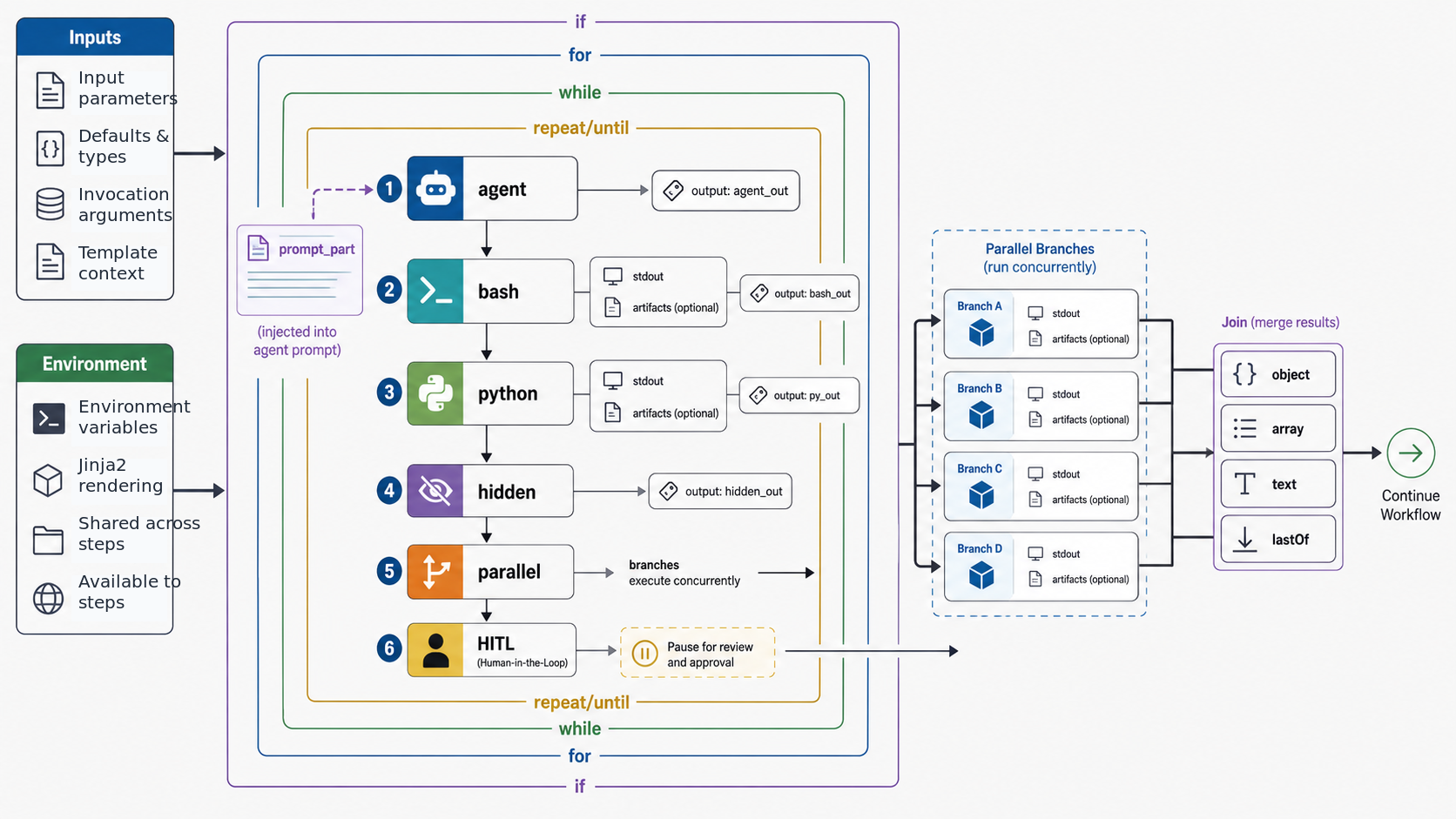
Table of Contents
- Top-Level Structure
- Input Parameters
- Environment
- Step Types
- Step Imports
- Output Specification
- Artifact Passing
- Control Flow
- Parallel Execution
- Join Modes
- Template Syntax
- Agent Output-Variable Namespaces
- Cross-Step Field Type Checking
- Human-in-the-Loop
- Cleanup Steps
- Completion Markers
- Examples
Top-Level Structure
A workflow YAML file must define steps and can include optional metadata, inputs,
environment variables, and local macro helpers:
description: Refresh generated docs # One-line summary (optional)
tags: vcs, rollover # Semantic role tags (optional)
hidden: false # Hide the workflow run row from sase's TUI default Agents-tab view (optional)
input: # Input parameter definitions (optional)
  ...
environment: # Environment variables (optional)
  MY_VAR: "value"
macros: # Workflow-local macro definitions (optional)
  helper:
    content: "Use {{ setup.path }}"
steps: # Ordered list of steps (required)
  - ...
Fields
| Field | Required | Description |
|---|---|---|
description |
No | One-line human-facing summary for catalogs and other rich macro surfaces. |
tags |
No | Semantic role tags. See Macro Tags for available tags. |
hidden |
No | Hide the workflow run row from sase's TUI default Agents-tab view. |
wraps_all |
No | Legacy wrapper flag; new workflows should prefer tags: vcs. |
input |
No | Input parameter definitions. See Input Parameters. |
environment |
No | Environment variables set before any steps run. See Environment. |
macros |
No | Workflow-local macro definitions available to this workflow's steps. |
steps |
Yes | Ordered list of workflow steps to execute. |
The workflow's name, as used in #name and #!name references, is always its file name
without the extension. There is no top-level name field: the loader ignores one, and
editors that validate against the bundled workflow.schema.json flag it as an unknown
key.
Input Parameters
Workflows can declare typed input parameters that users provide when invoking the workflow.
Longform Syntax
input:
  - name: diff_path
    type: path
  - name: max_retries
    type: int
    default: 3
  - name: description
    type: text
    default: ""
Shortform Syntax
input:
  diff_path: path
  max_retries: { type: int, default: 3 }
  description: { type: text, default: "" }
Or even more concise for simple types:
input: { diff_path: path, split_desc: { type: line, default: "multiple PRs" } }
Supported Types
type names the value the same way it does for markdown macros: scalar → inline enum
→ builtin → plugin. This table is the workflow view of that catalog; see
Typed Inputs for the rule, value rules, and model contract.
| Type | Description |
|---|---|
word |
Single word, no whitespace |
line |
Single line, no newlines (the default when type is omitted) |
text |
Multi-line text (any content) |
path |
File path (a single line; spaces are allowed) |
int |
Integer value (alias integer) |
bool |
Boolean value (true/false, yes/no, 1/0, on/off; alias boolean) |
float |
Floating point value |
code |
Structured source plus language (see Supported Types) |
enum |
One of the input's choices; choices work in both shortform and longform |
agent |
Agent name (no whitespace); sase's TUI completes agent targets |
effort |
One of the seven %effort levels (none/minimal/low/medium/high/xhigh/max) |
model |
A model token %model would accept without the default-provider fallback |
Plugin-shared enums use <distribution>@<id> (for example
sase-research-artifacts@audio_edition). sase macro types lists the installed
catalog. string is a deprecated alias of line.
Inputs can also set description and, on the last positional input, repeatable: true;
see Typed Inputs for the shared input rules.
Default Values
In shortform input definitions, parameters without a default are required. Parameters
with default: null or default: "" are optional. In current workflow YAML loading,
longform entries that omit default are treated like default: null; prefer shortform
for required workflow inputs.
Default values preserve their native Python types from YAML parsing — 3 stays an
int, true stays a bool, and "text" stays a str. This means downstream steps
receive properly typed defaults without needing explicit conversion.
Environment
Workflows can declare environment variables that are set once before any steps run and persist for the entire workflow run. Values support Jinja2 templates rendered against the workflow's input arguments.
# deploy_workflow.yml
input: { target: word }
environment:
  DEPLOY_TARGET: "{{ target }}"
  VERBOSE: "1"
steps:
  - name: deploy
    bash: echo "Deploying to $DEPLOY_TARGET"
Environment variables are injected into os.environ at workflow start, making them
available to all bash, python, and agent steps without explicit passing.
Step Types
Each step must have exactly one of these execution types:
Agent Steps
Execute an LLM prompt, optionally referencing inline-capable macros:
- name: generate_plan
  agent: |
    #plan_generator(
      context="{{ previous_step.output }}",
      requirements="{{ requirements }}"
    )
  output: { plan: text, files: text }
The agent field contains a prompt template that can:
- Reference macros using
#macro_name(args)syntax - Use Jinja2 template variables:
{{ variable }} - Include multi-line content
Standalone workflows, which have no prompt_part step, cannot be embedded inside an
agent prompt. Launch them with #!workflow_name(args) at the top level or inside an
anonymous wrapper prompt such as sase run '+sase #!sync'.
Note: The keyword
promptis still accepted for backward compatibility, butagentis the canonical name.
Prompt Part Steps
Inject text into the containing agent prompt without triggering a separate LLM call.
When a workflow is referenced via #name(args), the prompt_part content is expanded
inline into the calling prompt. Steps before and after the prompt_part still execute
as pre/post-processing.
- name: inject
  prompt_part: |
    ---
    IMPORTANT: You should make the necessary file changes, but should NOT create a git commit.
    ---
This is the step type that simple .md macros are internally converted to — a single
prompt_part step. Workflows with a prompt_part step can mix it with other step types
(bash, python) for pre/post-processing around an inline prompt fragment:
steps:
  - name: setup
    bash: git status --porcelain
    output: { status: text }
  - name: inject
    prompt_part: |
      Current git status:
      {{ setup.status }}
  - name: cleanup
    bash: echo "done"
Note: A workflow may have at most one
prompt_partstep. It is mutually exclusive withagent,bash,python, andparallelwithin a single step.
Bash Steps
Execute a shell command:
- name: get_status
  bash: git status --porcelain
  output: { files: text }
- name: complex_script
  bash: |
    counter_file="/tmp/counter"
    if [ ! -f "$counter_file" ]; then echo "0" > "$counter_file"; fi
    count=$(cat "$counter_file")
    echo "count=$count"
  output: { count: int }
Python Steps
Execute Python code:
- name: process_data
  python: |
    import json
    data = json.loads('{{ input_json }}')
    result = [item.upper() for item in data]
    print("result=" + json.dumps(result))
  output: { result: text }
Python steps run in a subprocess with access to installed packages.
Hidden Steps
Any step can be marked hidden: true to omit it from the normal sase's TUI Agents-tab
workflow expansion. Hidden steps execute normally and still write their outputs, but
they are shown only when the workflow row is fully expanded. This is useful for internal
bookkeeping steps (e.g., report steps that emit metadata outputs) that would clutter the
agent list:
- name: report
  hidden: true
  python: |
    import json
    print(json.dumps({"meta_commit_message": "..."}))
  output: { meta_commit_message: text }
A workflow can also set top-level hidden: true to omit the workflow run row from
sase's TUI default Agents-tab view. The workflow still executes and still writes
artifacts. appears_as_agent is not a YAML field to set directly; it is computed from
the workflow shape. When the only non-hidden step is an agent step, the recorded
workflow state gets appears_as_agent: true, so sase's TUI displays the run as an agent
row rather than a generic workflow row. Anonymous tmp_* workflows with that computed
state are included in the normal Agents-tab visible inbox unless the workflow row is
explicitly hidden.
Parallel Steps
Execute multiple nested steps concurrently:
- name: fetch_all
  parallel:
    - name: fetch_users
      bash: curl -s https://api.example.com/users
      output: { users: text }
    - name: fetch_posts
      bash: curl -s https://api.example.com/posts
      output: { posts: text }
See Parallel Execution for details.
Step Imports
The use field allows reusing step definitions from shared .yml files in steps/
directories. This enables extracting common step patterns into reusable libraries.
Syntax
- name: my_step
  use: shared/check_changes
  output: { status: text } # Local fields override base definition
The use value is a slash-separated path relative to a steps/ directory, without the
file extension.
Search Paths
Step definitions are resolved from the following steps/ directories (in priority
order):
<project>/sase/macros/steps/(canonical)<project>/.macros/steps/(legacy)<project>/macros/steps/(legacy)~/sase/macros/steps/(canonical)~/.macros/steps/(legacy)~/macros/steps/(legacy)~/sase/macros/<project>/steps/(canonical project-specific home source)~/.config/sase/macros/<project>/steps/(legacy project-specific home source)- A
steps/directory next to the workflow file itself, when it is not already listed <sase-package>/macros/steps/(built-in)
Both .yml and .yaml extensions are checked. First match wins. New shared steps are
written only to canonical project or home directories; the legacy sources remain
readable during the
content-layout compatibility window.
Override Behavior
Local step fields override any fields from the base definition. The use field itself
is stripped from the merged result:
# In steps/shared/lint.yml:
bash: ruff check .
output: { errors: text }

# In your workflow:
- name: lint_project
  use: shared/lint
  output: { errors: text, warnings: text }  # Overrides base output
Security
Paths containing .. or starting with / are rejected.
Output Specification
Steps can declare an output schema for structured output parsing.
Simple Object Format
output: { field_name: type, another_field: type }
Example:
- name: parse_config
  bash: echo "name=myapp\nversion=1.0"
  output: { name: word, version: word }
Array Format
For steps that produce a list of objects:
output: [{ name: word, description: text }]
Example:
- name: generate_items
  agent: Generate a list of items
  output: [{ name: word, description: text, priority: { type: int, default: 0 } }]
Nested Defaults
Fields can have defaults using nested dict syntax:
output:
  name: word
  parent: { type: word, default: "" }
  priority: { type: int, default: 0 }
Output Parsing
Step output is parsed in this order:
- JSON: If output is valid JSON, parse and validate against schema
- Key=Value: Parse lines like
key=valueinto a dict - Text fallback: Store raw output as
_rawor_output
For bash/python steps, output should be printed as key=value lines:
echo "success=true"
echo "count=42"
echo "message=Operation completed"
Artifact Passing
The artifact field captures a step's stdout to a file, making it available to
downstream steps as a file path.
Syntax
- name: generate_report
  bash: |
    echo "Full report content here..."
  artifact: stdout
  output: { summary: text }
Behavior
When artifact: stdout is set:
- The step's stdout is saved to
{artifacts_dir}/{step_name}.stdout - The file path is injected as the
_artifactfield in the step's output context - Downstream steps can reference it via
{{ step_name._artifact }}
Example
steps:
  - name: build
    bash: |
      make all 2>&1
      echo "status=success"
    artifact: stdout
    output: { status: word }

  - name: review
    agent: |
      Review the build output at {{ build._artifact }}
      Build status: {{ build.status }}
Restrictions
Only bash and python steps can use artifact. It is not allowed on agent,
prompt_part, parallel, or nested (parallel substep) steps. The only valid value is
"stdout".
Control Flow
Conditional Execution (if)
Skip a step if a condition is false:
- name: optional_step
  bash: echo "This runs conditionally"
  if: "{{ run_optional }}"
- name: skip_on_failure
  bash: echo "Only runs if previous succeeded"
  if: "{{ previous_step.success }}"
For Loops (for)
Iterate over a list:
# Single variable
- name: process_items
  bash: echo "Processing {{ item }}"
  for: { item: "{{ items }}" }
  output: { result: text }

# Multiple parallel variables (must have equal length)
- name: process_pairs
  bash: echo "{{ name }} has id {{ id }}"
  for:
    name: "{{ names }}"
    id: "{{ ids }}"
  output: { name: word, id: int }
The for field maps variable names to Jinja2 expressions that evaluate to lists. All
lists must have equal length.
For-Loop Error Handling (on_error)
For-loop iterations use different defaults by step type:
agentsteps default toon_error: continue, so one failed iteration is recorded and the remaining iterations still run.bashandpythonsteps default toon_error: stop, so the first failed iteration aborts the loop.
You can set on_error: stop or on_error: continue explicitly on any for: step:
- name: review_files
  agent: Review {{ file }}
  for: { file: "{{ files }}" }
  on_error: continue
  output: { summary: text }
While Loops (while)
Execute step while a condition is true (checked after each iteration):
# Short form
- name: poll_status
  bash: |
    status=$(check_status)
    echo "pending=$status"
  while: "{{ poll_status.pending }}"
  output: { pending: bool }

# Long form with max iterations
- name: poll_with_limit
  bash: echo "active={{ check_active }}"
  while:
    condition: "{{ poll_with_limit.active }}"
    max: 10
  output: { active: bool }
The step runs at least once, then continues while the condition is true. Default max iterations: 100.
Repeat/Until Loops (repeat)
Execute step until a condition becomes true (do-while semantics):
- name: retry_operation
  bash: |
    result=$(attempt_operation)
    echo "success=$result"
  repeat:
    until: "{{ retry_operation.success }}"
    max: 5
  output: { success: bool }
The step runs at least once, then repeats until the until condition is true. Default
max iterations: 100.
Combined Control Flow
if can be combined with for:
- name: conditional_loop
  bash: echo "Processing {{ item }}"
  if: "{{ should_process }}"
  for: { item: "{{ items }}" }
for can be combined with parallel:
- name: parallel_per_item
  for: { item: "[1, 2, 3]" }
  parallel:
    - name: task_a
      bash: echo "A processing {{ item }}"
    - name: task_b
      bash: echo "B processing {{ item }}"
Parallel Execution
The parallel field runs nested steps concurrently.
Basic Usage
- name: parallel_tasks
  parallel:
    - name: task_a
      bash: echo "result=done_a"
      output: { result: word }
    - name: task_b
      bash: echo "result=done_b"
      output: { result: word }
Accessing Results
Default join mode is object, nesting results under step names:
# After parallel_tasks completes:
{{ parallel_tasks.task_a.result }}  # "done_a"
{{ parallel_tasks.task_b.result }}  # "done_b"
Nested Step Restrictions
Steps within parallel cannot have:
for,repeat, orwhileloops- Nested
parallelblocks hitl: true
Fail-Fast Behavior
Parallel steps are fail-fast: if any nested step fails, remaining nested steps are cancelled best-effort.
Join Modes
The join field controls how iteration/parallel results are combined.
| Mode | Default For | Description |
|---|---|---|
array |
for loops |
Collect results as a list |
object |
parallel |
Merge results into a single object |
text |
- | Concatenate results as newline-separated text |
lastOf |
- | Keep only the last result |
Examples
# Array join (default for for:)
- name: collect_results
  bash: echo "value={{ item }}"
  for: { item: "[1, 2, 3]" }
  output: { value: int }
# Result: [{"value": 1}, {"value": 2}, {"value": 3}]

# Text join
- name: concatenate
  bash: echo "line={{ item }}"
  for: { item: "['a', 'b', 'c']" }
  join: text
  output: { line: word }
# Result: "line=a\nline=b\nline=c"

# lastOf join
- name: keep_last
  bash: echo "final={{ item }}"
  for: { item: "['first', 'middle', 'last']" }
  join: lastOf
  output: { final: word }
# Result: {"final": "last"}

# Object join (default for parallel:)
- name: merge_parallel
  parallel:
    - name: a
      bash: echo "key_a=value_a"
    - name: b
      bash: echo "key_b=value_b"
# Result: {"a": {"key_a": "value_a"}, "b": {"key_b": "value_b"}}
Template Syntax
Workflows use Jinja2 for template rendering.
Variable Access
# Input parameters
{{ parameter_name }}

# Step outputs
{{ step_name.field }}
{{ step_name.nested.field }}

# Loop variables (within for: loops)
{{ item }}
{{ name }}

# Output variables from waited named agents, loaded when this run starts
{{ agents["build"].report_path }}
{{ agents["research.final"].summary }}
Filters
# Convert to JSON
{{ data | tojson }}

# Get length
{{ items | length }}
Boolean Logic
# Conditions
{{ value and other_value }}
{{ value or fallback }}
{{ not value }}

# Defined check
{{ variable is defined }}
Conditionals in Templates
agent: |
  {% if condition %}
  Include this text
  {% endif %}

  {{ "yes" if flag else "no" }}
Agent Output-Variable Namespaces
Workflow step outputs are the normal way to pass data between steps in one YAML
workflow. Cross-agent output variables are a separate handoff for SASE agents. After a
consumer's %wait dependencies complete, SASE reads small string values that the
producers wrote with sase var set KEY=VALUE and adds them to the consumer's Jinja
context.
Those values are loaded when the consumer starts; they are not live-updated after
rendering begins. Have the producer call sase var set before it finishes. In workflows
launched as agents, the agents dictionary is available to workflow template rendering,
including agent, bash, python, environment, and prompt_part templates.
Every producer's variables live under a single agents dictionary keyed by the
producer's stable name. Agent-name templates use the template base instead of the
concrete allocated name. The key is the raw agent name with no identifier munging, so
dotted, hyphenated, and digit-leading names work via bracket access:
| Producer name or template | Referenced as |
|---|---|
%id:build-agent |
{{ agents["build-agent"].report_path }} |
%id:build-@ |
{{ agents["build"].report_path }} |
%id:research.@.final |
{{ agents["research.final"].report_path }} |
%id:0n.cld |
{{ agents["0n.cld"].report_path }} |
Identifier-safe keys also support attribute access such as
{{ agents.build.report_path }}.
The agents dictionary is an agent-level handoff, not a replacement for workflow
output: schemas or sase's TUI WORKFLOW VARIABLES section. Use output: for values
produced and consumed inside one YAML workflow; use sase var set when a later named
agent, segment, or agent-launched workflow needs a small value from a completed
producer. agents is a reserved agent-run Jinja name; a workflow input named agents
collides and fails clearly.
Cross-Step Field Type Checking
The workflow validator checks {{ step_name.field }} template references against each
step's declared output schema at load time. This catches field name typos before the
workflow runs.
What It Checks
{{ build.atrifact_path }}produces an error ifbuildonly definesartifact_pathin its output- Works with parallel step nesting:
{{ parallel.nested.field }} - Recognizes the special
_artifactfield on steps withartifact: stdout - Recognizes the special
approvedfield onbashandpythonHITL steps - Skips for-loop iteration variables (e.g.,
item)
Error Format
Step 'deploy': references 'build.atrifact_path' but 'build' output has no field 'atrifact_path'. Available: ['artifact_path', 'status']
Human-in-the-Loop
The hitl: true directive pauses execution for user approval.
Basic Usage
- name: generate_plan
  agent: Generate a migration plan
  output: { plan: text }
  hitl: true
Approval Flow
When a HITL step completes:
- Step output is displayed to the user
- User can:
- Accept: Continue to next step
- Edit: Modify the output before continuing (offered for
agentsteps and forbash/pythonsteps that declareoutput; cancelling the edit rejects the step) - Reject: Abort the workflow
The workflow state machine handles accept, edit, and reject as direct control actions.
When the workflow is running inside a SASE agent, the HITL boundary hands the session to
a processless HITL gate turn and ends that agent turn. Accept and edit can launch the
next session member to resume the workflow; gate-turn feedback and rerun branches may
also launch a fresh continuation. Reject, cancellation, timeout, and terminal branches
without an explicit follow-up stop the workflow. Outside an agent-runner context, the
executor waits inline for the same durable decision instead.
When a workflow runs in the foreground of a terminal, HITL uses an inline prompt
instead: a accepts, e edits, x rejects, and Enter with no input accepts. That
prompt also offers free-text feedback for agent steps and r (re-run) for
bash/python steps, but the inline executor does not act on either yet; it continues
to the next step without setting approved.
Accessing Approval Status
After an accepted bash or python HITL step, step.approved is set to true for
downstream conditions. An edited step continues with the edited output but does not get
approved, so a condition such as if: "{{ step.approved }}" skips its target after an
edit:
- name: prompt_user
  bash: echo "message=Continue with operation?"
  output: { message: text }
  hitl: true

- name: execute_if_approved
  if: "{{ prompt_user.approved }}"
  bash: perform_operation
Restrictions
- HITL steps cannot be nested within
parallelblocks - HITL works with
agent,bash, andpythonstep types agentHITL steps do not automatically add anapprovedfield to their output
Cleanup Steps
Steps marked with finally: true run even when prior steps fail or are HITL-rejected.
This is useful for cleanup and teardown operations.
Syntax
steps:
  - name: setup
    bash: mkdir -p /tmp/workdir
    output: { dir: text }

  - name: main_work
    agent: Do the main work in {{ setup.dir }}
    output: { result: text }

  - name: cleanup
    finally: true
    bash: rm -rf /tmp/workdir
Rules
- Put
finally: truesteps at the end of the workflow, after all non-finally steps. After a failure, later non-finally steps are skipped whilefinallysteps still run. - Cannot be used on
prompt_partor nested (parallel substep) steps - Can be combined with
if:for conditional cleanup:
- name: conditional_cleanup
  finally: true
  if: "{{ setup.dir }}"
  bash: rm -rf {{ setup.dir }}
Completion Markers
When a multi-step workflow finishes, a done.json marker is written to track completion
status. For multi-agent workflows (workflows that spawn follow-up agents), done.json
is written to both the current step's artifacts directory and the root artifacts
directory. The root copy ensures that:
%waitdependencies resolve correctly (the workflow name is recognized as successful)- Agent name allocation preserves the workflow's reserved name
find_named_agent()can discover the completed workflow from the root
Structure:
{
  "cl_name": "branch-name",
  "project_file": "/path/to/project.spec",
  "timestamp": "260327_143000",
  "artifacts_timestamp": "260327_143000",
  "outcome": "completed",
  "workspace_num": 1,
  "name": "agent-name",
  "model": "opus",
  "llm_provider": "claude",
  "vcs_provider": "git"
}
The outcome field is either "completed" or "failed". Failed markers additionally
include "error" and "traceback" fields.
Workflow-Aware Wait Success
The %wait directive treats a workflow dependency as satisfied only when the newest
matching workflow run completed successfully:
- Find all agents belonging to the workflow (matching
workflow_name) - Select the newest root agent (no
parent_timestamp) when one exists - Require the root
done.jsonoutcome to be"completed" - Require every child agent for that root to have a
done.jsonoutcome of"completed"
If older artifacts only retained workflow_name on children and no root can be
identified, the newest matching artifact is used as a compatibility fallback, but it
still must have outcome "completed". Failed, killed, crashed, still-running,
malformed, or missing done.json artifacts do not satisfy %wait; the dependent agent
remains waiting until a later successful run of the same workflow name appears.
If a workflow name is not recognized (no agents with that workflow_name), the system
falls back to single-agent success checking with the same "completed" outcome
requirement.
Examples
Complete Workflow Files
The following workflow files demonstrate these features:
eval_ifs_loops.yml- Conditional execution, for loops, while/repeat loopseval_parallel.yml- Parallel execution with different join modessync.yml- Real standalone workflow that mixes hidden Python steps with a repeated, conditional agent step
Minimal Example
# simple_workflow.yml
input: { name: word }
steps:
  - name: greet
    bash: echo "message=Hello, {{ name }}!"
    output: { message: line }
Multi-Step with Conditionals
# conditional_workflow.yml
input:
  run_optional: { type: bool, default: true }
  items: { type: text, default: '["a", "b", "c"]' }

steps:
  - name: setup
    bash: echo "ready=true"
    output: { ready: bool }

  - name: process_items
    bash: echo "processed={{ item }}"
    if: "{{ setup.ready }}"
    for: { item: "{{ items }}" }
    output: { processed: word }

  - name: optional_step
    bash: echo "ran=true"
    if: "{{ run_optional }}"
    output: { ran: bool }

  - name: summary
    bash: echo "items_count={{ process_items | length }}"
    output: { items_count: int }
Parallel with Dependencies
# parallel_workflow.yml
steps:
  - name: fetch_data
    parallel:
      - name: users
        bash: echo "count=100"
        output: { count: int }
      - name: orders
        bash: echo "count=500"
        output: { count: int }

  - name: combine
    bash: |
      total={{ fetch_data.users.count + fetch_data.orders.count }}
      echo "total=$total"
    output: { total: int }
Retry with HITL
# retry_workflow.yml
steps:
  - name: attempt_operation
    bash: |
      # Simulated operation that may fail
      success=$((RANDOM % 2))
      echo "success=$success"
    repeat:
      until: "{{ attempt_operation.success }}"
      max: 3
    output: { success: bool }
    hitl: true

  - name: finalize
    if: "{{ attempt_operation.approved }}"
    bash: echo "finalized=true"
    output: { finalized: bool }