SASE
Structured Agentic Software Engineering
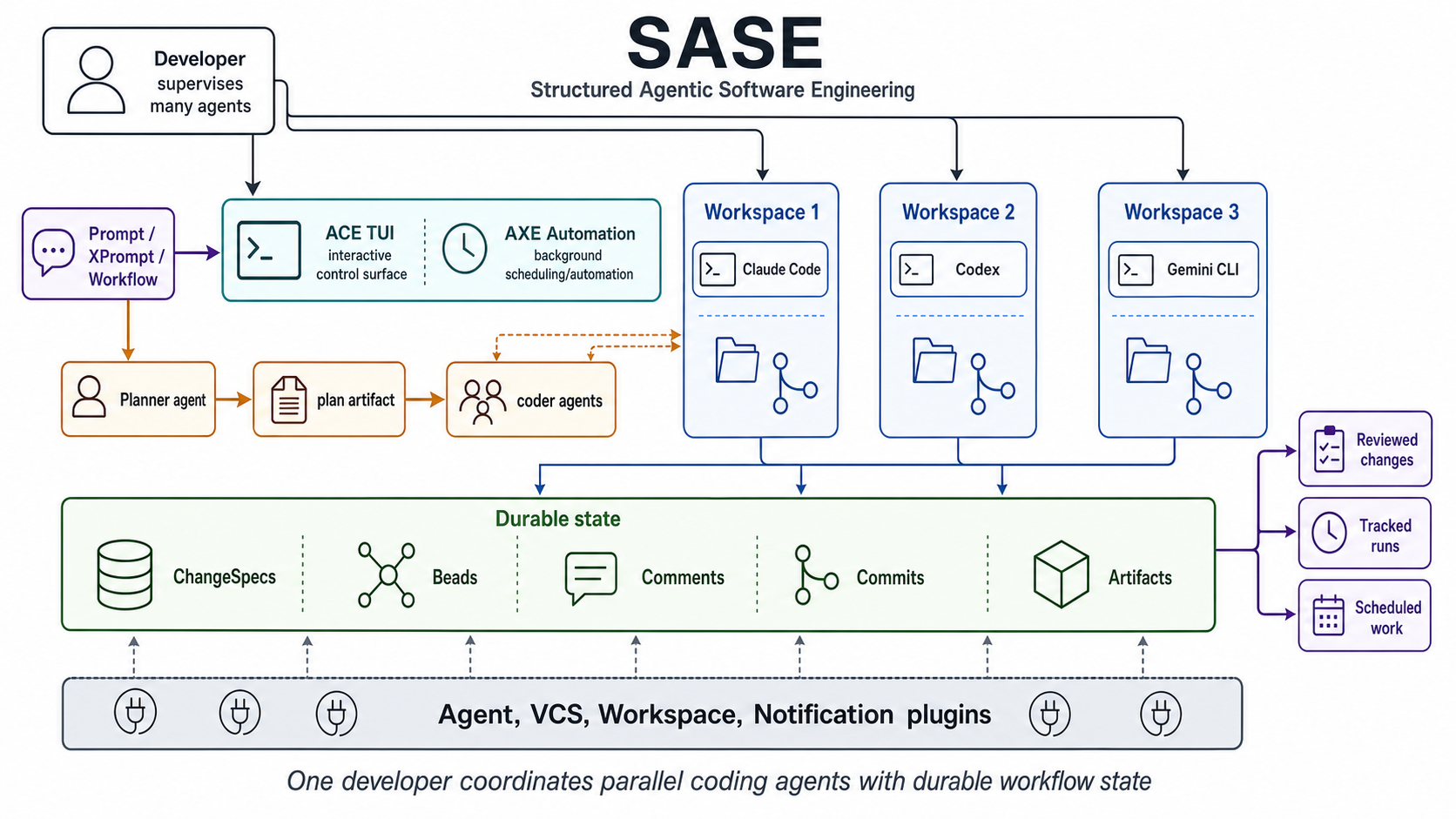
SASE is a Python toolkit for coordinating coding-agent work: durable plans, tracked handoffs, reviewable changes, resumable runs, and automation that can move across model and version-control providers.
Why SASE exists
One prompt is not an engineering system
A single coding-agent run can produce a patch. Real projects also need a place to store intent, pass work between agents, order dependencies, track review state, retry failed runs, run background automation, and record what happened. SASE provides that coordination layer without tying the workflow to one model provider or one terminal app.
Start by role
Pick the surface that matches your work
I am setting up a repo
Run sase init to check and apply owner identity, optional remote-machine enrollment, agent memory,
sidecar repositories, and generated skill files before handing work to agents.
I want a TUI for agent work
Use sase's TUI to navigate Patches, live agents, notifications, and automation state from one terminal interface.
Open sase's TUI guideI want durable work units
Use Patches for PR-sized review state and Beads for plan, epic, phase, and standalone task work that can drive single- or multi-agent execution.
Learn the SDD flowI need shared agent memory
Use instruction memory loaded through AGENTS.md, audited reference reads, and sase's TUI Memory panel for flat-note changes plus memory-web strand creation and deletion.
Open memoryI want reusable agent workflows
Use XPrompts for reusable prompt templates and workflow specs for repeatable multi-step automation.
Build with XPromptsI want implementation context
Use the architecture overview, command index, and development guide to understand the CLI surface, source layout, provider boundaries, and docs workflow.
Read the architecture mapI want editor completions
Use the xprompt LSP and editor helper bridge for prompt completion, snippets, hover, diagnostics, and jump-to-definition.
Open editor integrationCore primitives
The coordination model
SASE keeps the work state outside the chat transcript. Plans, Patches, beads, agent artifacts, and workflow records let agents be scheduled, resumed, reviewed, retried, or handed off without relying on one session's context window.
- ProjectSpecs and Patches track project lifecycle, PR-sized work, commits, review state, comments, mentors, and lifecycle transitions.
- Beads provide git-native issue tracking for plans, executable epics, phase dependencies, and agent handoff.
- XPrompts turn prompt templates into reusable workflows with reference expansion and typed inputs.
- sase's TUI is the interactive control surface for daily work.
- Axe Automation runs background hooks, mentors, maintenance jobs, and scheduled workflows.
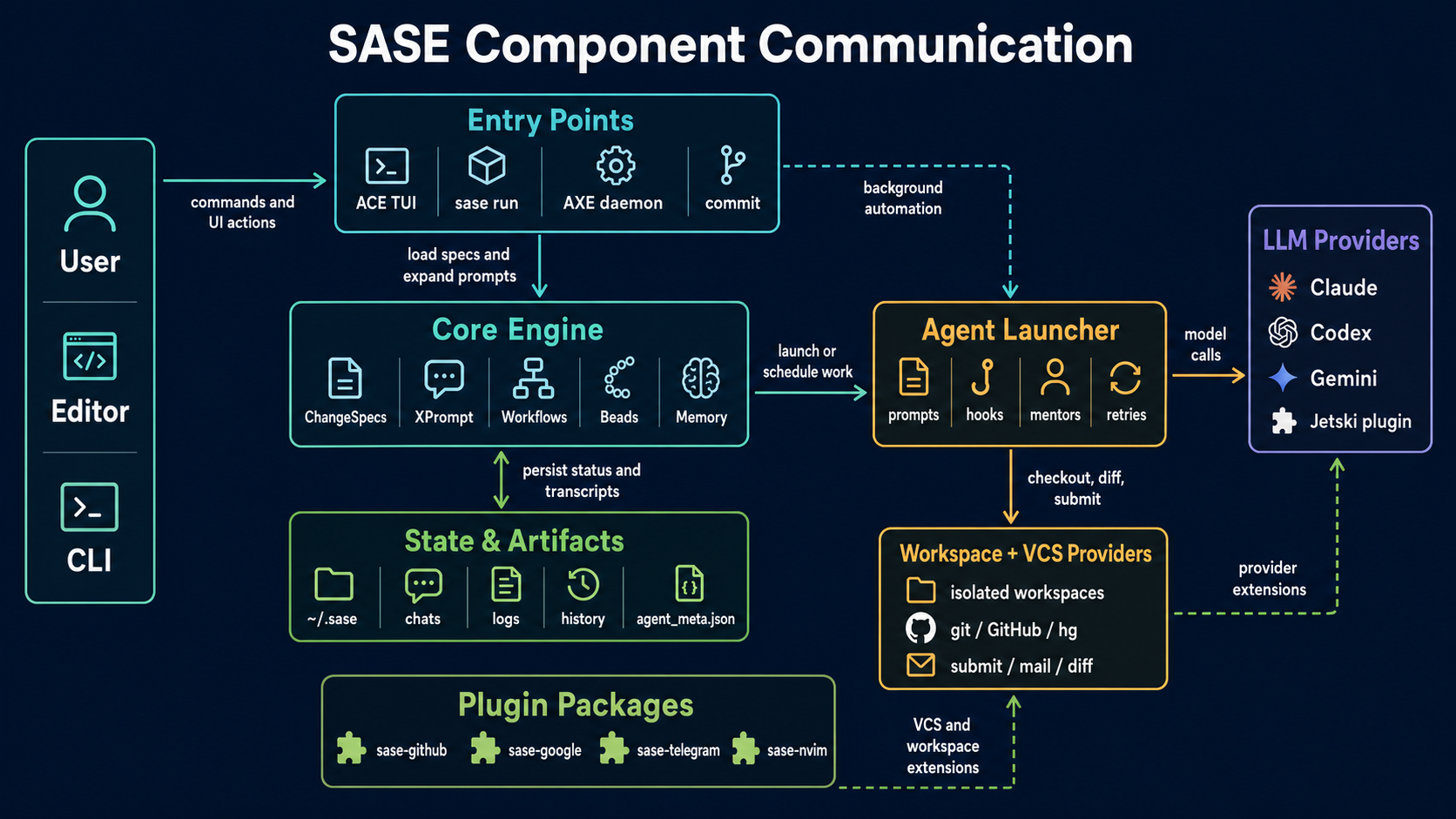
- Provider and workspace abstractions route agent launches, VCS operations, and workspace setup through plugin-backed boundaries.
How the pieces connect
Designed around real agent handoffs
Next clicks
Move from overview to practice
Find a command
Use the CLI index to route from a command to its detailed owner page.
Open the CLI referenceUnderstand the system
See how CLI, sase's TUI, axe, workflows, providers, and the Rust core fit together.
Open architectureContribute locally
Review setup, verification commands, source layout, and docs deployment.
Open developmentRead the launch essay
Why coding agents need orchestration above individual provider CLIs.
Read the essayStart with sase's TUI
Learn the terminal interface for day-to-day SASE work.
Open sase's TUIOpen the blog
Read launch posts and longer essays as they publish.
Open the blogDownload the handbook
Keep the current public docs and launch articles in one static PDF.
Download PDFView the code
Inspect the implementation, issues, and project direction.
Open GitHub