SASE: Structured Agentic Software Engineering
Note: SASE xprompts have been renamed to macros since this post was published.
The status quo is useful enough to be dangerous. Open a handful of terminal or tmux windows, run one coding-agent CLI in each, hand each one a scoped task, and hop between them as they finish. I think of this as the Boris Cherny method because Boris Cherny's Claude Code setup thread described running multiple Claude sessions in parallel, and Anthropic now documents parallel Claude Code sessions with worktrees as a normal workflow.
I automated my version of it with
tmux_ai_window,
a small script in my public dotfiles. One tmux binding opens a display-menu with
claude, codex, agy, qwen, and opencode. Each installed CLI gets an accent
color and a one-key shortcut; missing CLIs are greyed out. Choosing one opens a new
window named ai, ai2, ai3, and so on, in the current pane's directory, with the
relevant "yes, go do the work" flags already wired. When the CLI exits, the window
closes and the remaining ai* windows are renumbered.
That got me a long way. It also made the missing layer painfully obvious.
- 😈 The scrollback buffer is the database. Close the window, lose the run.
- 😈 No notifications. "Monitoring" means cycling windows with a thumb on
n. - 😈 Prompts are retyped, pasted, or fished out of shell history.
- 😈 Seven agents means seven windows and no single answer to "which one needs me?"
- 😈 One prompt launches one agent. Fan-out means typing the same thing several times.
- 😈 Plans, approvals, retries, and "what did agent 4 change?" live in your head.
SASE keeps the same operating idea. The menu can stay local and familiar; everything around it grows up.
SASE (Structured Agentic Software Engineering, pronounced "sassy") is an open-source operating layer that orchestrates coding-agent CLIs into tracked, repeatable engineering workflows. It gives agent runs durable records, reusable prompts, scheduling, notifications, approval gates, workspace routing, and a TUI where the whole mess becomes a screen you can read.
- 😇 Agent runs become durable records with prompts, transcripts, status, and artifacts.
- 😇 Notifications tell you when a plan, question, failure, or launch request needs attention.
- 😇 Macros make repeated prompts reusable and composable.
- 😇 sase's TUI gives one control surface for many agents.
- 😇 Alternations and multi-prompt syntax launch many agents from one prompt.
- 😇 Plan and launch approvals put gates back where the human still matters.
This post is the front door: how SASE wraps agent CLIs instead of model APIs, how Macros work, how the Agents tab in sase's TUI changes the day-to-day UX, and how to install and initialize the system. The deeper engineering pieces get their own posts.
SASE Wraps Agent CLIs, Not Models
SASE is not a model router that happens to know about coding. It is an orchestration layer around existing agent runtimes. The architecture guide describes the launch path: parse prompt text and directives, resolve a workspace reference, expand Macros, invoke the selected LLM provider or workflow executor, stream subprocess output, write agent artifacts, emit notifications, and hand review or commit work back to the VCS layer. The LLM provider docs make the boundary explicit: providers are thin. They construct CLI commands and run subprocesses; preprocessing and postprocessing live in SASE.
That boundary is the whole trick. SASE never has to replace Claude Code, Codex,
Antigravity CLI (agy), Qwen Code, OpenCode, or Meta's Muse Code. It launches the CLI
you already installed and authenticated, then records durable state around the run:
prompt, transcript, status, workspace metadata, generated files, plans, and completion
artifacts. You inherit each provider CLI's account model, sandbox choices, tool
behavior, and future improvements instead of asking SASE to clone all of it.
The bundled agent CLIs are exactly claude, codex, agy, qwen, opencode, and
muse. agy is Antigravity CLI. It can route to model names that contain "Gemini", but
those are model labels, not a separate gemini command or provider. Muse Code is
explicit-only: SASE never auto-detects the generic muse executable name, so select it
with llm_provider.provider: muse, SASE_MUSE_PATH, or a %model:muse/... directive.
This distinction matters because provider names show up in commands, config, model
routing, skills, and sase's TUI rows.
Provider and model selection is still flexible per prompt. You can write
%model:codex/o3, %model:claude/opus, %m:agy/gemini-3.7-flash-high,
%model:opencode/anthropic/claude-sonnet-4-5, or %model:muse/muse-spark-1.3. Known
model names auto-map to providers, and when no provider is configured SASE auto-detects
installed built-ins with unambiguous CLI names in priority order: claude, codex,
qwen, opencode, then agy. Muse Code remains explicit-only. For repeated workflows,
model aliases such as %model:@default or %model:@blogger let your sase.yml choose
the concrete provider/model at launch time.
Uniformity is not just about launching. SASE skills, hooks, and commit finalization are
provider-neutral by design. sase skill init renders skill sources into
provider-specific SKILL.md targets such as ~/.claude/skills/...,
~/.codex/skills/..., ~/.qwen/skills/..., ~/.config/opencode/skills/..., and
~/.config/muse/skills/.... Generated provider instruction shims are full copies of the
managed AGENTS.md. Write the SASE workflow once; let the selected runtime execute it.
The trade-off is honest. SASE has less direct control over provider token accounting, model semantics, and low-level tool protocols than it would have if it called raw model APIs directly. It also inherits provider pricing, policy, and CLI behavior changes. I still prefer that bargain. The agent CLIs are where the provider-specific work is moving fastest, and SASE is more useful as a durable control plane around them than as a second-rate replacement for them.

One GitHub prompt fans out to Claude, Codex, and Antigravity. All three agents run in isolated workspaces and remain controllable from the same sase's TUI view.
Macros
The smallest Macro is just a Markdown file. Put this in sase/macros/til.md at the
project root where you run SASE:
Append one Today-I-Learned entry to `til.md` about something useful in this workspace.
Keep it to two sentences. If the file does not exist, create it.
Now this is a complete launch:
sase run "#til"
That single #til reference expands into the Markdown body before the agent sees the
prompt. Macros can live in a project sase/macros/ directory, the user-wide
~/sase/macros/ directory, or the macros: block in sase/sase.yml; project-local
definitions win when names collide. The full discovery table has more tiers for plugins
and built-ins, but day one is simple: put reusable prompts near the work, then move them
outward when they become personal tools.

ACE prompt input expands an Macro reference, offers completion, and keeps the workspace prefix visible.
Typed inputs turn that Markdown file into a small interface. The reference example is deliberately boring:
---
name: greet
description: Greet a named user.
input:
  user_name:
    type: word
    description: User name to include in the greeting.
---

Hello, {{ user_name }}! Welcome aboard.
The frontmatter says user_name is a single word, and the body renders it through
Jinja2. You can call inputs with parentheses (#greet(user_name=Alice)), a compact
colon form (#greet:Alice), or a text shorthand that captures prose until a blank line
(#review: check this diff for edge cases). Bad arguments fail before a model runs,
which is exactly where argument mistakes should fail.
Directives are the other half of the language. They are %-prefixed controls that SASE
strips before the model sees the prompt:
%model:`claude-sonnet-4-20250514`
%id:code-reviewer
%wait:planner
Review the code changes and provide feedback.
%model selects a provider/model. %id gives the run a durable name. %wait waits for
another named agent or a time floor. %effort sets reasoning effort where the provider
supports it. %auto requests adapter-owned gate resolution. %hide hides noisy helper
runs from the default Agents view. %repeat repeats a prompt, and the tribe= keyword
on %id assigns a user-visible tribe. Those controls live in the same Markdown as the
prompt, which keeps the common case out of YAML.
Alternations are the direct answer to "one prompt equals one agent." This:
%{#review | #test | #docs}
launches three branches. Multiple alternations form a Cartesian product, so a focus
alternation paired with %{%m:opus | %m:sonnet} becomes one agent per focus/model
combination. For multi-model benchmarking, the prompt can be as small as:
%{%m:opus | %m:sonnet}
Review this code for edge cases.
For ordered multi-agent work, use literal --- segment separators. Each segment becomes
an agent, and %wait decides which ones depend on earlier work:
---
macros:
  _common: "Follow the project coding conventions."
---

%id:step1
#_common
Implement the new feature.

---

%id:step2
%wait:step1
#_common
Write tests for the new feature.
That launches two agents. step2 starts after step1 succeeds because the second
segment waits on the first. YAML workflows exist for real graphs, bash/python steps,
approvals, structured outputs, and joins; do not reach for them just because a Markdown
file feels too small to be serious. Small is often the point.
There are a few special Macros worth knowing early. #fork resumes a prior agent
conversation by name. Workspace refs such as #git:home, #git:<project>, and
#gh:<owner>/<repo> decide where the agent runs. Project Macros can be namespaced, so a
prompt like #gh:sase #sase/sync can target a repo and expand a project-specific
prompt.
You type the same language in several places. sase run accepts it directly. sase's TUI
prompt input adds completion (Ctrl+T), fuzzy file search (Ctrl+R), snippets,
vim-style NORMAL mode, prompt history (Ctrl+K), and prompt stash (Ctrl+S). The
sase-nvim plugin and sase lsp bring the same
catalog to an editor through completion, hover, diagnostics, and jump-to-definition.

Prompt history and stashes make useful launches recoverable instead of leaving them in shell history.
The Agents Tab In sase's TUI
sase tui opens sase's TUI. It has three top-level tabs: Agents, Artifacts, and
Services. Agents is the startup default. Artifacts has views for the historical
Agent catalog, Stitches, Patches, Beads, configured document providers, and Files. Its
Patches view owns durable PR-sized Patch records. Services shows the service host and
scheduler. This post stays on Agents because that is the tmux-window-farm replacement.
The first difference is observability. The Agents tab groups runs by project, date, or
status; folds and unfolds the tree with h/l and H/L; and shows a metric strip
such as N [S stopped · R running · W waiting · F failed · U unread · D done] with
zero-count items omitted. Each row uses compact glyphs: ▶ for running, ✓ for done,
✎ for a submitted plan, ? for a user question, ⏳ for waiting, ↻ for retrying,
and ⚡ for autonomous plan approval. Provider emoji badges make the runtime visible at
a glance: 🎭 Claude, 🪐 Antigravity, 🤖 Codex, 🐼 Qwen, 🐙 OpenCode, and 🦋 Muse Code.
State you used to keep in your head becomes a display. Which agent is waiting? Which one failed? Which one produced a plan? Which completed row is still unread? Which provider/model did it use? The row already knows.

The Agents tab groups runs, shows status/provider/model cues, and keeps the selected agent's artifacts nearby.
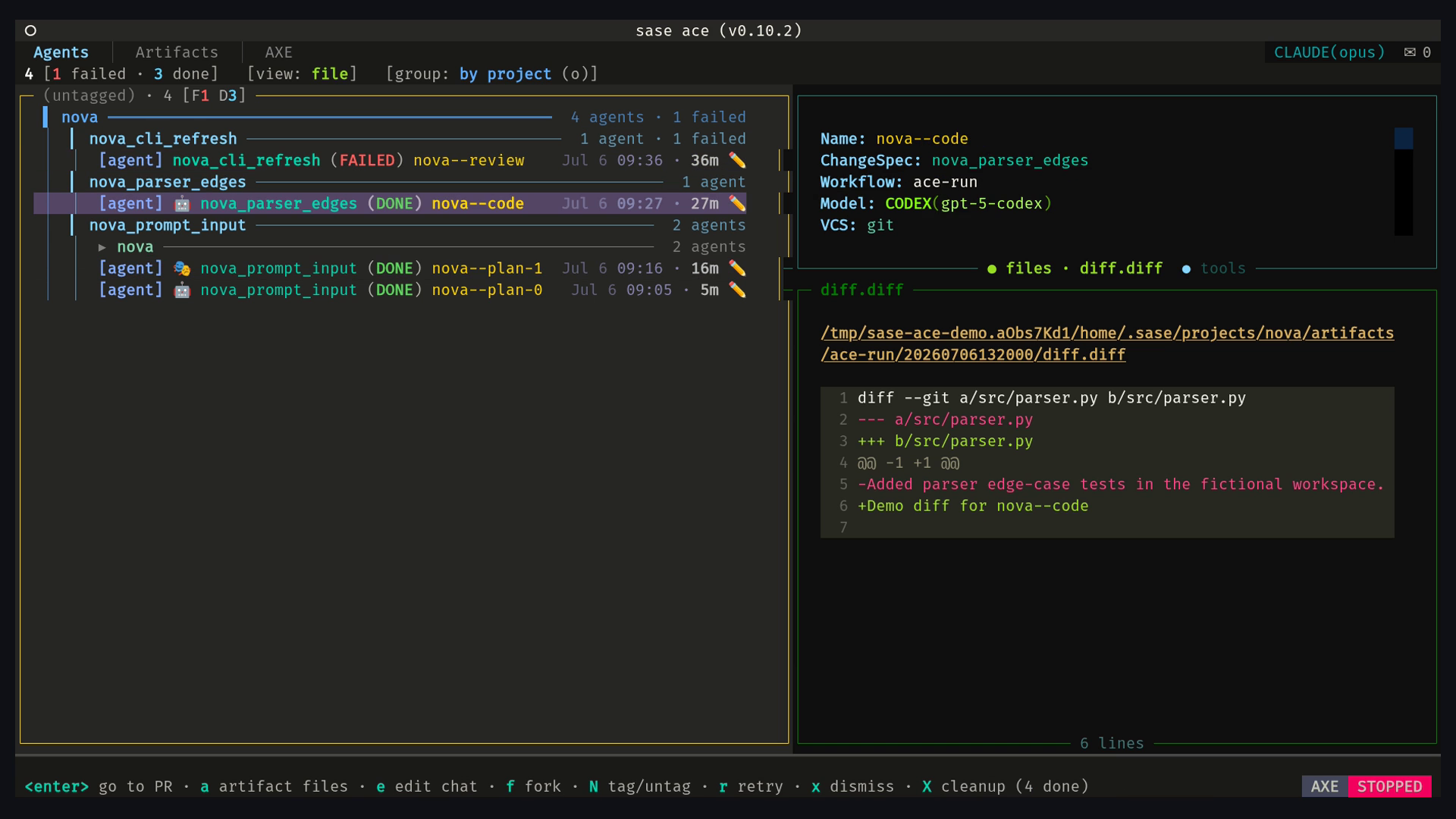
A still frame makes the session grouping, selected model, and detail pane easier to inspect than the loop.
Three grouping ideas make dense views navigable. Sequential plan-chain sessions use --
suffixes to keep one unit of work together: nova--plan, nova--code, and
nova--review render as related workflow rows under a pure session container. Rootless
%clan:<name> containers group hood-scoped parallel agents without changing launch
order or execution. Agent hoods use dotted names such as foo.bar and foo.baz; ~
jumps among visible ancestors, descendants, and same-namespace neighbors. Tribes such as
@review label related work across both structures. The point is not taxonomy for its
own sake. It is being able to collapse, revive, search, wait on, or dismiss a coherent
set of agents instead of playing guess-the-window.
sase's TUI is also where you steer. When an agent submits a plan through /sase_plan or
sase plan propose, the row enters PLAN status and the notification carries
provider/model metadata. The plan approval modal uses single keys: a approve and run
the coder, r reject, f request feedback, e edit, t save as a tale, and E make
an epic. The A key on an active row opens the auto-approve menu, matching %auto,
%auto:tale, and %auto:epic.
Launch approval is the second gate. If a running agent asks SASE to launch more agents,
the request becomes a priority LaunchApproval notification. The modal previews the
requested launch; a approves, r rejects, and q cancels. This is where fan-out gets
human review without making the human type every branch by hand.
The everyday verbs stay one key away: f forks a run, r edits and retries the prompt,
w adds or removes waits, x kills or dismisses, / opens structured agent search,
and i opens the notifications inbox. That is the same information density I wanted
from the window farm, but with records, gates, and one keyboard.
Install, Configure, Initialize
SASE's boring install path is the right one. You need uv, Python 3.12 or newer, git
with user.name and user.email configured, and at least one authenticated supported
agent CLI: claude, codex, agy, qwen, opencode, or muse. Muse Code requires
explicit provider/model selection; the other built-in CLI names can be auto-detected.
Prebuilt sase-core-rs wheels are available for CPython 3.12+ on Linux x86_64, Linux
aarch64, and macOS; SASE targets POSIX platforms.
Install and check the tool:
uv tool install sase
sase version
sase doctor        # readiness gate: install, config, provider, and state report
sase core health   # confirm the required Rust core extension loaded
Use uv tool install rather than pip install for the normal path because
sase update, sase plugin install, and the Admin Center Updates tab all rely on uv's
tool receipt. To install with GitHub support from the start:
uv tool install sase --with sase-github
One uv detail matters: --with replaces the injected plugin set instead of appending to
it. To add a plugin after the tool is installed, use sase plugin install github or the
Admin Center.
The minimal provider config lives in ~/.config/sase/sase.yml:
llm_provider:
  provider: claude # default: auto-detect
  # Other built-ins: qwen, opencode, agy, muse. Muse is explicit-only.
  model_tier_map:
    large: opus
    small: sonnet
  model_aliases:
    builtin:
      default: opus # model used when a prompt has no %model directive
      claude_coder: codex/gpt-6.1-sol # coder follow-ups from Claude-authored plans
      codex_coder: claude/opus # coder follow-ups from Codex-authored plans
Config layers are predictable: bundled defaults, plugin defaults,
~/.config/sase/sase.yml, alphabetized sase_*.yml overlays, then a project-local
sase/sase.yml for agent-launch contexts. That gives you a global default, machine or
persona overlays, and repo-local behavior without rewriting the same block everywhere.
Initialization wires up the files agents and companion tools depend on:
sase init -c       # report drift without writing
sase init          # interactive
sase init --yes    # skip generic prompts; missing sidecar creation still asks
The coordinator plans in registry order: memory, repositories, then skills. Memory
initialization owns the managed AGENTS.md and provider instruction copies. Repository
initialization owns configured sidecars, generated guides, and the workspace ignore
rule. Skill initialization renders SASE skill sources to every provider's skill
directory. That is the command-line version of the earlier promise: write the SASE
workflow once, then deploy it across runtimes.
After sase doctor reports a usable provider, launch one read-only first run. Use the
Muse form only when selecting Muse explicitly:
# Auto-detected providers:
sase run "#git:home summarize what this repository does; do not change files"
# Muse Code:
sase run "%model:muse/muse-spark-1.3 #git:home summarize what this repository does; do not change files"
# Then:
sase agent list
sase tui
That is enough to see the loop: a prompt becomes an agent record, the record appears in the CLI and sase's TUI, and the transcript and artifacts survive the terminal window that launched it. For the guided path, use Getting Started.
What's Next
This post covered SASE's front door: provider CLIs, Macros, sase's TUI Agents tab, and the installation path. The parts that make it an engineering system deserve their own posts: Beads and Spec-Driven Development, Patches, hooks, mentors, review comments, memory, Telegram/mobile control, and SASE's plugin architecture.
The quick start is still the same:
uv tool install sase
Docs live at sase.sh, source lives at github.com/sase-org/sase, and issues are welcome.