Macro Template Reference
Macros are reusable prompt templates with optional typed inputs and Jinja2 support. They
let you define a prompt fragment once and reference it by name anywhere a prompt is
composed, keeping prompts DRY and consistent across projects. Inline prompt fragments
use #name; standalone workflows use #!name when they are launched as workflows.
Use macros when you want to:
- Share common instructions across multiple prompts (e.g., output format rules, role definitions).
- Parameterize prompts with typed, validated arguments.
- Compose prompts from smaller building blocks using
#name(args)syntax.
For steps to turn a useful one-off prompt into a reusable macro, see Reuse a prompt with macros. This page documents macro syntax, inputs, and expansion behavior.
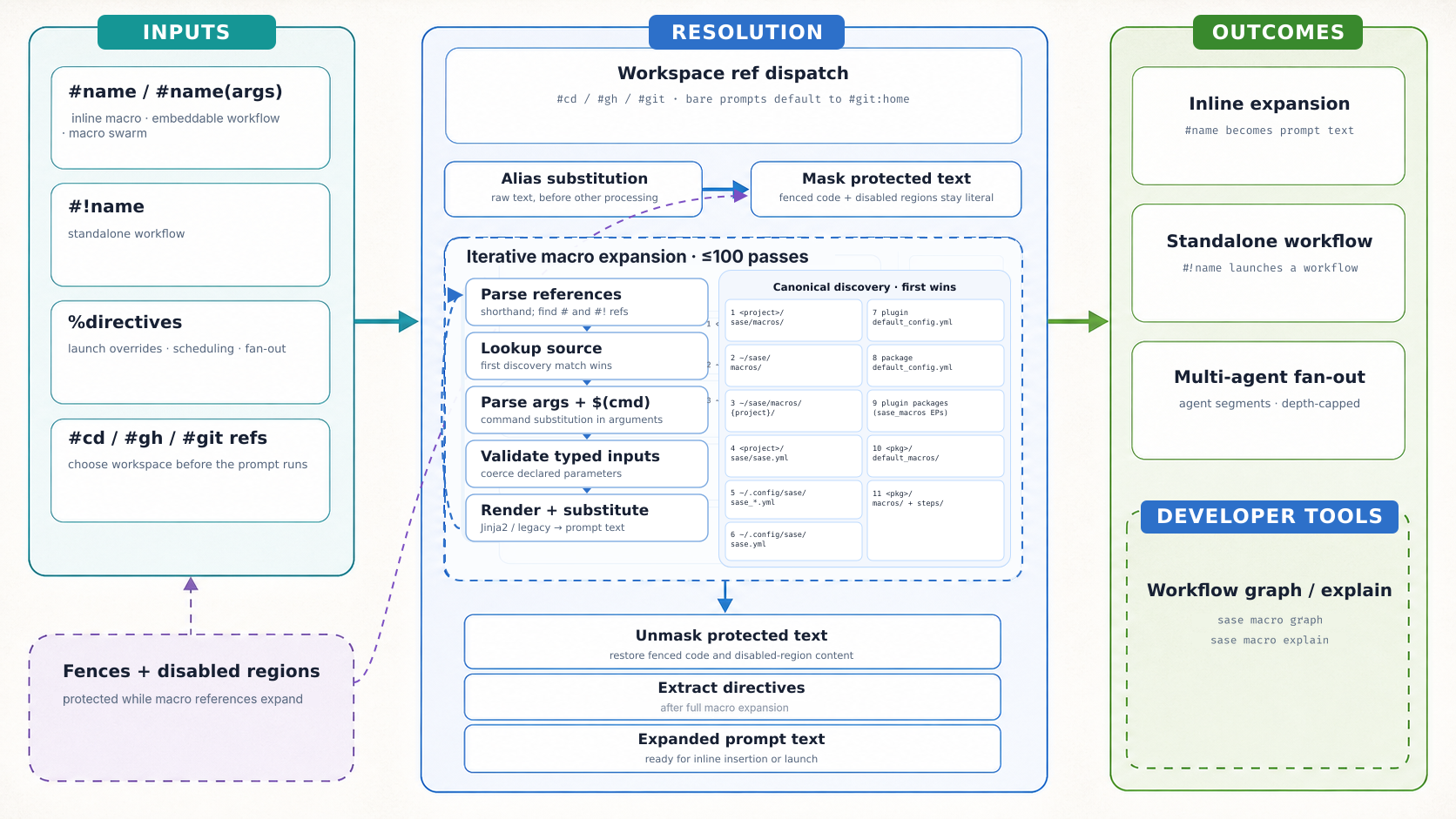
There are two related paths to keep separate:
launch setup:
  project tag validation and expansion (+sase -> #gh:gh_sase-org__sase)
  -> macro swarm fan-out check
  -> default workspace ref insertion when needed (#git:home)
  -> project name/alias canonicalization (#gh:bob -> #gh_bbugyi200__bob)
  -> workspace ref resolution (#git/#gh, plugin-provided refs, and known-project fallbacks)
  -> prompt/workflow execution

macro expansion inside a prompt or prompt_part:
  alias substitution
  -> fenced-block and disabled-region protection
  -> iterative reference expansion (parse -> lookup -> args -> render -> substitute)
  -> directive extraction at the launch or workflow-step boundary
The checked-in infographic prompt in
docs/images/macro-resolution-infographic.prompt.md tracks the intended visual version
of this model; the text model above is the authoritative current reference for resolver
order.
Syntax and sources
- File format and reference syntax — macro files, references, workspace targets, and project tags
- Arguments and typed inputs — argument forms, types, defaults, and output validation
- Template rendering — Jinja2, placeholders, aliases, and expansion
- Tags — available tags and lookup behavior
- Fields — snippet, skill, and memory fields
- Built-in and configured macros — definitions from SASE and config
- Discovery — lookup order and reserved namespaces
Directives
- Generated directive catalog — directive names, aliases, syntax, and arguments
- Syntax and completion — directive forms and model or dispatch
- Launch directives — identity, launch settings, and admission
- Composition and fan-out — review, repetition, and branches
Tools and workflows
Related
_[project]: A sase project is a named unit of work registered with SASE. _[workspace]: A sase workspace is a numbered clone of a project's primary repo, managed by the workspace store and tracked in that project's registry.json. _[agent]: A sase agent is an agent session or a single agent that does not belong to a session. _[prompt]: A prompt is the text SASE hands to a provider to start an agent turn. _[macro]: A macro is a reusable prompt triggered with #name in agent prompts. _[Patch]: A Patch is SASE's local unit of change. _[bead]: A bead is one tracked work item in SASE's git-native issue tracker. _[plan]: A plan is a persisted, approved artifact recording the intent behind agent work. _[TUI]: The TUI is SASE's terminal interface for running agents and reviewing results. _[epic]: An epic is an executable multi-phase plan run with sase bead work. _[gate]: A sase gate is a durable, command-backed request for one user decision, created when work must pause for the user. _[monitor]: A sase monitor is a monitor turn that runs one long command under a detached supervisor, so the command outlives the agent that started it. *[stitch]: A stitch is the lightweight ordered change record inside a Patch's STITCHES: section.