[01] Hello, SASE — Your First 15 Minutes Orchestrating Coding Agents
SASE (pronounced "sassy" — yes, really) is a coordination layer that sits above coding-agent CLIs like Claude Code,
Codex, or Antigravity CLI (agy). This post is the practical on-ramp: by the end you'll have installed sase, checked
that a provider CLI is ready, launched a safe read-only agent run, found the resulting agent record, and picked up the
vocabulary you'll keep bumping into in the rest of the docs. Plan on roughly fifteen minutes at a terminal, plus however
long your favorite model takes to think.
This is [01] in the SASE Blog Series. If you'd rather read about why a system like this exists before touching it, [00] The Missing Operating Layer for Coding Agents makes that argument. The two posts can be read in either order; this one runs first and names the parts afterward.
Step 1 — Install SASE (≈90 seconds)
SASE needs Python 3.12+, uv, and one authenticated coding-agent CLI such as Claude Code,
Codex, Antigravity CLI (agy), Qwen Code, or OpenCode. With Python and uv in place:
uv tool install sase --python 3.12
sase version
If sase version prints the SASE package plus the sase-core-rs package, the CLI is installed. The first install can
stretch past 90 seconds when uv has to fetch wheels — that's normal, not a hang.
What you just did. Installed the public sase CLI and its Rust core extension as a user tool, without cloning the
repository or setting up a contributor environment.
Step 2 — Check provider readiness (≈2 minutes)
SASE orchestrates an existing provider CLI; it does not replace that provider's own install or authentication flow. Run the read-only doctor before the first agent launch:
sase doctor
If the provider check reports a missing executable or an authentication gap, install and authenticate one provider CLI,
then run sase doctor again. The LLM provider reference keeps the setup pointers in one place so this
quickstart can stay focused.
What you just did. Verified that SASE can find a usable coding-agent provider before spending time on an agent run.
Step 3 — Launch a safe first agent (≈3 minutes, plus model time)
Start with a read-only task in the directory you want the agent to inspect:
sase run "#cd:$(pwd) summarize what this repository does; do not change files"
sase agent list
The #cd:$(pwd) prefix makes the target workspace explicit. sase run allocates an isolated workspace — a sibling
clone of the repo named sase_<N> — and runs the provider CLI there. That isolation is what lets you fire off several
agents at once without them colliding, and what lets a failed run be retried without touching your real checkout.
The launched agent gets its own durable record on disk: prompt, reply transcript, artifacts directory, status, and
workspace path. sase agent list gives you the first visible handle for that record while the model is thinking or
after it finishes.
What you just did. Dispatched a read-only coding-agent run inside an explicit workspace, then looked up the resulting SASE agent record.
Step 4 — Open ACE and find the result (≈3 minutes)
ACE is the TUI control surface. Open it:
sase ace
ACE has three tabs:
- Agents — live and recent agent records. Find the run you just launched: prompt, reply transcript, workspace path, status, retry chain.
- PRs — every ChangeSpec on this project. A ChangeSpec is SASE's durable record of one CL/PR-sized unit of work; think of it as the long-lived sibling of a pull request that holds the description, parent, status (WIP → Draft → Ready → Mailed → Submitted), commits, hooks, comments, and mentor activity all in one place. The ChangeSpec guide goes deeper when you're curious.
- Axe — the background daemon's view: scheduled jobs, hooks waiting to complete, mentor launches, error digests. ACE auto-starts AXE the first time it opens, so this tab is already ticking before you click it.
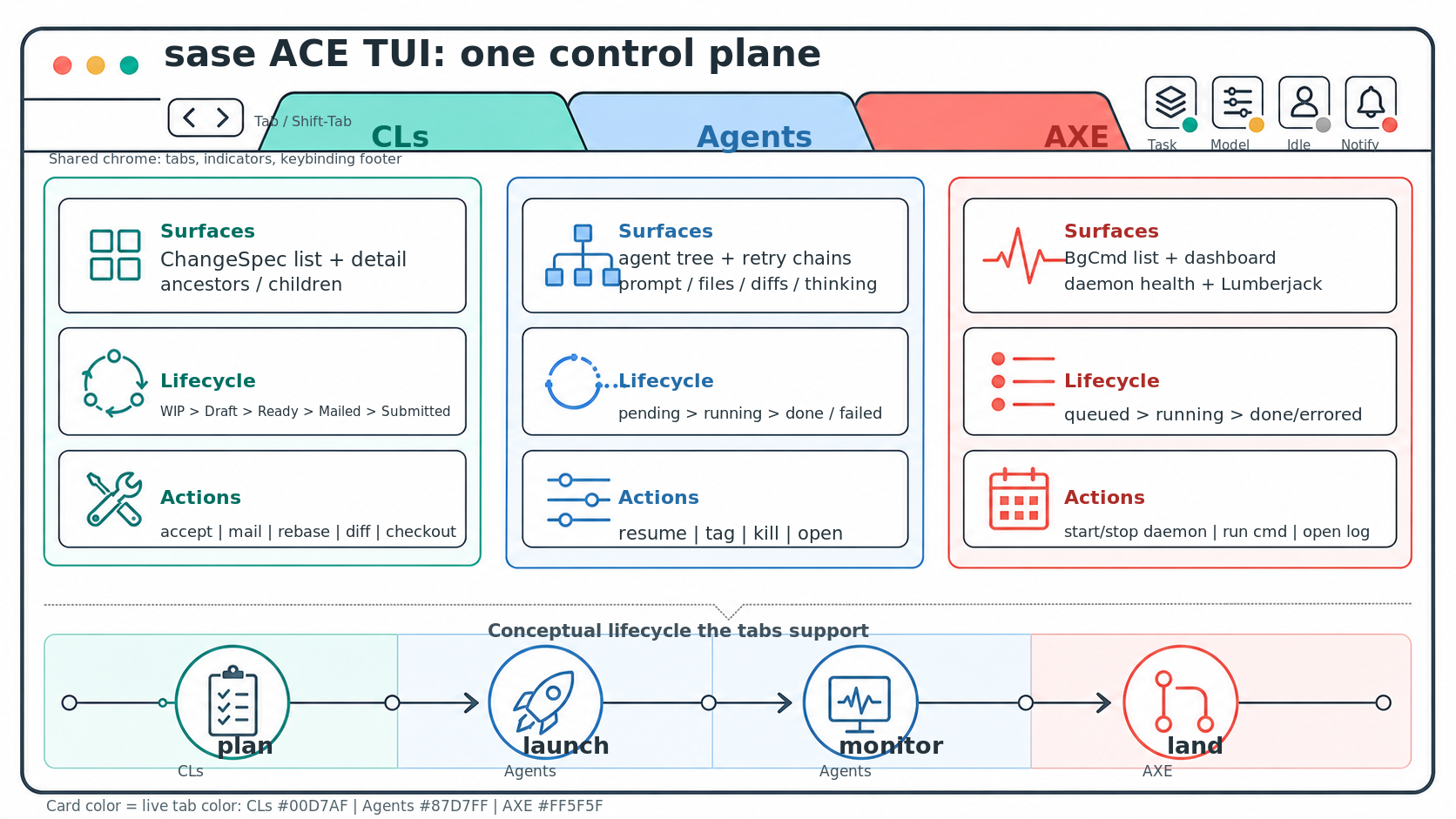
What you just did. Observed one sase run produce a persistent agent artifact visible in ACE, with
AXE handling lifecycle work in the background.
Step 5 — Try one tiny edit (≈3 minutes, plus model time)
After you have seen the agent record, try a low-risk change:
sase run "#cd:$(pwd) make a tiny documentation-only improvement and explain the diff"
sase agent list
Now the agent has permission to make a visible diff in its isolated workspace. Review the resulting workspace or ChangeSpec before bringing anything back to your primary checkout.
What you just did. Moved from a read-only run to a small editable task after confirming where SASE records agent state.
Step 6 — Reuse the prompt as an XPrompt (≈3 minutes)
A one-off prompt is fine once. The second time you find yourself reaching for it, wrap it as an XPrompt so you're
not retyping the same paragraph forever. Create xprompts/docstring.md in your project root:
Add a one-line docstring to the most recently edited Python function in this repo. Keep the wording terse; do not change
behavior.
Now the same agent run is one tag:
sase run "#cd:$(pwd) #docstring"
That is the smallest XPrompt shape — a single Markdown file becomes a reusable prompt part. XPrompts also support YAML
files with typed inputs, multi-step workflows (prompt parts, Python, bash, parallel fan-out, approvals), and ---
separators for multi-agent dispatch. The XPrompts guide covers the full surface, and the
workflow spec reference documents the YAML form.
What you just did. Turned a one-off prompt into a reusable XPrompt, the smallest unit of repeatable agent work in SASE.
Step 7 — Plan bigger work with SDD and Beads (≈3 minutes)
When a task is too big to hand to a single agent and hope, SASE asks you to write a plan first. Spec-Driven Development (SDD) keeps those plans as first-class artifacts on disk under three (admittedly whimsical) names: ordinary plans are tales, executable multi-phase plans are epics, and longer cross-cutting plans are legends. Any of them can be filed as a bead — a git-portable, issue-like work unit with status, dependencies, and an assignee.
The smallest useful loop:
sase bead onboard         # walks through the issue-tracking quick start
sase bead ready           # lists work whose blockers are closed
sase bead show <bead-id>  # inspects one bead in detail
Once an epic plan exists and its phase beads are filed, sase bead work <epic-id> builds a dependency schedule from the
open phases, pre-claims each phase bead, launches one agent per phase in the right order, and runs a final land agent
after the phases finish. That's the on-ramp from one-shot prompts to multi-agent execution with actual ordering — no
more babysitting sase run calls in a shell loop.
What you just did. Stepped from one-shot prompts into Spec-Driven Development with Beads as dependency-aware work units.
The component map (recap)
The names you'll keep bumping into, in one place:
- ACE — the TUI control surface for ChangeSpecs, agents, notifications, and automation.
- AXE — the background automation daemon. Runs hooks, mentor launches, comment polling, dependency unblocking, error digests.
sase run— the entry point that launches an agent or workflow. See the CLI reference.- Workspaces — isolated
sase_<N>clones of the repo so agents can work in parallel without touching your checkout. - ChangeSpecs — durable CL/PR-sized review records: status lifecycle, commits, hooks, comments, mentors.
- Beads — dependency-aware, git-portable work units. Powers epic execution.
- XPrompts — reusable prompt templates and YAML workflows with typed inputs and multi-agent fan-out. See also workflow specs.
- SDD — Spec-Driven Development. Plans, epics, and legends as first-class artifacts on disk.
- Plugins and providers — model and VCS providers behind a common boundary: Claude Code,
Antigravity CLI (
agy), Codex, Qwen Code, OpenCode for agents; bare git and GitHub for version control.
What to read next
- [00] The Missing Operating Layer for Coding Agents — the conceptual half of the series, for when you want the why to match the how.
- SASE Blog Series — all ten posts in one place.
- CLI reference — every
sasesubcommand on one page. - The SASE repository — source, issues, and project direction. If something on this page didn't work, an issue is the fastest way to make the next reader's first 15 minutes smoother.
Series Navigation
This is [01] in the SASE Blog Series.
- Previous: [00] The Missing Operating Layer for Coding Agents.
- Next: more series posts are forthcoming.
- Continue reading: SASE Blog Series, blog home, or ACE guide.